Thanks once again Jane.
Yes, use an older version. That's what I was hoping to avoid. I am processing some old images - an image set taken back in 2021 for star trails. The photos are good but my original processing back then wasn't so good so I decided that they were worth a revisit using the new tools available in PS 2024. I have however following your suggetsion. I have installed PS 2022 (I never have auto updates set for Adobe - it has a habit of updating at the most inconvenient of times!) - so, armed with a few years of improved processing skills, I aim to do a better job this time (249 images) albeit with PS 2022 rather than PS2024. Whish me luck 🙂
Here's a (screen grab) of a single image taster from the set:

Kind regards,
Alan
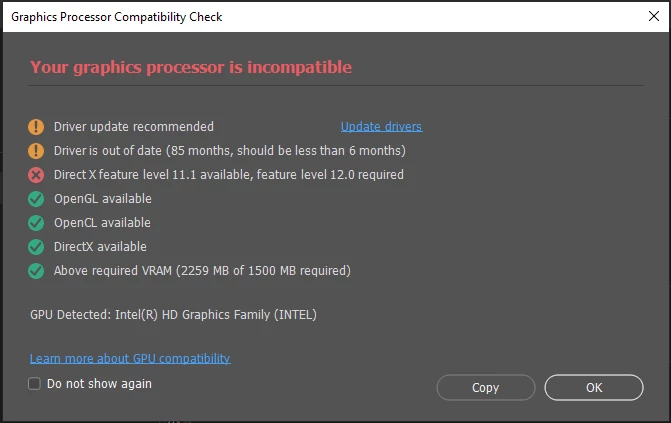
@atlaurie DirectX Support is not the same thing as DirectX Feature Level.
DirectX 12 "support" refers to the DirectX12 APIs, the programming interfaces. The GPU speaks the right language. This is mainly important in the gaming world, so that it can run games written for DirectX 12.
DirectX "feature level" is what the GPU can actually do, its actual physical capabilities. Feature level is hardware, not software. This is the Photoshop requirement, and currently it's feature level 12.0.
So a GPU can support DX12, but only have feature level 11.0, 11.1, etc.
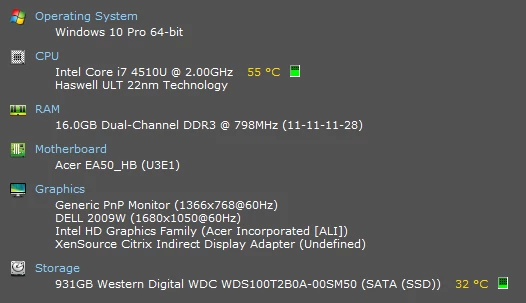
The second thing to note is that you have an integrated Intel HD series GPU. That is in itself a very marginal GPU for Photoshop. Even if it did formally have the required feature level, its general performance is on the low end. It may work and it may not. Some functions might not run properly.
If you do get a new laptop, there is an additional problem these days: Nearly all of them come with dual GPUs now, a dedicated high performance Nvidia/AMD GPU, plus an integrated Intel GPU. That sounds like a good idea for battery saving - but in advanced applications like Photoshop the two will quickly conflict. The GPU is used for actual data processing, it's not a simple one-way downstream flow. It's quite likely that you may need to disable the integrated GPU completely from the operating system.
Generally, laptop manufacturers tend to put "helpful" layers between the user and the operating system. This, again, tends to cause problems. Try to get one that is as lean as possible, with a minimum of extra manufacturer interfaces. You really want to deal directly with Windows, not Dell/Asus/Acer etc.


 AdChoices