

Marltutski
Inspiring
May 29, 2012
Answered

How do you make a .ico file in Photoshop CS6?

  • May 29, 2012
  • 11 replies
  • 210467 views

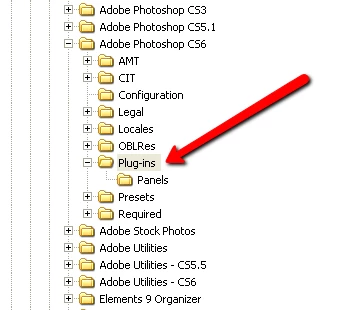
I used to use a plugin in previous versions, but the file formats sub-directory is missing from the plugins directory. See screenshot :

Surely this should be possible in CS6 (extended even) straight out of the box given that every web developer on the planet needs to make loads of these ...
Correct answer waltwinchel

For OSX just place your "ICOFormat.plugin" file in the folder here: Adobe Photoshop CS6 / Plug-Ins  Then restart PS.

11 replies

Participant
January 6, 2025

To add to the all the replies. Make sure you work in 8 bit RGB and your documents size is exactly 256px x 256px. Good luck!

Participant
January 6, 2025

Sorry 254px x 254px (not 256px x 256px)

nbird01
Participant
July 14, 2014

I read this thread today to try and place the .ICO plugin in the plugins folder.

It didn't work for me either. However.... I found for some reason when I installed CS6 on to my 64bit PC.... it has installed it in two different places.

The first place I tried was in the [Progam Files x86] - seems the right place...right?  Not so, for some reason.

Whereas... I found a Photoshop CS6 file in [Program Files] folder too. Popped the plugin in there.... and it worked.

Not sure why I have two installs...? but hey it works.

Cheers to those with useful comments.

#rolleyes at those who didn't.

Thanks folks.

Participant
November 12, 2015

Hi Folks

I am running OSX 10.10.5 and Photoshop CS6, the plugin does work, I used the file from telegraphics.com (could not see one specifically for 64 bit or otherwise - but chose the one for CS6.

But this is crucial - it will only allow you to save images that are less than 256px x 256px, above that size and the save as ICO will not show in the save options.

Hope this helps?

Participant
March 29, 2013

For people who still can not get it to work: you have to convert to RGB color, otherwise you won't see the .ico in the save list.

Participant
February 12, 2013

You only have to set the picture to 8 Bit mode!

In 16 or 32 Bit it won't work and you won't be able to see the save option.

Participant
February 21, 2013

You can also just Save to Web as an 8-bit PNG file, then rename the file extension to ".ico"

Participant
January 23, 2013

It works if you just put it in the Plugins folder.

Windows Photoshop CS6

Known Participant
January 23, 2013

Edited:

I downloaded the latest plugin for Mac CS5 from http://telegraphics.com.au/sw/product/ICOFormat

and it works fine in Mac PS CS5.1 and CS6. (I must have been using an older plugin earlier.)

Chris Cox
Legend
December 16, 2012

Third party plugins should NOT be in the required folder.

That's what the normal plugins folder is for.

Participant
December 16, 2012

Guys... It's right you should put it in Plug-ins folder which is directly under Photoshop CS6 folder. If it didn't show up just restart photoshop while holding ctrl+alt+shift and that will set Photoshop preferences and you will see the option "ICO (Windows Icon) (*.ICO)" under "save to".

Note: you must have a square image with maximum 256*256 resolution to see it.

Participant
October 1, 2012

I need a link to an actual free ICO plugin to be able to install!

I tried this one but it seems a dud.

Help

http://download.cnet.com/Icon-Plugin-for-PhotoShop/3000-2195_4-10587858.html - did not work

Participant
August 30, 2012

This is not an answer to this question.

I have put an .ICO plugin into the panels folder under plugins in CS6 for OSX 10.8 and it is not registering. How do you get this plugin to work?

Noel Carboni
Legend
August 30, 2012

Kastnick, what plug-in did you put there?  Is it 64 bit Photoshop CS6-compatible?

Maybe I didn't write it plainly enough:

For Macintosh, Photoshop CS6 can only use 64 bit plug-ins.

-Noel

Participant
August 30, 2012

Snarky details don't help people. You still didn't provide an answer. Where can I get a 64 bit CS6 plug-in for .ICO? Based on my web research, one doesn't exist yet, which means if you upgrade to CS6, you cannot create favicons.