Participating Frequently
Jan 17, 2021 3:23 AM UTC
Answered

How To Create Thermal Like Effect?

Does anybody have any tutorial I can follow that can achieve a similar effect as to the photo below.


I'm not sure what the effect is called, the best I could think of is almost like a thermal heat map effect but I don't think that's entirely it. Any advice would be greatly appreciated.

Norman Sanders
Norman SandersCorrect answer
Legend
Jan 17, 2021 6:04 PM UTC

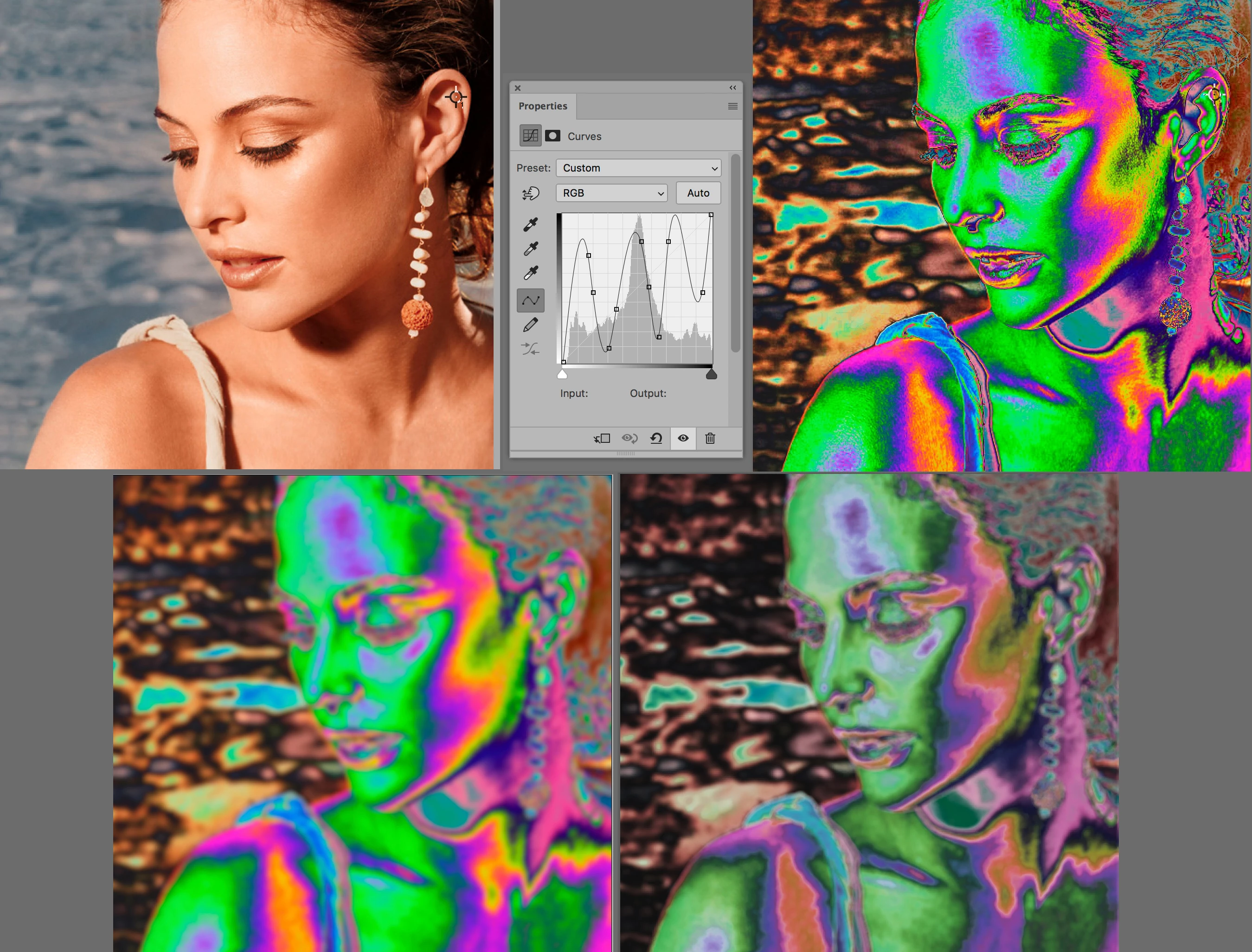
Fig 1. Original

Fig 2. Curves (The possibilities are infinite.)

Fig 3. Lens Blur 

Fig 4. Hue/Saturation  

4 replies

Norman Sanders
Norman SandersCorrect answer
Legend
Jan 17, 2021 6:04 PM UTC

Fig 1. Original

Fig 2. Curves (The possibilities are infinite.)

Fig 3. Lens Blur 

Fig 4. Hue/Saturation  

Translate
didiermazier
Community Expert
Community Expert
Jan 17, 2021 5:11 PM UTC

Just a clue… try with gradient… several ways with or withour mask, uniform or noise

Translate
Semaphoric
Community Expert
Community Expert
Jan 17, 2021 5:41 AM UTC

I would guess a Gradient Map. I think it is helped by the lighting of the original, which models the subject well. The area around the ear looks weird to me. I think the original was monochrome, and someone airbrushed out the ear. The smoothness of the airbrushing would yield the bulls eye effect with a Gradient Map applied.

Translate
JJMack
Community Expert
Community Expert
Jan 17, 2021 4:03 AM UTC

Having a heat wave we are  But you want thermal image  

Translate
JJMack