


ANPE
Participant
August 30, 2020
Answered

HOW to DISABLE "Extras" in photoshop, it keeps appearing even when I disable it!!
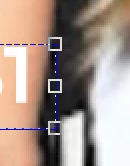
THIS IS SO ANNOYING to see these edges ALL THE TIME!
I cannot be going to "View > Extras" over and over again! HELP

JJMack
JJMackCorrect answer
Community Expert
August 31, 2020

Make sure You Display device driver and system software are up to date and you do not have use Legacy Compositing performance section checked. Reset all Photoshop Tools.


Make sure your move tool option bar is not set to show Transform controls.


If this does not fix your issue try resetting your Photoshop.  Extras should not be part of your image and the should be able to be hidden and set not to be displayed. Are you using a PC or Mac?  

JJMack

40 replies

JJMack
Community Expert
Community Expert
August 30, 2020

The extras showing look like the Move show Transform Controls.  Or you are Transforming a active selection.  The shortcut Ctrl+H will hide these usually you want to see the transform controls what you are transforming.  Hiding the controls and the selection would make it very difficult to make the transform you are currently doing.  If that is the screen  capture is for, We can not see your Photoshop UI  so we can only guess at what you  are currently doing in Photoshop.

Translate
JJMack
ANPE
ANPEAuthor
Participant
August 30, 2020

Thanks, but the shortcut Ctrl + H doesn't do anything... I even went to "Show Extra Options" and unchecked them all, and STILL I see that transformation box 😞

Translate
