



Kapik
Known Participant
July 31, 2021
Answered

How to disable inertia scrolling?

  • July 31, 2021
  • 2 replies
  • 5164 views

Hi guys, 

Does anybody knows how to disable the inertia scrolling? I am currently using the latest photoshop 22.4.3. The scroll seems to carry some momentum and will glide to a slow stop once my finger has left the tablet surface.

It's quite bothering as I have to be cautious with the way I scroll my image. If I scroll too fast, the scroll will glide further and so on. How do I turn this off- the image will stop scrolling when my finger leave the surface?
This topic has been closed for replies.
Correct answer Jeff Arola

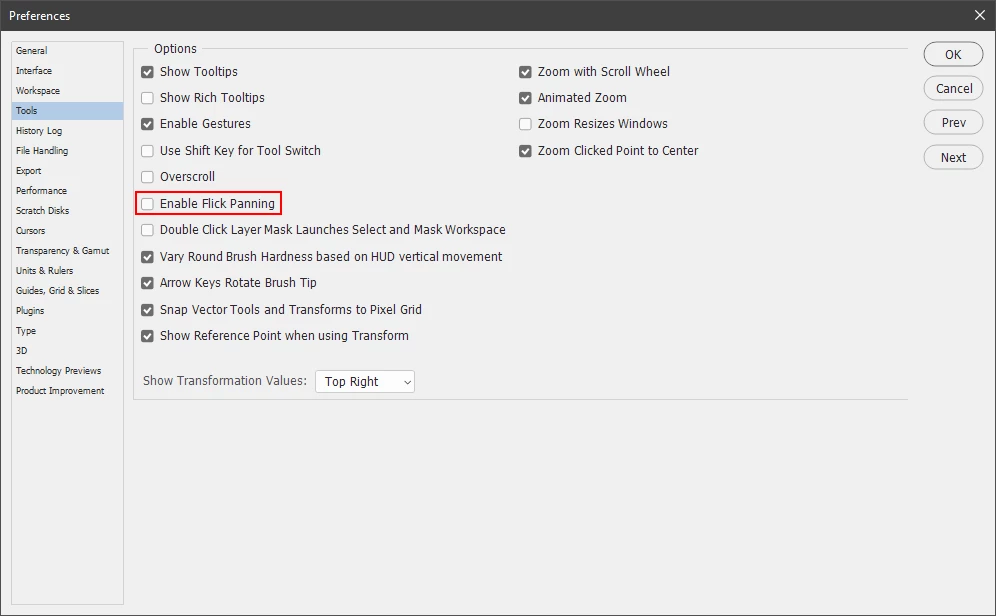
In photoshop go to Edit>Preferences>Tools and uncheck Enable Filck Panning.


2 replies

Trevor.Dennis
Community Expert
Community Expert
July 31, 2021

You can stop it by left clicking, but have you tried the spring loaded H key shortcut?  You hold down the H key and pan, and the image temporarily zoom out to 100% with a white box indicating the current zoom setting.  You can movew that box to where you want to pan to, and release the H key and it zooms back in to the new location.  It's a nifty feature.


Jeff Arola
Community Expert
Jeff ArolaCommunity ExpertCorrect answer
Community Expert
July 31, 2021

In photoshop go to Edit>Preferences>Tools and uncheck Enable Filck Panning.


Kapik
KapikAuthor
Known Participant
July 31, 2021

It worked. This is very useful. Thank you very much