Inspiring
Jan 20, 2024 10:57 AM UTC
Answered

How to get chamfer corners in PS

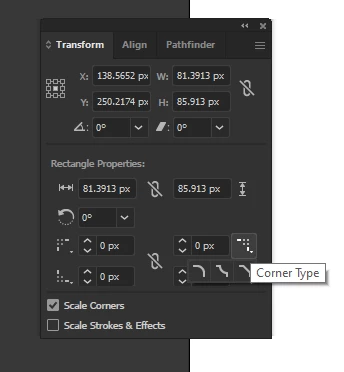
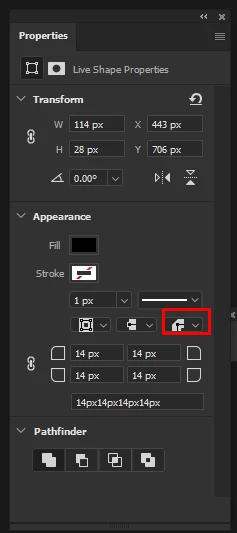
Hi forum, is there an equivalent in PS to get Corner type like in Illustrator? I notice in PS there is an option to round off the corners, but I also would like to know if there's an option about making the corners of a shape chamfer or inverted round.


Thank you


Myra Ferguson
Myra FergusonCorrect answer
Community Expert
Jul 30, 2025 8:45 PM UTC

Hi Claire!

Is it possible for this to work as a frame in photoshop after making it in illustrator and pasting it into photoshop?

Thank you!


You can bring Illustrator content into Photoshop by copying and pasting, using either of the File > Place options, or adding the frame to a CC Library and dragging it out from that CC Library to your canvas in Photoshop.


If you make the shape of the frame that you want in Illustrator, you can fill it in (so it's solid) and use it as a Clipping Mask in Photoshop. Place the shape below your image layer, right-click on the image layer, and select Create Clipping Mask.

12 replies

gabriel_8183
Participant
May 14, 2026 8:52 PM UTC

now i want anyone to tell me why they cant put this options in photoshop. my bet is lazyness.

Translate
CMass
Community Manager
Community Manager
May 14, 2026 11:37 PM UTC

Hey ​@gabriel_8183, 
 

I can definitely see how support for these workflows, especially for users familiar with similar functionality in Illustrator would be helpful in Photoshop. 
 

I’d recommend submitting this as a Feature Request so the Photoshop product team can better track interest and gather feedback from other users:

Create a feature request here: https://community.adobe.com/feature-requests-713
 

Invite other to vote on your idea! 


^CMass

Translate
Legend
Jul 31, 2025 3:52 PM UTC

There is a somewhat clunky and PITA way to get cutout rounded corner paths in Photoshop if you don't have Illustrator.


Draw your rectangle as a path. To make things easier, set the edges to a specific coordinates.

Next, draw a circle (or other shape) with the radius that you want your inner corner to be. Option/Alt drag this to each corner of the rectangle path. With the path select tool active, set the operation to Subtract Front Shape. Then Merge Shape Components. This will cut out each corner. (See screenshots.)


I just did this quick and dirty and didn't bother with guides or precise placement which you should do.


Translate
Jeff Arola
Community Expert
Community Expert
Apr 18, 2025 5:03 AM UTC
Trevor.Dennis
Community Expert
Community Expert
Apr 18, 2025 1:17 AM UTC

This is clunky, and only works with squares and not rectangles.


Set Rectangular Shape tool to Path, and drag out a path while holding down Shift to force a square.

Copy the path by dragging to the New Path icon.

Use Free Transform to rotate the copy by 45°

Use Direct Selection tool to copy the rotated path's points, and paste to the original path.

With the points still active, use FT again to give the required chamfer size.

Set Path Operations to Intersect.


Merge Shape Components and you are done.


You can turn the path into a shape layer.  Layer > New Fill Layer > Solid Color


Translate
Myra Ferguson
Community Expert
Community Expert
Jan 20, 2024 3:57 PM UTC

When you make a rectangle with the Rectangle tool, you can set the corner in the Properties panel (Window > Properties).

Translate
Participant
Apr 17, 2025 8:47 PM UTC

The answer provided does not work when working with thin lines. Is there a way to switch the corner type to chamfer?

Translate
Claire H.
Community Manager
Community Manager
Apr 17, 2025 10:01 PM UTC

Hi @Emery22439463vbrw, the easiest way to add chamfered corners is to use Adobe Illustrator, which has built-in tools specifically for customizing corner styles. Once you're happy with the shape, you can easily copy and paste it into Photoshop. If Illustrator isn’t available, you can still achieve a similar effect directly in Photoshop. Try creating a rounded rectangle shape (using either Shape or Path mode), then use the Convert Point Tool to manually adjust or remove the corner curves. It takes a few more steps, but it should work! ^CH

Translate