Inspiring
September 16, 2013
Answered

How to get current brush name

  • September 16, 2013
  • 16 replies
  • 38153 views

Hi, I use tool presets to select my tools (I never use the brush panel)

After I select a particular brush, and then use it for a few minutes, sometimes I forget the name of the brush preset I'm using, so I got back into the tool presets window to see if it's still highlighted, but it isn't. 

I've looked everywhere else to see where I can get the name of the current brush (which was seleted via tool presets panel, not brush presets panel), but I can't find it anywhere. Surely there has to be a way to do this? If anyone knows that would be great (I'm hoping this is a simple solution that I've overlooked )

    Correct answer BC_KPRC

    For anyone still looking for a solution/workaround in 2025, here's mine. Im using release 26.11.0.

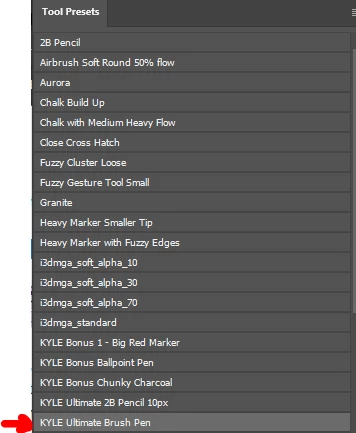
    • Select the brush tool > go to the Tool Presets panel > select the brush you want to use(in this example Ill be using "KYLE 

    Ultimate Brush Pen") . See Image 01

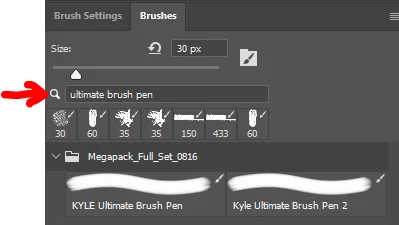
    • Next, In the Brushes Panel > go to the search field > type the name of the brush. (e.g. "Ultimate Brush Pen"). See Image 02
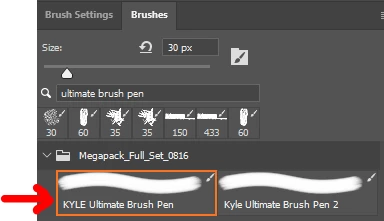
    • Then click on the brush in the list generated from the search. See Image 03

    THAT'S IT!! Use the brush tool as you normally would. Even if you use another tool, or perform another task, when you go back to your brush tool it will still be selected in the brush panel with the Name of the Brush shown. 

    This worked for me and hopefully will save a life 😃

    16 replies

    BC_KPRCCorrect answer
    Participant
    November 14, 2025

    For anyone still looking for a solution/workaround in 2025, here's mine. Im using release 26.11.0.

    • Select the brush tool > go to the Tool Presets panel > select the brush you want to use(in this example Ill be using "KYLE 

    Ultimate Brush Pen") . See Image 01

    • Next, In the Brushes Panel > go to the search field > type the name of the brush. (e.g. "Ultimate Brush Pen"). See Image 02
    • Then click on the brush in the list generated from the search. See Image 03

    THAT'S IT!! Use the brush tool as you normally would. Even if you use another tool, or perform another task, when you go back to your brush tool it will still be selected in the brush panel with the Name of the Brush shown. 

    This worked for me and hopefully will save a life 😃

    Participant
    November 20, 2021

    I don't know if you ever figured this out. I have the same issue but am now in 2022 version. I have figured out how to do it in 2022. Brush settings window. bottom right the small square with + in it to add brush. It pops up a window with the name of the current brush. LOL, sorry I'm about 9 years too late. Hope it can help you still. 

    Participant
    December 25, 2018

    I'm using Photoshop CC 2019: If you hover long enough over the brush in the list of brushes you recently used: the name will pop up.

    Kukurykus
    Legend
    December 25, 2018

    So like in CS6 Extended.

    Participant
    June 11, 2018

    I've been puzzled by this for ages but have just double clicked on the highlighted brush in the Brush Settings panel and Photoshop gave me the name.

    Kukurykus
    Legend
    February 20, 2018

    I have 2 solutions for it using scriptng (they are examples that can be modified) in replies 1 and 14 of this topic, but you may try also r-bin solution: Getting the name of the current brush preset / If you have idea that worked other way, let me know...

    Participant
    March 13, 2017

    This is just a work around, but I've found it's helpful to create a new layer, and give that layer the same name as your tool preset name, so you can look back later for reference. This definitely adds more work though if you switch brushes a lot in the same doc.

    March 1, 2019

    The tool preset last selected will be highlighted in the tool preset picker/palette until you change the tool settings and they no longer match the preset.

    Participant
    January 25, 2017

    I use tool presets - rather than brush presets - and have hundreds.  Like in the OP, I can't remember the names when switching between several while painting or drawing in Photoshop CC 2017. 

    My idea was that PS should have something like a swatches palette... when switching colors, I can go to the swatches palette and easily click on a recently used color.  If there was a similar thing for the tool (or brush) presets, then the most recent ones used would be logged on a list separate from the preset palette itself.  Then I could just click on the one I used a few minutes earlier but no longer remember the name of.

    This seems like an easy fix and I'm really surprised no one has implement this already.

    PECourtejoie
    Community Expert
    Community Expert
    January 25, 2017

    Hello, you asked, and they made it!

    Go to the Brush Preset panel, you will see the 7 most recent brushes you used...

    Participant
    January 26, 2017

    Not really... The question is regarding tool presets, not brush presets.

    Inspiring
    June 9, 2016

    Chris Cox's explanation is technically correct: as soon as you change any tool option, you are working with a custom tool, not a preset. But what is important to the user, and what the user needs to remember, is the PURPOSE of the tool, which is encapsulated in its name.

    Dave Hallows suggested clicking the Create New Tool Preset button.  This pops up a dialog with the name of the current tool preset. This suggests writing an action that copies and pastes from this dialog to ... somewhere.  Perhaps into an extension panel that contains a scrolling text box that allows pasting.  Then whenever you select a brush tool preset, you simply hit a function key that runs the action.

    I am a brand new user of brush tool presets and I ran into this problem on day 1.  I'm only using the brush tool presets that come with Photoshop CC, specifically the Mixer Brush Tool Presets.  When I use a Cloner brush (e.g., Cloner Flat Fan), the Sample All Layers option on the toolbar is unchecked.  I may be missing something, but I don't understand how a Cloner brush can clone onto a new transparent layer unless it is sampling from another layer (or layers).  So I check the Sample All Layers button.  As soon as I do so, the tool preset is de-highlighted.

    Participant
    March 11, 2016

    If you go to the Brush Panel in CS5, you can see the current brush thumbnail having a thicker outline.

    Participant
    October 15, 2015

    Hi

    Did you ever resolve this? I'm on Creative Cloud PS and it is driving me crackers. Dave Hallows point above does work but when you're using a brush from the a tool preset selection then it gives it a different name to its original.

    Cheers

    Sufferincats
    Known Participant
    November 19, 2015

    Hello artists,

    Here is the solution if you are using PS CC: go to the drop down menu at the top of the brush presets palate and select LARGE LIST.

    The names and icons of all the brushes are displayed. One post to this problem suggested deleting all the brushes you don't use and making a custom list. However, whenever you make a new brush it is displayed at the bottom of the panel, so you can see your custom brushes there without deleting any of the default brushes in case you need to use those as well.

    Best Regards

    Participant
    November 26, 2015

    From what I can see in PS CC 2015 this displays the large list, but doesn't solve the "current preset name" problem.