


Known Participant
January 26, 2017
Answered

How to get this grey effect?

  • January 26, 2017
  • 2 replies
  • 502 views

a lot of sites grey out company logos when displaying the logos on their site

how do i create this same effect? here's a few examples

I am a beginner at photoshop so please explain in a way a noob can understand

thanks a lot for any help given, means a lot
    This topic has been closed for replies.
    Correct answer Trevor.Dennis

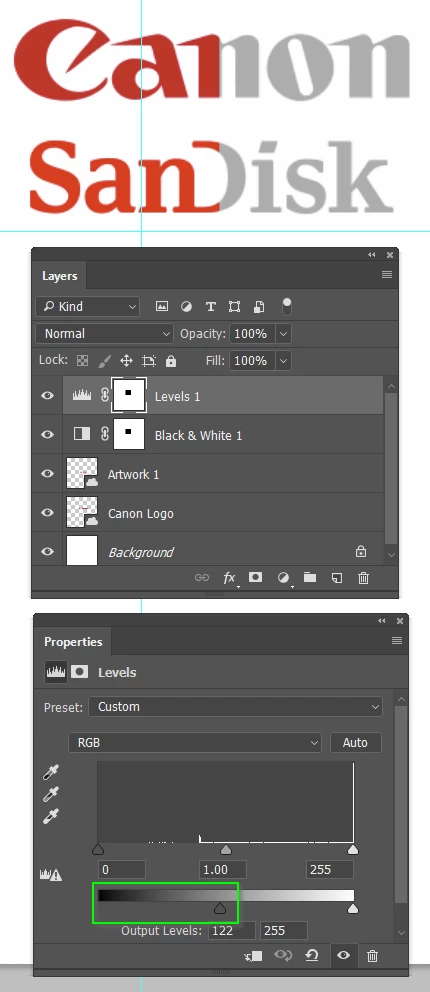
    Lots of ways to remove the colour, but I have used a B&W Adjustment layer.

    To give the mid grey effect, use a Levels layer, and move the black output slider to the right.

    You can see I have masked out the left side to show before and after

    2 replies

    postrophe
    Inspiring
    January 26, 2017

    Hi

    Plus what have been said above :

    Just upload a greyscale version of the logos to your website image image uploader and use these links to your div.

    Pierre

    Trevor.Dennis
    Community Expert
    Community Expert
    January 26, 2017

    You'd still need to lift the black point to get to that mid grey.

    Trevor.Dennis
    Community Expert
    Trevor.DennisCommunity ExpertCorrect answer
    Community Expert
    January 26, 2017

    Lots of ways to remove the colour, but I have used a B&W Adjustment layer.

    To give the mid grey effect, use a Levels layer, and move the black output slider to the right.

    You can see I have masked out the left side to show before and after
