Inspiring
April 14, 2021
Answered

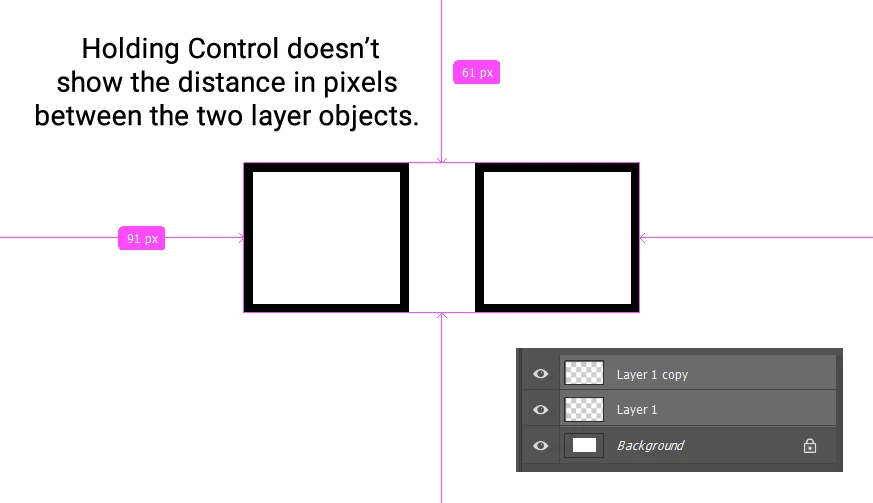
How to rapidly find the pixel distance between two layer objects? Holding control doesn't work.

  • April 14, 2021
  • 3 replies
  • 5088 views

I have two layers selected. Now I want to RAPIDLY find out the distance in pixels between the two. I tried holding down control, but it only shows me the distances that I don't need. It doesn't show me the distance in pixels between the two selected objects.


What's the fastest way I can find the distance in pixels between two layers? 
 

This topic has been closed for replies.
Correct answer Stephen Marsh

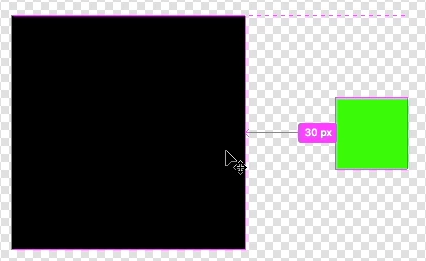
With the smart guides active, moving one layer so that it touches the edge of the other layer will indicate the distance, then undo.


Even better... With one layer targeted/active and smart guides on and with the move tool selected, simply hold down the cmd/ctrl key and move the mouse to hover over the object in the other layer. No need to move anything or undo!


3 replies

Stephen Marsh
Community Expert
Stephen MarshCommunity ExpertCorrect answer
Community Expert
April 14, 2021

With the smart guides active, moving one layer so that it touches the edge of the other layer will indicate the distance, then undo.


Even better... With one layer targeted/active and smart guides on and with the move tool selected, simply hold down the cmd/ctrl key and move the mouse to hover over the object in the other layer. No need to move anything or undo!


Participant
March 4, 2023

How do I adjust that pink text that shows the pixels between two objects? I want to adjust that number to change the distance between two objects. How do I adjust the distance between two objects by pixels?

D Fosse
Community Expert
Community Expert
March 4, 2023

You use the arrow keys on your keyboard. Zoomed in to 100%, that nudges by single pixel increments.


The pink text is just information, it's not a data input field.

c.pfaffenbichler
Community Expert
Community Expert
April 14, 2021

How well-versed are you with JavaScript and Photoshop’s DOM?

Trevor.Dennis
Community Expert
Community Expert
April 14, 2021

I don't know of a 'rapid' method.  The ruler tool will return that info but you'd need to zoom in to place the ends.

Same thing with setting the grid zero point on one of the objects and reading the other from the rulers


Try typing Measure into the search field in the top right corner and seeing what Help says about the Measurement features. Let us know what you find.