

Kharbertson
Participant
February 8, 2026
Question

How to reduce glare on glossy black acrylic without affecting overlapping metallic chains (no manual tracing)

  • February 8, 2026
  • 2 replies
  • 134 views

I’m working in Photoshop on a product photo that includes a high-gloss black acrylic board with metal chains and gold elements hanging in front of it. The problem is that the specular glare on the acrylic overlaps and intersects with the chains, and any attempt to select the board also selects parts of the chain.


Key constraints:


The acrylic board and the chains share similar brightness and color in places


The glare overlaps the chains (not cleanly separated)


I do not want to manually trace or lasso the chains or board


I want a non-destructive workflow (adjustment layers / masks preferred)


My goal:


Reduce or control glare/reflections on the black acrylic


Keep the chains, gold bar, and lettering completely untouched


Ideally use tonal, luminosity, object-based, or mask-driven techniques rather than hand masking


Is there a recommended Photoshop workflow for protecting complex metallic objects and adjusting the surface behind them when selections overlap like this?


Screenshot attached.

Photoshop version: Photoshop 2026 (v27.3.1, Windows 11, 64-bit)
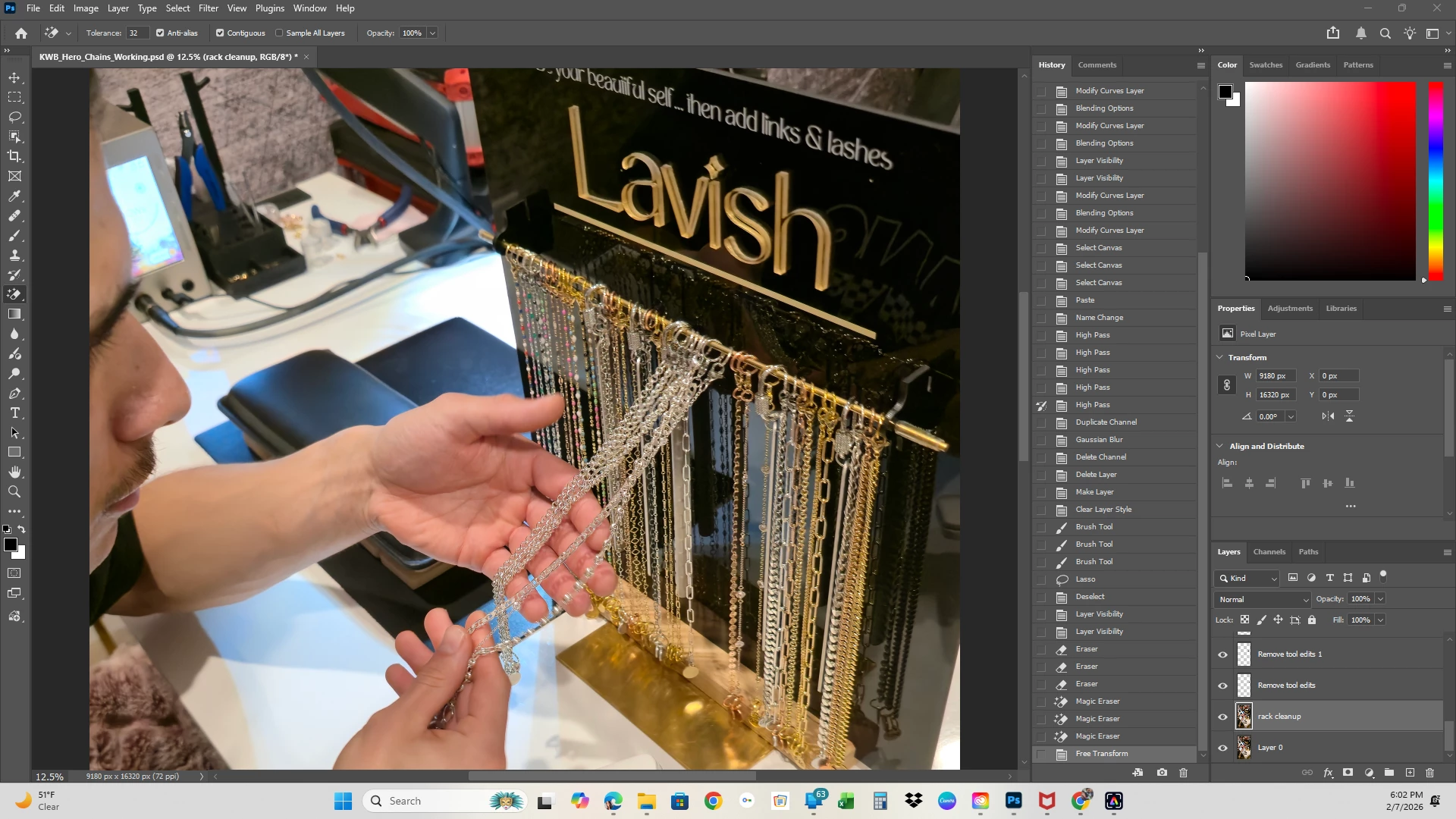
 

    2 replies

    D Fosse
    Community Expert
    Community Expert
    February 8, 2026

    Reshoot the same scene - but this time have two people hold a piece of black fabric behind the person’s head, so that the reflection from the window is shielded. Then you avoid the whole problem.


    Yes, it’s possible to remove such things in Photoshop, but it can be incredibly time-consuming. I don’t see any way to avoid masking here. It’s much quicker to fix while shooting.


    You can try reflection removal in ACR on a cropped portion, but I’m very skeptical that it would work here.

    Kharbertson
    Participant
    February 10, 2026

    Ya thanks for the reply. I came to the conclusion that it would be easier to reshoot. I am not a photographer and this was taken with my phone so I think I was just so focused on getting pictures I didn't even think about glare. Unfortunately I don't have easy access to a good camera. If you have suggestions on how to shoot in raw camera mode at all I'd love that. I have a Samsung Galaxy S 24 Ultra. 

    This is also my first time using photoshop, I have used Lightroom a ton but photoshop is on a whole other level. I'm loving the control though, once I figure it out I think it will give me way better outcomes!

    davescm
    Community Expert
    Community Expert
    February 10, 2026

    @Kharbertson Your S24 Ultra phone will produce raw files. To do that use ‘Expert Raw’ as the phone application when using the camera.If not already installed you can get it from the Galaxy store.

    However, for the issue you raised, the problem is not with the camera but with the lighting. We’ve all done it, quickly grabbed a shot then noticed the bad reflections afterwards. Much better to look for them first then arrange things to cut out those reflections. It might involve putting up cards/sheets to prevent reflections, or it could be as simple as turning the subject backboard and camera together to ensure nothing bright is reflected.

    Dave

    Trevor.Dennis
    Community Expert
    Community Expert
    February 8, 2026

    Can you be more specific about the area you want to fix?

    Is it the reflections behind the chains, for instance?

    The top left corner has some glare. Is that it? 


    Something that has been working well for me is also something I don’t think you are going to like, but it is so quick and easy it is hard to ignore.  Gemini 3.0 with the prompt Remove the reflections from behind the chains did this for me, but I only selected the relative area, and NB did its usual shift thing.  You’ll be working at way too high a resolution to get past this.


    If it was not commercial, and demanding super sharp results then you could maybe get away with working at low res and upscaling with the Topaz option.


    Anyway, give us some belt and braces account of what needs to be changed.


    BTW  Can you use the Shoot-it-Again filter?  I suspect you could control that surface with a large black flag in the right position.  Have you ever read Fil Hunter’s Light Science & Magic?  Its the defacto source for product photography lighting and set up.  It might be out there as a downloadable PDF if you look.

    Kharbertson
    Participant
    February 10, 2026

    Oh man that is awesome! IDK why I didn't think of that in the first place. I'll try running it through my ai before reshooting, thanks for the tip. Ideally I would want to remove any glare from behind the chains (anywhere on the black board). When I had this chain display made I didn't think about how it would photograph, next time I'll do a matte black for sure. 


    I have not read that but I for sure will. I am not a photographer and am just using my Samsung Galaxy S24 Ultra to take pictures. If you have any suggestions for easy to use low cost decent cameras I'd love to know. I'm trying to talk my business partner into getting one as I mostly end up taking all our pictures. This is also my first time using photoshop so I wasn't sure ig I was just missing something obvious.

    Trevor.Dennis
    Community Expert
    Community Expert
    February 10, 2026

    Lighting that sort of situation is all about the angles, although that is true of most situations.  This can work for you because the background is flat, and chains have multiple angles because they are round. 

    So, consider the background as if it was a mirror, and fill the area you would see reflected in that mirror with black.  I have a bunch of black matt fleece blankets that cost me about NZ$6 each.  The closer you can get to the subject without being in shot, the smaller the area that needs to be blocked out.   You can reduce the are still more by using a longer focal length.  You can see in the diagram below that the wide angle lens reflects a lot more background.  This works exactly the same using a cell phone camera. 

    I took this when running a lighting workshop (about ten years ago). The shape of the reflective subject (jewellery) means it will reflect a very wide angle.  Go look for images of chrome object and see they are basically black and white. I used white foam board, but bed sheets would do. Remember the closer to the subject, while still out of shot, the smaller they can be. 

    Following this advice would produce nice shiny chains, with zero reflections on the background.