

How to remove small black dots from text page - selecting pixel radius via script
I have thousands of antique pages of text and some of them have little black dots on them. These are not text layers but rather all the text is a single image layer. I am trying to remove the dots without damaging or altering the text in anyway but I don't have time to do it manually by erasing each dot with the eraser tool. I have tried every tutorial and tool I can find to solve the problem but they all seem to
1. Removes to much of the text I am trying to keep
2. Has to be selected manually one by one
3. Effects the text I am trying to preserve
Here is an example of what I am working with
Notice all the small black dots that don't belong.
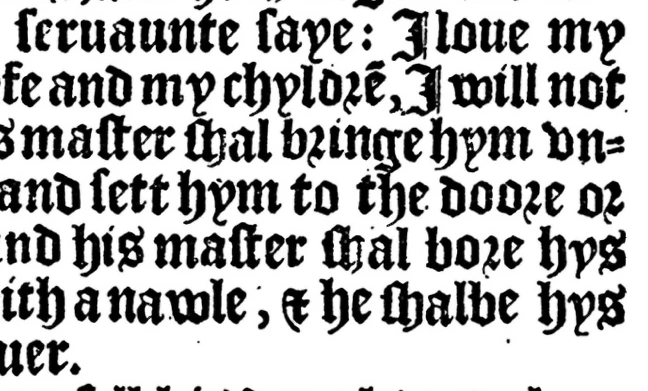
Perhaps there is another tool available that I have missed but I can't seem to find one so here is what I am thinking and asking.
If I separate the black text from the white background in the layer is it possible to create a script that can select any parts of the layer/image that are a radius of say 5 pixels or less?
If I could I could then select the small dots and delete them and the main text would be preserved because off of those items will be larger than only 5 pixels.
If there is another tool I don't know about that would work I am open to that, please keep in mind I have thousands of pages so I am looking at running a script or action to accomplish this and not manually selecting all of them.
Thanks for reading this and any help that might follow,
Dan
 I haven't been honoured by any means yet and haven't supposed I can. Well, if you guys want to be nice for me this way - that is completetly ok if I take some little payback

 AdChoices