


Participating Frequently
June 6, 2023
Answered

I want to modify this photoshop .js script to save as a different format

  • June 6, 2023
  • 4 replies
  • 1193 views
 

I'm very new to photoshop scripting, so I appologize if this is such a newbie question, but my coding skills didn't take me very far unfortunately.

my goal is to have a script that saves as an Icon and close the document afterwards, photoshop doesn't support saving as Icon by default, but using This Plugin it gives me the option to do so (image has to be 8bit and no larger than 256x256) 
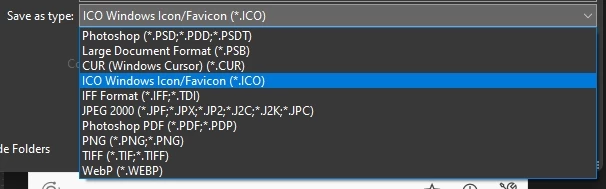
 

I found the script below in the form, it does most of what I want, except that it saves as png, I want to change that so it saves as an Icon.ico


main();
function main(){
if(!documents.length) return;
try{
    var Path = decodeURI(activeDocument.path);
    }catch(e){return;}
if(!Folder(Path).exists){
    alert(Path + " Does not exist!");
    return;
    }
var Name = decodeURI(app.activeDocument.name).replace(/\.[^\.]+$/, '');
var saveFile = File(Path + "/" + Name + ".png");
sfwPNG24(saveFile);
//Uncomment the line below if you want to close the document.
//app.activeDocument.close(SaveOptions.DONOTSAVECHANGES);
}
function sfwPNG24(saveFile){
var pngOpts = new PNGSaveOptions;
pngOpts.compression = 9;
pngOpts.interlaced = false;
activeDocument.saveAs(saveFile, pngOpts, true, Extension.LOWERCASE); 


and if possible, I want the script to also minimize photoshop after it's finished.

I should mention that after choosing to save as an icon, the plugin pops up this "Choose icon format" box (I always use standard ICO) so this has to be addressed in the script somehow
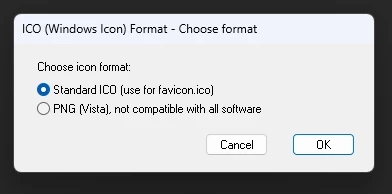
 

any help is appreciated, Thank you in advance.

 
Correct answer Stephen Marsh

@Stephen Marsh So, I got things to run as smooth as possible with AHK, but all my attempts to make the script save the ICO in it's active location have failed unfortunately!


quote

@Stephen Marsh So, I got things to run as smooth as possible with AHK, but all my attempts to make the script save the ICO in it's active location have failed unfortunately!


By @Mr.Turquoise


OK, try this (code updated):


main();

function main() {

	if (!documents.length) return;

	try {
		// Use the previously saved directory path
		var Path = activeDocument.path;
	} catch (e) {
		// If unsaved, prompt for the save path
		alert('Unsaved file, save the file manually and run the script again!');
		return;
	}

	var savedRuler = app.preferences.rulerUnits;
	app.preferences.rulerUnits = Units.PIXELS;
	if (activeDocument.width.value < 257 && activeDocument.height.value < 257) {
		var Name = decodeURI(activeDocument.name).replace(/\.[^\.]+$/, '');
		var saveFile = new File(Path + "/" + Name + ".ico");
		saveICO("ICO Windows Icon/Favicon", saveFile);
		// Uncomment the line below if you want to close the document.
		//app.activeDocument.close(SaveOptions.DONOTSAVECHANGES);
	} else {
		alert("The canvas width or height must be under 256 px for ICO format!");
	}
	app.preferences.rulerUnits = savedRuler;
	
}

function saveICO(as, In) {
	var c2t = function (s) {
		return app.charIDToTypeID(s);
	};
	var s2t = function (s) {
		return app.stringIDToTypeID(s);
	};
	var descriptor = new ActionDescriptor();
	descriptor.putString(s2t("as"), as);
	descriptor.putPath(c2t("In  "), In);
	descriptor.putInteger(s2t("documentID"), 219);
	descriptor.putEnumerated(s2t("saveStage"), s2t("saveStageType"), s2t("saveSucceeded"));
	executeAction(s2t("save"), descriptor, DialogModes.NO);
}


4 replies

Stephen Marsh
Community Expert
Community Expert
June 6, 2023
quote
 

I should mention that after choosing to save as an icon, the plugin pops up this "Choose icon format" box (I always use standard ICO) so this has to be addressed in the script somehow


any help is appreciated, Thank you in advance.


By @Mr.Turquoise


It appears that this second window is not captured in an action or the SL code, so it will always be presented. The following is test code, it seemed pointless to make it use variable paths and filenames.


// check should be in place for files over 256px longest canvas edge
var savedDisplayDialogs = app.displayDialogs;
app.displayDialogs = DialogModes.NO;
saveICO("ICO Windows Icon/Favicon", new File("~/Desktop/theICON.ico"));
app.displayDialogs = savedDisplayDialogs;
app.beep();

function saveICO(as, In) {
	var c2t = function (s) {
		return app.charIDToTypeID(s);
	};
	var s2t = function (s) {
		return app.stringIDToTypeID(s);
	};
	var descriptor = new ActionDescriptor();
	descriptor.putString( s2t( "as" ), as );
	descriptor.putPath( c2t( "In  " ), In );
	descriptor.putInteger( s2t( "documentID" ), 219 );
	descriptor.putEnumerated( s2t( "saveStage" ), s2t( "saveStageType" ), s2t( "saveSucceeded" ));
	executeAction( s2t( "save" ), descriptor, DialogModes.NO );
}


Participating Frequently
June 6, 2023

Thanks Stephen, the script seems to work as intended, although photoshop gives me the "error alarm sound" while the script is running, not sure what's going wrong in the background because the icon get's saved on the desktop as intended..


this second "standard icon" window is a real bummer.. I think I narrowed it down and I believe this is the part that corresponds with it..

// =======================================================
var idmodalStateChanged = stringIDToTypeID( "modalStateChanged" );
    var desc256 = new ActionDescriptor();
    var idLvl = charIDToTypeID( "Lvl " );
    desc256.putInteger( idLvl, 0 );
    var idStte = charIDToTypeID( "Stte" );
    var idStte = charIDToTypeID( "Stte" );
    var idexit = stringIDToTypeID( "exit" );
    desc256.putEnumerated( idStte, idStte, idexit );
    var idkcanDispatchWhileModal = stringIDToTypeID( "kcanDispatchWhileModal" );
    desc256.putBoolean( idkcanDispatchWhileModal, true );
    var idTtl = charIDToTypeID( "Ttl " );
    desc256.putString( idTtl, """Save As""" );
executeAction( idmodalStateChanged, desc256, DialogModes.NO );


if it's not too much trouble, could you please test it on your machine, installing the "save as icon" plugin is really easy to install, you just place the file in C:\Program Files\Adobe\Adobe Photoshop 2022\Required\Plug-ins\File Formats
you can get it here 

quoteit seemed pointless to make it use variable paths and filenames.


it's actually crucial for me that the icon gets saved in the same folder as the original file.. I tried using lines from the first script into yours but unfortunately I couldn't get it to work..

Stephen Marsh
Community Expert
Community Expert
June 7, 2023

that worked beautifully, thank you so much. and the alerts were a nice touch, very professional 😉
just a small note for anyone who might ever need to use this in the future, just edit the width value from 256 to 257 so you could save icons that are 256

quote


	if (activeDocument.width.value < 256 && activeDocument.height.value < 256)


You're welcome and good catch for 256 vs 257! RGB 8 bpc was obvious, however the size limit was not until I was forced to RTFM.

Participating Frequently
June 6, 2023

@c.pfaffenbichler @Stephen Marsh I think I might be in luck, looks like the Log picked up on the plugin, but it all looks like gibberish to me unfortunately, idk where to go from there. 

ScriptingListenerJS.log :

// =======================================================
var idhostFocusChanged = stringIDToTypeID( "hostFocusChanged" );
    var desc232 = new ActionDescriptor();
    var idactive = stringIDToTypeID( "active" );
    desc232.putBoolean( idactive, true );
    var iddontRecord = stringIDToTypeID( "dontRecord" );
    desc232.putBoolean( iddontRecord, true );
    var idforceNotify = stringIDToTypeID( "forceNotify" );
    desc232.putBoolean( idforceNotify, true );
executeAction( idhostFocusChanged, desc232, DialogModes.NO );

// =======================================================
var idinvokeCommand = stringIDToTypeID( "invokeCommand" );
    var desc233 = new ActionDescriptor();
    var idcommandID = stringIDToTypeID( "commandID" );
    desc233.putInteger( idcommandID, 32 );
    var idkcanDispatchWhileModal = stringIDToTypeID( "kcanDispatchWhileModal" );
    desc233.putBoolean( idkcanDispatchWhileModal, true );
executeAction( idinvokeCommand, desc233, DialogModes.NO );

// =======================================================
var idmodalStateChanged = stringIDToTypeID( "modalStateChanged" );
    var desc234 = new ActionDescriptor();
    var idLvl = charIDToTypeID( "Lvl " );
    desc234.putInteger( idLvl, 1 );
    var idStte = charIDToTypeID( "Stte" );
    var idStte = charIDToTypeID( "Stte" );
    var identer = stringIDToTypeID( "enter" );
    desc234.putEnumerated( idStte, idStte, identer );
    var idkcanDispatchWhileModal = stringIDToTypeID( "kcanDispatchWhileModal" );
    desc234.putBoolean( idkcanDispatchWhileModal, true );
    var idTtl = charIDToTypeID( "Ttl " );
    desc234.putString( idTtl, """Save As""" );
executeAction( idmodalStateChanged, desc234, DialogModes.NO );

// =======================================================
var idmodalStateChanged = stringIDToTypeID( "modalStateChanged" );
    var desc235 = new ActionDescriptor();
    var idLvl = charIDToTypeID( "Lvl " );
    desc235.putInteger( idLvl, 0 );
    var idStte = charIDToTypeID( "Stte" );
    var idStte = charIDToTypeID( "Stte" );
    var idexit = stringIDToTypeID( "exit" );
    desc235.putEnumerated( idStte, idStte, idexit );
    var idkcanDispatchWhileModal = stringIDToTypeID( "kcanDispatchWhileModal" );
    desc235.putBoolean( idkcanDispatchWhileModal, true );
    var idTtl = charIDToTypeID( "Ttl " );
    desc235.putString( idTtl, """Save As""" );
executeAction( idmodalStateChanged, desc235, DialogModes.NO );

// =======================================================
var idpluginRun = stringIDToTypeID( "pluginRun" );
    var desc236 = new ActionDescriptor();
    var idNm = charIDToTypeID( "Nm  " );
    desc236.putString( idNm, """ICOFormat64.8bi""" );
    var idisFirstParty = stringIDToTypeID( "isFirstParty" );
    desc236.putBoolean( idisFirstParty, false );
    var idIjsx = charIDToTypeID( "Ijsx" );
    desc236.putBoolean( idIjsx, false );
executeAction( idpluginRun, desc236, DialogModes.NO );

// =======================================================
var idMRUFileListChanged = stringIDToTypeID( "MRUFileListChanged" );
    var desc237 = new ActionDescriptor();
    var iddontRecord = stringIDToTypeID( "dontRecord" );
    desc237.putBoolean( iddontRecord, true );
    var idforceNotify = stringIDToTypeID( "forceNotify" );
    desc237.putBoolean( idforceNotify, true );
executeAction( idMRUFileListChanged, desc237, DialogModes.NO );

// =======================================================
var idsave = charIDToTypeID( "save" );
    var desc238 = new ActionDescriptor();
    var idAs = charIDToTypeID( "As  " );
    desc238.putString( idAs, """ICO Windows Icon/Favicon""" );
    var idIn = charIDToTypeID( "In  " );
    desc238.putPath( idIn, new File( "D:\\Downloads\\New folder\\Test\\Antinous_Osiris_Louvre_2.ico" ) );
    var idDocI = charIDToTypeID( "DocI" );
    desc238.putInteger( idDocI, 219 );
    var idLwCs = charIDToTypeID( "LwCs" );
    desc238.putBoolean( idLwCs, true );
    var idsaveStage = stringIDToTypeID( "saveStage" );
    var idsaveStageType = stringIDToTypeID( "saveStageType" );
    var idsaveBegin = stringIDToTypeID( "saveBegin" );
    desc238.putEnumerated( idsaveStage, idsaveStageType, idsaveBegin );
executeAction( idsave, desc238, DialogModes.NO );

// =======================================================
var idsave = charIDToTypeID( "save" );
    var desc239 = new ActionDescriptor();
    var idAs = charIDToTypeID( "As  " );
    desc239.putString( idAs, """ICO Windows Icon/Favicon""" );
    var idIn = charIDToTypeID( "In  " );
    desc239.putPath( idIn, new File( "D:\\Downloads\\New folder\\Test\\Antinous_Osiris_Louvre_2.ico" ) );
    var idDocI = charIDToTypeID( "DocI" );
    desc239.putInteger( idDocI, 219 );
    var idLwCs = charIDToTypeID( "LwCs" );
    desc239.putBoolean( idLwCs, true );
    var idsaveStage = stringIDToTypeID( "saveStage" );
    var idsaveStageType = stringIDToTypeID( "saveStageType" );
    var idsaveSucceeded = stringIDToTypeID( "saveSucceeded" );
    desc239.putEnumerated( idsaveStage, idsaveStageType, idsaveSucceeded );
executeAction( idsave, desc239, DialogModes.NO );

// =======================================================
var idhostFocusChanged = stringIDToTypeID( "hostFocusChanged" );
    var desc240 = new ActionDescriptor();
    var idactive = stringIDToTypeID( "active" );
    desc240.putBoolean( idactive, false );
    var iddontRecord = stringIDToTypeID( "dontRecord" );
    desc240.putBoolean( iddontRecord, true );
    var idforceNotify = stringIDToTypeID( "forceNotify" );
    desc240.putBoolean( idforceNotify, true );
executeAction( idhostFocusChanged, desc240, DialogModes.NO );


and this is from  ScriptingListenerVB.log

REM =======================================================
DIM objApp
SET objApp = CreateObject("Photoshop.Application")
REM Use dialog mode 3 for show no dialogs
DIM dialogMode
dialogMode = 3
DIM idhostFocusChanged
idhostFocusChanged = objApp.StringIDToTypeID( "hostFocusChanged" )
    DIM desc232
    SET desc232 = CreateObject( "Photoshop.ActionDescriptor" )
    DIM idactive
    idactive = objApp.StringIDToTypeID( "active" )
    Call desc232.PutBoolean( idactive, True )
    DIM iddontRecord
    iddontRecord = objApp.StringIDToTypeID( "dontRecord" )
    Call desc232.PutBoolean( iddontRecord, True )
    DIM idforceNotify
    idforceNotify = objApp.StringIDToTypeID( "forceNotify" )
    Call desc232.PutBoolean( idforceNotify, True )
Call objApp.ExecuteAction( idhostFocusChanged, desc232, dialogMode )

REM =======================================================
DIM objApp
SET objApp = CreateObject("Photoshop.Application")
REM Use dialog mode 3 for show no dialogs
DIM dialogMode
dialogMode = 3
DIM idinvokeCommand
idinvokeCommand = objApp.StringIDToTypeID( "invokeCommand" )
    DIM desc233
    SET desc233 = CreateObject( "Photoshop.ActionDescriptor" )
    DIM idcommandID
    idcommandID = objApp.StringIDToTypeID( "commandID" )
    Call desc233.PutInteger( idcommandID, 32 )
    DIM idkcanDispatchWhileModal
    idkcanDispatchWhileModal = objApp.StringIDToTypeID( "kcanDispatchWhileModal" )
    Call desc233.PutBoolean( idkcanDispatchWhileModal, True )
Call objApp.ExecuteAction( idinvokeCommand, desc233, dialogMode )

REM =======================================================
DIM objApp
SET objApp = CreateObject("Photoshop.Application")
REM Use dialog mode 3 for show no dialogs
DIM dialogMode
dialogMode = 3
DIM idmodalStateChanged
idmodalStateChanged = objApp.StringIDToTypeID( "modalStateChanged" )
    DIM desc234
    SET desc234 = CreateObject( "Photoshop.ActionDescriptor" )
    DIM idLvl
    idLvl = objApp.CharIDToTypeID( "Lvl " )
    Call desc234.PutInteger( idLvl, 1 )
    DIM idStte
    idStte = objApp.CharIDToTypeID( "Stte" )
    DIM idStte
    idStte = objApp.CharIDToTypeID( "Stte" )
    DIM identer
    identer = objApp.StringIDToTypeID( "enter" )
    Call desc234.PutEnumerated( idStte, idStte, identer )
    DIM idkcanDispatchWhileModal
    idkcanDispatchWhileModal = objApp.StringIDToTypeID( "kcanDispatchWhileModal" )
    Call desc234.PutBoolean( idkcanDispatchWhileModal, True )
    DIM idTtl
    idTtl = objApp.CharIDToTypeID( "Ttl " )
    Call desc234.PutString( idTtl, "Save As" )
Call objApp.ExecuteAction( idmodalStateChanged, desc234, dialogMode )

REM =======================================================
DIM objApp
SET objApp = CreateObject("Photoshop.Application")
REM Use dialog mode 3 for show no dialogs
DIM dialogMode
dialogMode = 3
DIM idmodalStateChanged
idmodalStateChanged = objApp.StringIDToTypeID( "modalStateChanged" )
    DIM desc235
    SET desc235 = CreateObject( "Photoshop.ActionDescriptor" )
    DIM idLvl
    idLvl = objApp.CharIDToTypeID( "Lvl " )
    Call desc235.PutInteger( idLvl, 0 )
    DIM idStte
    idStte = objApp.CharIDToTypeID( "Stte" )
    DIM idStte
    idStte = objApp.CharIDToTypeID( "Stte" )
    DIM idexit
    idexit = objApp.StringIDToTypeID( "exit" )
    Call desc235.PutEnumerated( idStte, idStte, idexit )
    DIM idkcanDispatchWhileModal
    idkcanDispatchWhileModal = objApp.StringIDToTypeID( "kcanDispatchWhileModal" )
    Call desc235.PutBoolean( idkcanDispatchWhileModal, True )
    DIM idTtl
    idTtl = objApp.CharIDToTypeID( "Ttl " )
    Call desc235.PutString( idTtl, "Save As" )
Call objApp.ExecuteAction( idmodalStateChanged, desc235, dialogMode )

REM =======================================================
DIM objApp
SET objApp = CreateObject("Photoshop.Application")
REM Use dialog mode 3 for show no dialogs
DIM dialogMode
dialogMode = 3
DIM idpluginRun
idpluginRun = objApp.StringIDToTypeID( "pluginRun" )
    DIM desc236
    SET desc236 = CreateObject( "Photoshop.ActionDescriptor" )
    DIM idNm
    idNm = objApp.CharIDToTypeID( "Nm  " )
    Call desc236.PutString( idNm, "ICOFormat64.8bi" )
    DIM idisFirstParty
    idisFirstParty = objApp.StringIDToTypeID( "isFirstParty" )
    Call desc236.PutBoolean( idisFirstParty, False )
    DIM idIjsx
    idIjsx = objApp.CharIDToTypeID( "Ijsx" )
    Call desc236.PutBoolean( idIjsx, False )
Call objApp.ExecuteAction( idpluginRun, desc236, dialogMode )

REM =======================================================
DIM objApp
SET objApp = CreateObject("Photoshop.Application")
REM Use dialog mode 3 for show no dialogs
DIM dialogMode
dialogMode = 3
DIM idMRUFileListChanged
idMRUFileListChanged = objApp.StringIDToTypeID( "MRUFileListChanged" )
    DIM desc237
    SET desc237 = CreateObject( "Photoshop.ActionDescriptor" )
    DIM iddontRecord
    iddontRecord = objApp.StringIDToTypeID( "dontRecord" )
    Call desc237.PutBoolean( iddontRecord, True )
    DIM idforceNotify
    idforceNotify = objApp.StringIDToTypeID( "forceNotify" )
    Call desc237.PutBoolean( idforceNotify, True )
Call objApp.ExecuteAction( idMRUFileListChanged, desc237, dialogMode )

REM =======================================================
DIM objApp
SET objApp = CreateObject("Photoshop.Application")
REM Use dialog mode 3 for show no dialogs
DIM dialogMode
dialogMode = 3
DIM idsave
idsave = objApp.CharIDToTypeID( "save" )
    DIM desc238
    SET desc238 = CreateObject( "Photoshop.ActionDescriptor" )
    DIM idAs
    idAs = objApp.CharIDToTypeID( "As  " )
    Call desc238.PutString( idAs, "ICO Windows Icon/Favicon" )
    DIM idIn
    idIn = objApp.CharIDToTypeID( "In  " )
    Call desc238.PutPath( idIn, "D:\\Downloads\\New folder\\Test\\Antinous_Osiris_Louvre_2.ico" )
    DIM idDocI
    idDocI = objApp.CharIDToTypeID( "DocI" )
    Call desc238.PutInteger( idDocI, 219 )
    DIM idLwCs
    idLwCs = objApp.CharIDToTypeID( "LwCs" )
    Call desc238.PutBoolean( idLwCs, True )
    DIM idsaveStage
    idsaveStage = objApp.StringIDToTypeID( "saveStage" )
    DIM idsaveStageType
    idsaveStageType = objApp.StringIDToTypeID( "saveStageType" )
    DIM idsaveBegin
    idsaveBegin = objApp.StringIDToTypeID( "saveBegin" )
    Call desc238.PutEnumerated( idsaveStage, idsaveStageType, idsaveBegin )
Call objApp.ExecuteAction( idsave, desc238, dialogMode )

REM =======================================================
DIM objApp
SET objApp = CreateObject("Photoshop.Application")
REM Use dialog mode 3 for show no dialogs
DIM dialogMode
dialogMode = 3
DIM idsave
idsave = objApp.CharIDToTypeID( "save" )
    DIM desc239
    SET desc239 = CreateObject( "Photoshop.ActionDescriptor" )
    DIM idAs
    idAs = objApp.CharIDToTypeID( "As  " )
    Call desc239.PutString( idAs, "ICO Windows Icon/Favicon" )
    DIM idIn
    idIn = objApp.CharIDToTypeID( "In  " )
    Call desc239.PutPath( idIn, "D:\\Downloads\\New folder\\Test\\Antinous_Osiris_Louvre_2.ico" )
    DIM idDocI
    idDocI = objApp.CharIDToTypeID( "DocI" )
    Call desc239.PutInteger( idDocI, 219 )
    DIM idLwCs
    idLwCs = objApp.CharIDToTypeID( "LwCs" )
    Call desc239.PutBoolean( idLwCs, True )
    DIM idsaveStage
    idsaveStage = objApp.StringIDToTypeID( "saveStage" )
    DIM idsaveStageType
    idsaveStageType = objApp.StringIDToTypeID( "saveStageType" )
    DIM idsaveSucceeded
    idsaveSucceeded = objApp.StringIDToTypeID( "saveSucceeded" )
    Call desc239.PutEnumerated( idsaveStage, idsaveStageType, idsaveSucceeded )
Call objApp.ExecuteAction( idsave, desc239, dialogMode )

REM =======================================================
DIM objApp
SET objApp = CreateObject("Photoshop.Application")
REM Use dialog mode 3 for show no dialogs
DIM dialogMode
dialogMode = 3
DIM idhostFocusChanged
idhostFocusChanged = objApp.StringIDToTypeID( "hostFocusChanged" )
    DIM desc240
    SET desc240 = CreateObject( "Photoshop.ActionDescriptor" )
    DIM idactive
    idactive = objApp.StringIDToTypeID( "active" )
    Call desc240.PutBoolean( idactive, False )
    DIM iddontRecord
    iddontRecord = objApp.StringIDToTypeID( "dontRecord" )
    Call desc240.PutBoolean( iddontRecord, True )
    DIM idforceNotify
    idforceNotify = objApp.StringIDToTypeID( "forceNotify" )
    Call desc240.PutBoolean( idforceNotify, True )
Call objApp.ExecuteAction( idhostFocusChanged, desc240, dialogMode )


Participant
March 6, 2025
does anyone know what charIDToTypeID( "LwCs" ) and charIDToTypeID( "DocI" ) refere to in terms of actions or gui?

cTID = function (s) { return app.charIDToTypeID(s); };
sTID = function (s) { return app.stringIDToTypeID(s); };

var desc1 = new ActionDescriptor();
var desc2 = new ActionDescriptor();
desc2.putInteger(cTID('BtDp'), 16);
desc2.putInteger(cTID('Cmpr'), pCompression);

desc1.putObject(cTID('As '), cTID('EXRf'), desc2);
desc1.putPath(cTID('In '), new File(PROJECT_PATH + pSavePath + pName + ".exr"));
desc1.putInteger(cTID('DocI'), 938);
desc1.putBoolean(cTID('LwCs'), true);
executeAction(cTID('save'), desc1, DialogModes.NO);

I do not know what the value 938 'desc1.putInteger(cTID('DocI'), 938);' and the boolean 'desc1.putBoolean(cTID('LwCs'), true);' refers to
Stephen Marsh
Community Expert
Community Expert
March 6, 2025
quote
does anyone know what charIDToTypeID( "LwCs" ) and charIDToTypeID( "DocI" ) refere to in terms of actions or gui?

By @gerardoc50494125


If TypeID codes are the same as StringID codes, then:


charIDToTypeID( "LwCs" ) = 'lowerCase'


charIDToTypeID( "DocI” ) = 'documentID'

Stephen Marsh
Community Expert
Community Expert
June 6, 2023

I agree with @c.pfaffenbichler


If the plug-in records into a useable action, then there is a good chance that the SL plug-in will produce workable code.

c.pfaffenbichler
Community Expert
Community Expert
June 6, 2023

Please use ScriptingListener.plugin to record the operation – does it produce meaningful code? (It might or it might not, I think it depends on the plugin-maker’s effort.)