Participating Frequently
Jan 25, 2022 3:20 PM UTC
Answered

Is there a Radial gradient tool on Photoshop for IPad?

I've spent hours combing through the community support pages and have yet to see one definitive answer for this simple question. Yet I'm not the only one who has been left utterly frustrated looking for this basic PS tool. And now, I give up... I cannot waste anymore time searching, I just want to know much like the unicorn, does it or doesn't it exist?

jane-e
jane-eCorrect answer
Community Expert
Jun 15, 2024 8:55 PM UTC
quote

can't find the options bar you mention on the iPad version?

By @pacey-j


Photoshop for iPad does not have an options bar. It also does not have a radial gradient (yet).


To make a feature request, please start a new thread and tag it as "Ideas" instead of "Discussions". Follow these steps:

https://community.adobe.com/t5/photoshop-ecosystem-ideas/how-do-i-write-a-feature-request/idi-p/12384447


Jane


15 replies

Known Participant
Nov 1, 2024 1:27 PM UTC

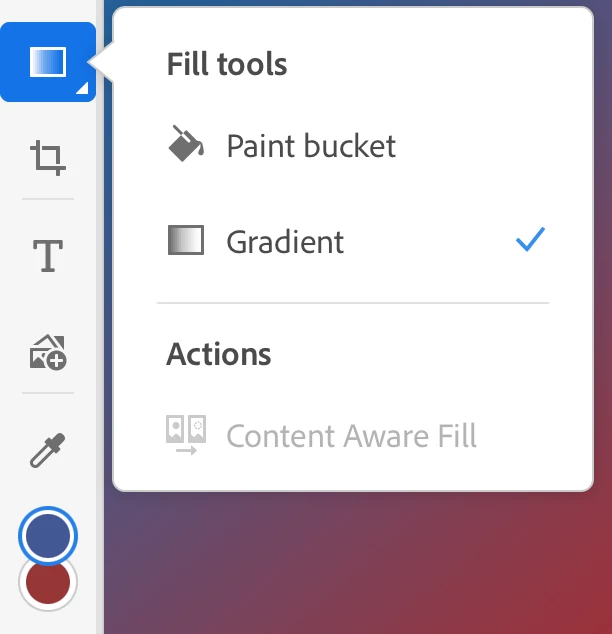
On my iPad, I selected the color that I wanted to use, then I selected the fly out from the paint bucket to where I found gradient. I selected that, went back to my canvas, drew an arrow from the top of my canvas to the bottom to indicate the direction of the gradient and voilà! I got my gradient. Hope this helps.

Translate
Inspiring
Mar 25, 2025 10:35 PM UTC

This is just a standard gradient and not a radial gradient

Translate
Participant
Jun 15, 2024 3:12 PM UTC

No Radial Gradient Tool

And no settings one of the gradient colors to transparent. 


It's bizarre that this basic tool is missing for years. 

Translate
cendiAuthor
Participating Frequently
Jun 15, 2024 3:51 PM UTC
Yes I thought so as well, in addition to no motion blur. 😔 However, I
thank you for your response.
Translate
Cendi
pjglad
Inspiring
Jun 15, 2024 4:06 PM UTC

I'm befuddled why Photoshop iPad lacks so many features (Shapes, Smart Filters/Objects, Sky Replacement, etc) as the product is almost five years old. Photoshop is Adobe's premier product - weird.

Translate
Participant
Jan 28, 2024 7:29 AM UTC

I feel your pain. Not the first time I've been disappointed a core feature is simply not available in the iPad version. Easier to accept lack of vignette ... but very frustrating not to be able to work around this with a radial gradient fill. NB desktop users ... as far as I can see there are no gradient type options at the top of the screen. IPad users ... if I'm missing something would love to be enlightened.

Translate
pjglad
Inspiring
Jan 29, 2024 1:12 AM UTC

Tap the Paint Bucket tool then tap Gradient.

Translate
willc5494353
Participant
Feb 27, 2024 4:00 PM UTC

This is not an answer. The person is looking for a radial gradient tool in the iPadOS version of photoshop. 

Translate
melissapiccone
Community Expert
Community Expert
Jan 25, 2022 3:28 PM UTC

In the options bar at the top of your screen you can change the gradient type when you have the gradient tool selected.

Translate
Melissa Piccone | Adobe Trainer | Online Courses Author | Fine Artist
Participant
May 28, 2022 12:52 PM UTC

This holds true for Photoshop on the desktop but that option isn't available on the iPad. Thanks. 

Translate