


Inspiring
July 10, 2022
Answered

Is there a way to turn negative values 32 bit image into normalized 0-1 one in Photoshop?

  • July 10, 2022
  • 5 replies
  • 4623 views

Automatically  I mean , and then make a script that do it by single  click.    My guess i could do it with a use of flat fill effect adding some positive value  then levels maybe.     But I'd like a quick universal solution  whatever  values are in  original image.
This topic has been closed for replies.
Correct answer davescm

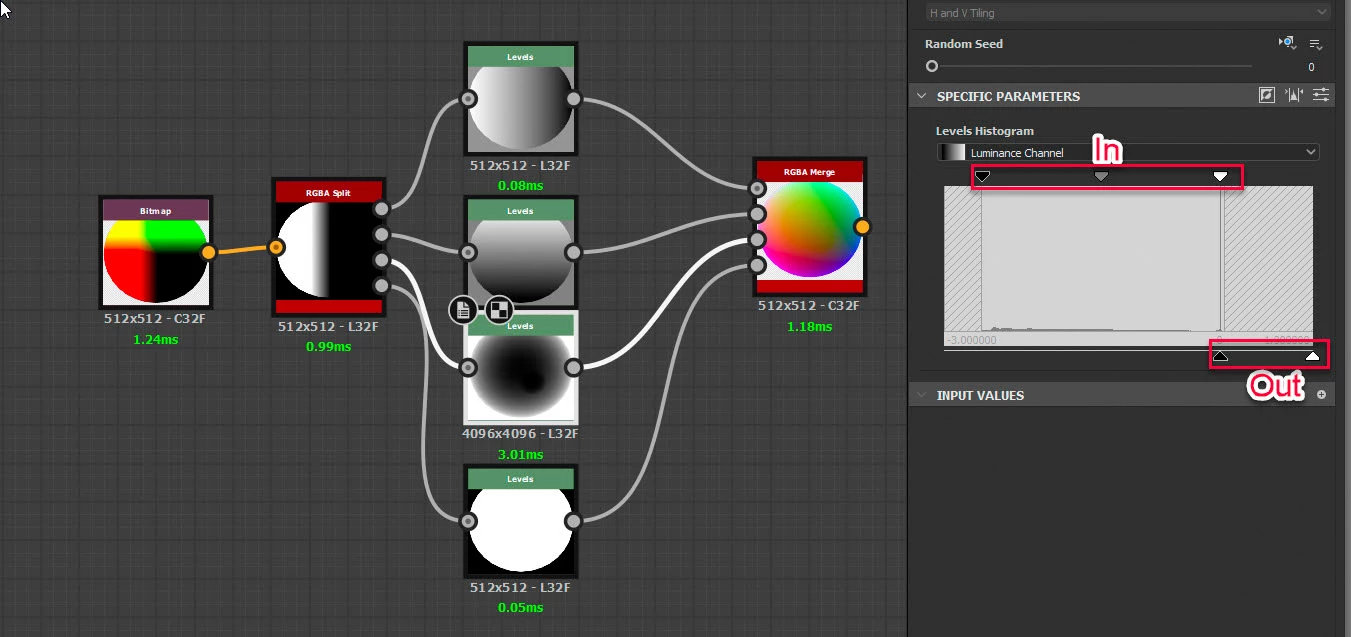
I just checked and you can remap -x to +x to a normalised 0 to 1, either by channel or overall, very simply in Adobe 3D Designer using levels nodes.

'By channel' shown below with the levels settings for the blue channel shown.


Dave


5 replies

davescm
Community Expert
Community Expert
July 12, 2022

Hi

To remap the 32 bit values values from negative to all positive between 0 and 1 , you can use a colour fill layer set to Linear Dodge (Add) to bring all values positive then a second set to Divide to restrict the positive range. There is no automatic adjustment for that.


As an aside, comparing Photoshop to Nuke is a bit 'apples and pears', as they were designed for differing purposes and while the full version of Photoshop costs £9.99 /month, Nuke starts at £399/year for the cut down Indie version.


Dave

kirkr5689Author
Inspiring
July 13, 2022

Divide  to what, could you elaborate that part please?      


yeah, Nuke is cool but too expensive . It's exactly a reason I try to use Phootoshop. After all I need just to composite a single frame , a static image  and Photoshop became quite flexible with all its groups clipping  , linked smart objects  and scripts . So perhaps it can do  something more advanced too  beyond just photo tweaks .     I also love its simple ICC color managment vs all that ACES pain in your ....


davescm
Community Expert
Community Expert
July 13, 2022

The divide blend mode will divide the pixel values on the lower layer by those on the top. So if you set all  the pixels on the upper layer to the maximum value on the lower layer then the result will be normalised 0 to 1.

What size is the image i.e. pixel dimensions? Processing it via Adobe Substance Designer's pixel processor may be a better way as you could then build a control function to do what you want to each pixel.


Dave

Jeff Arola
Community Expert
Community Expert
July 12, 2022

Have a look at Filter>3D>Generate Normal Map

kirkr5689Author
Inspiring
July 12, 2022

How can it be related ?      It was most useless thing ever existed in Photoshop. To create  low quality blurry normal maps  nobody used


kirkr5689Author
Inspiring
July 12, 2022

I have posted the exmple  : https://community.adobe.com/t5/photoshop-ecosystem-discussions/is-there-a-way-to-turn-negative-values-32-bit-image-into-normalized-0-1-one-in-photoshop/td-p/13059792?attachment-id=115295

  it's a position render of a biug and small spheres.   B channel  is depth  . it's all in negative  value space   aroud -40  .    I am looking  for an automated  way I could bring it to positive visiable  0-1 space to make a 16 bit integer  image.    Make an action of it  and execute whenever I need .         So I could use it with any kind of CG image of any  depth easily.    To make a FOV effect or put a mist , smoke   render  etc to a scene rendered picture.  Or to make an edge mask through hipass   to paint on worn edges .    Whatever  2d compostors  like Nuke  do for movies  , just in a single picture  and using just Photoshop.

Legend
July 10, 2022

You can use the "calculate" or "apply image" commands to modify the channel's pixels. It works, but I'm not sure if you can get perfect accuracy.


In Photoshop, the ability to work with image pixels through scripts is extremely limited.

I think you should look for another way to solve this problem.

Legend
July 10, 2022
quote

In Photoshop, the ability to work with image pixels through scripts is extremely limited.

I think you should look for another way to solve this problem.


By @jazz-y


Save as photoshop raw. Open the file with a script. Change the data as needed. Open the modified raw file. Bingo!

Abambo
Community Expert
Community Expert
July 10, 2022

Show an example. Where do the “negative values 32 bit image” come from?

Negative 32 bit (integer) values range from -1 to -2,147,483,648, so -1 may be 0 and -2,147,483,648 may represent 1 and any value in between may represent any fraction of value between 0 and 1 (or vice versa). But you need scripting to do that.

ABAMBO | Hard- and Software Engineer | Photographer
kirkr5689Author
Inspiring
July 10, 2022

Here is example. look at blue channel. it's all black  becaouse pixel values  are all in betwwen  -1 and -2 something.   and red  and green values is  in between 1 and -1 .    Can  photoshop turn  it into normalized 0-1      visiable  range somehow?

Abambo
Community Expert
Community Expert
July 10, 2022

I still don't understand.


Photoshop represents on screen what is in the image channels. I don't know the source of your image, but it there should some information in that channel, you probably need to write a program that reads this channels and transforms the data accordingly. For Photoshop, this is a picture with no blue channel content, and therefore it's all black. That stays all black, independent of any operation you apply.


If I understand well, the 32 bits colour mode is only used for HDR images and Photoshop is ill-equipped to work with those images.

ABAMBO | Hard- and Software Engineer | Photographer