


Inspiring
August 1, 2024
Answered

Lab color yellow L=100?

  • August 1, 2024
  • 5 replies
  • 3904 views

Making my own simple Lab color wheel.

all colors on the middle gray plain L=50,

red, blue, green all work fine

"yellow" on the mid gray plain is brown

it works if I crank it up to L=100.


is this an old fudge to get Lab color on a computer screen?


This topic has been closed for replies.
Correct answer P38942367gj62

@P38942367gj62 

A yellow hue with L=50 will be a greenish olive brown.

A saturated yellow will have L=90 or so.


Accept it and spend your energy finding out why that is so, instead of refusing to accept the facts. This discussion is going nowhere.


CONCLUSIONS:


In the Lab color space,

the maximum positive b value on the middle gray color plane (L=50) is pure yellow.

https://opentextbc.ca/graphicdesign/wp-content/uploads/sites/42/2015/04/Lab-colour-space.png

https://expertphotography.b-cdn.net/wp-content/uploads/2019/12/lab-color-space.jpg


In photoshop,

the maximum positive b value on the middle gray color plane (L=50) is NOT pure yellow


THEREFORE

photoshop does NOT display this particular Lab color correctly

even though it does display Lab red, blue, and green.


"Accept it and spend your energy finding out why that is so, instead of refusing to accept the facts."

5 replies

davescm
Community Expert
Community Expert
August 2, 2024

There are two effects here:


1. Lab does separate colour from Lightness, however a Yellow colour described by Lab L,0,127 will only percieved as Yellow with high lightness values. When Lightness is lowered we see a darker or dirty looking yellow (which we perceive as brown) all the way down to L=0 which is black regardless of the colour settings.

2. When you are looking at a computer screen, like it or not, you are limiting the reproducable colours even further by restricting them to the colour space available in the RGB primaries for that screen. That might be as narrow as sRGB primaries or a little wider with a wide gamut monitor. That limits the colours to those that can be mixed by those three primaries. 

There is a good demonstration half way down this page https://en.wikipedia.org/wiki/CIELAB_color_space (click on the two videos) which shows a 3D representation of the visible real colours under D65 lighting in a CIE Lab graph. As you can see the visible saturation reduces as L reduces.


No fudge - just physics and visual perception.


Dave

Inspiring
August 2, 2024

Then I guess all those Lab color space diagrams

which show a pure yellow on the middle gray L=50 color plane


https://www.researchgate.net/profile/Paul-Nascimbene/publication/235005211/figure/fig5/AS:668845874372627@1536476691622/Model-of-CIELab-Color-Space-3-D-representation-of-perceptible-color-change.png


are just fooling themselves …


I don't really need the color,

just wanted to reassure myself that

my photoshop was "working" as designed.

davescm
Community Expert
Community Expert
August 2, 2024

That diagram is theoretical. As described above, a visible lit colour is restricted within that theoretical space, and a colour represented using three (RGB) primaries, as you see on a screen, even more so. 


Dave


Inspiring
August 1, 2024

When I enter L=50, 0. -128 in Lab mode,

which is the DEFINITION of blue in Lab

photoshop produces  a nice blue color.


The same for red and green.

when I enter the Lab DEFINITION for yellow

L=50, 0 127

photoshop produces a brown not a yellow.

I discovered L=100 which is not a correct value does.


can anyone produce a correct Lab yellow with L=50, 0 127 ?


Right now I am guessing you can't,

that whatever conversion adobe is using or has used

is an approximation that leaves yellow just a bit short.


By the way,

L=0 is black

L=100 is white

L=50 is medium gray

Stephen Marsh
Community Expert
Community Expert
August 1, 2024

My last post on this topic, as we are going in circles...


Adobe RGB Primary/Secondary Values:

Red (255r 0g 0b) = 63L 90a 78b

Green (0r 255g 0b) = 83L -128a 87b

Blue (0r 0g 255b) = 30L 69a -114b

Cyan (0r 255g 255b) = 86L -83a -22b

Magenta (255r 0g 255b) = 68L 101b -51b

Yellow (255r 255g 0b) = 98L -16a 104b


The RGB values contain both lightness and hue, when converted into Lab one can see the relative lightness and hue differences. For example, Adobe RGB "yellow" isn't as pure as one might think, it has a green cast/impurity. 

Inspiring
August 2, 2024

Been there, done that, purchased the T-shirt and coldie-holder.


See the attachment PSD that I posted earlier.  

Also, as I previously wrote:


50% L (gray) + yellow creates a "yellow-gray" hue.


no Lab yellow is defined as

L=50, 0, 127


Inspiring
August 1, 2024

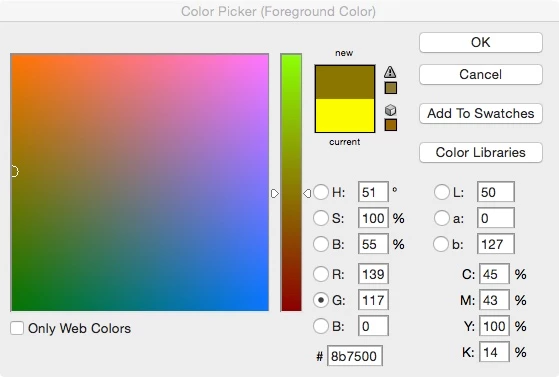
mode set to Lab.
Blue token in Lab

Yellow token when set like the blue token at L=50

Yellow token at L=100 "works"

Can someone get a yellow on their setup with L=50?

Stephen Marsh
Community Expert
Community Expert
August 1, 2024

No. The three channel input fields are mixed/combined, they allow independent input but the result is a combination of the 3 inputs.


The "a" and "b" accept a neutral value of zero, however, the "L" does not have a "neutral value", it must have some value of lightness between 0 and 100.


50% L (gray) + yellow creates a "yellow-gray" hue.


That there is a neutral zero value in the "a" channel in Lab means that if you have a colour number in RGB and or a visual perception of another colour, then that is how colour conversions and the human visual system work.


For example, when 50L0a127b is converted to Adobe RGB, there is a -9a value where the conversion to RGB has become "dirty" and is no longer purely yellow, now there is some green that didn't exist in Lab.


EDIT: Sample Lab mode layered PSD file attached.


D Fosse
Community Expert
Community Expert
August 1, 2024

This is the way Lab works, there's nothing wrong. The Lab color model maps inherent brightness in the L channel, and yellow is inherently very bright at full saturation. A dark yellow is olive brown.


Best illustrated by desaturating RGB vs. Lab:


Inspiring
August 1, 2024


Lab separates the "color" from the lightness.

all the "colors" lie on a plane, designated by a x b coordinates.

the lightness is captured by a grayscale running through the center of the plane

L=50 is middle gray, it lies in the center of the "color" plane


the red, blue, and green tokens were defined with L=50, a,b

the yellow token with L=50 was brown

it only "worked" when I set it to L=100.


as I understand it,

there should be a pure yellow on the middle gray color plane. L=50.

Stephen Marsh
Community Expert
Community Expert
August 1, 2024

A positive value in a "b" channel will indicate a yellow hue, with higher values being stronger. Although the "L" lightness channel is defined independently, there must be a valid tonal value to combine with the colour values.


At some point in time, the theoretical colours defined in Lab mode have to be transformed into RGB or other colour models that don't separate colour from tone. For example, your monitor isn't a Lab-based device, it is RGB, therefore, Lab has to be converted to your RGB monitor profile for display. This is where interesting things can happen!


For strong yellow inks on glossy white paper, the "L" value is often somewhere between 80-90 and the "b" 95-105.

NB, colourmanagement
Community Expert
Community Expert
August 1, 2024

@P38942367gj62 yellow is a bright / light colour. They get a copy of Steve Uptons marellous Colorthink app and plot a very strong yellow in a large RGB colorspace to 3D Lab and see where it sits


I hope this helps
neil barstow, colourmanagement net - adobe forum volunteer - co-author: 'getting colour right'
google me "neil barstow colourmanagement" for lots of free articles on colour management
Help others by clicking "Correct Answer" if the question is answered.
Found the answer elsewhere? Share it here. "Upvote" is for useful posts.

NB, colourmanagement
Community Expert
Community Expert
August 1, 2024

@P38942367gj62 Check this out, in Adobe RGB a bright yellow R,G,B = 255,255,0 is L,a,b + 98, -16, 104


Plainly with L = 50 on the same hue angle (a,b = -16, 105)(see below) it's not a yellow at all but olive green


does that help you understand? 

The IS no yellow around the waistline of the Lab colourspace.


I hope this helps
neil barstow, colourmanagement net - adobe forum volunteer - co-author: 'getting colour right'
google me "neil barstow colourmanagement" for lots of free articles on colour management
Help others by clicking "Correct Answer" if the question is answered.
Found the answer elsewhere? Share it here. "Upvote" is for useful posts.


Inspiring
August 2, 2024


Thank you this is on the right track.

please repeat but using the DEFINITION of Lab Yellow

L=50, 0, 127