
Lightroom "deconvolution" sharpening vs. Photoshop Smart Sharpen (lens blur removal)
As someone relatively new to Lightroom and Photoshop, I have been trying to gain a better understanding of the sharpening options available in both applications (e.g., bought The Digital Negative (Jeff Schewe) as well as The Adobe Photoshop Lightroom Classic CC Book (Martin Evening)). I also found the community thread "Sharpening in ACR 7.1" (Jun 10, 2012) very informative.
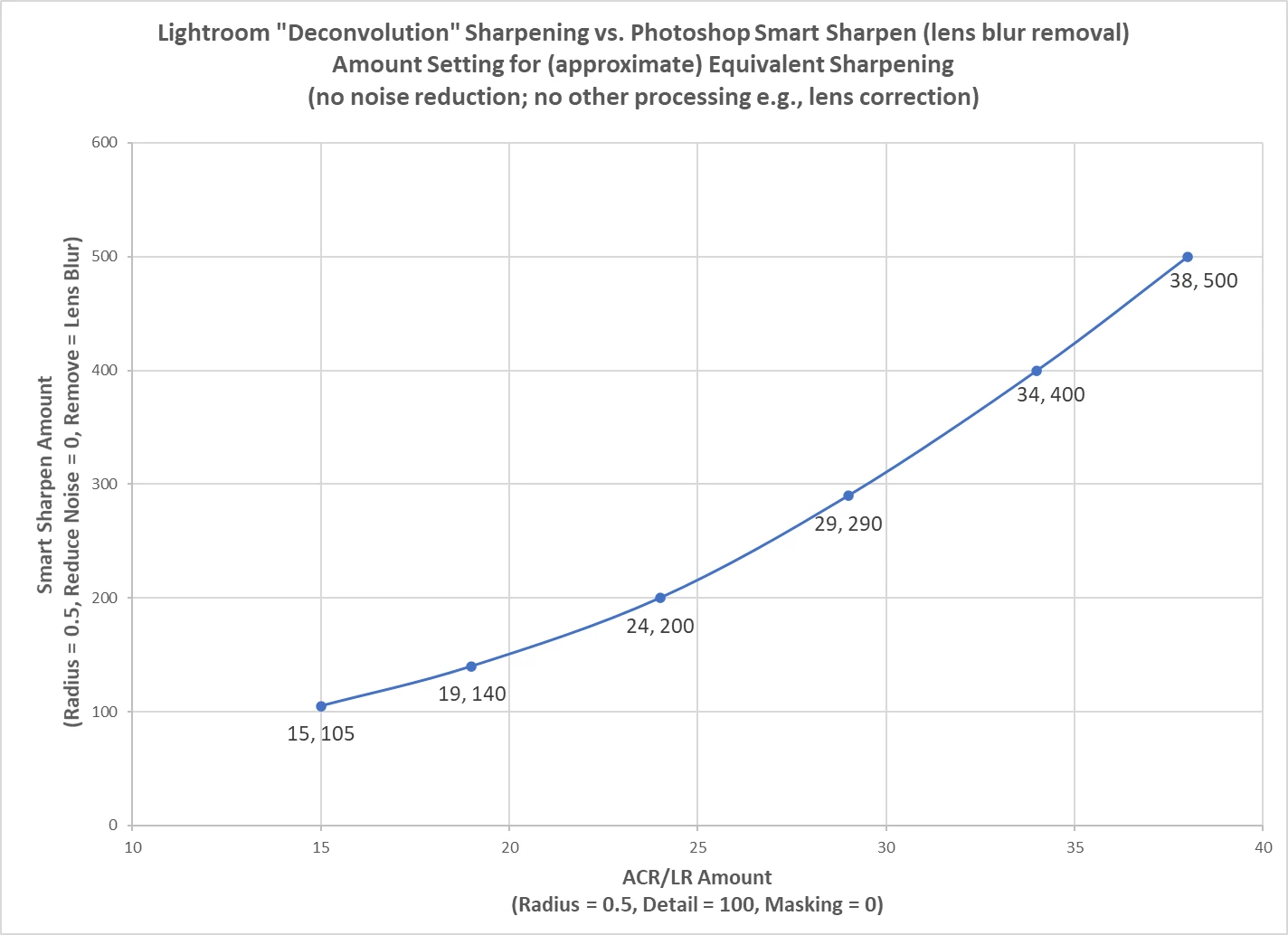
In the referenced 2012 post, MadManChan2000 (Adobe Employee) acknowledged "Yes, moving Detail towards 100 will use a deconvolution-based method to sharpen the image." Jeff Schewe indicated "ACR's deconvolution processing is very similar to Photoshop's Smart Sharpen when set to the Lens Blur option." So, I embarked on an effort to determine "amount" settings for equivalent sharpening. Results are illustrated below:
A few caveats:
- I analyzed one relatively complex daylight landscape image (sand dunes, mountains, partly cloudy sky) to generate the chart. 135 mm Sigma (Art) Lens, ISO 100, f/6.3, 1/500 second.
- Reviewed "sharpening artifacts" to determine equivalency in a manner similar to the process described in my post "Enhance details produces noise artifacts" (Feb. 20, 2022). Later, I verified each data point with color images.
- As included in the chart's title, "approximate" is an important adjective - as far as I can tell, the "deconvolution" algorithms implemented in ACR/LR and Smart Sharpen are not identical. Very similar, but not identical.
Thoughts? Have others attempted to generate a similar chart? Adobe?
 AdChoices