
Participant
September 25, 2018
Answered

Liquify Tool Black pixels after MOJAVE OS

  • September 25, 2018
  • 66 replies
  • 40915 views

Just updated my Mac to Mojave today.

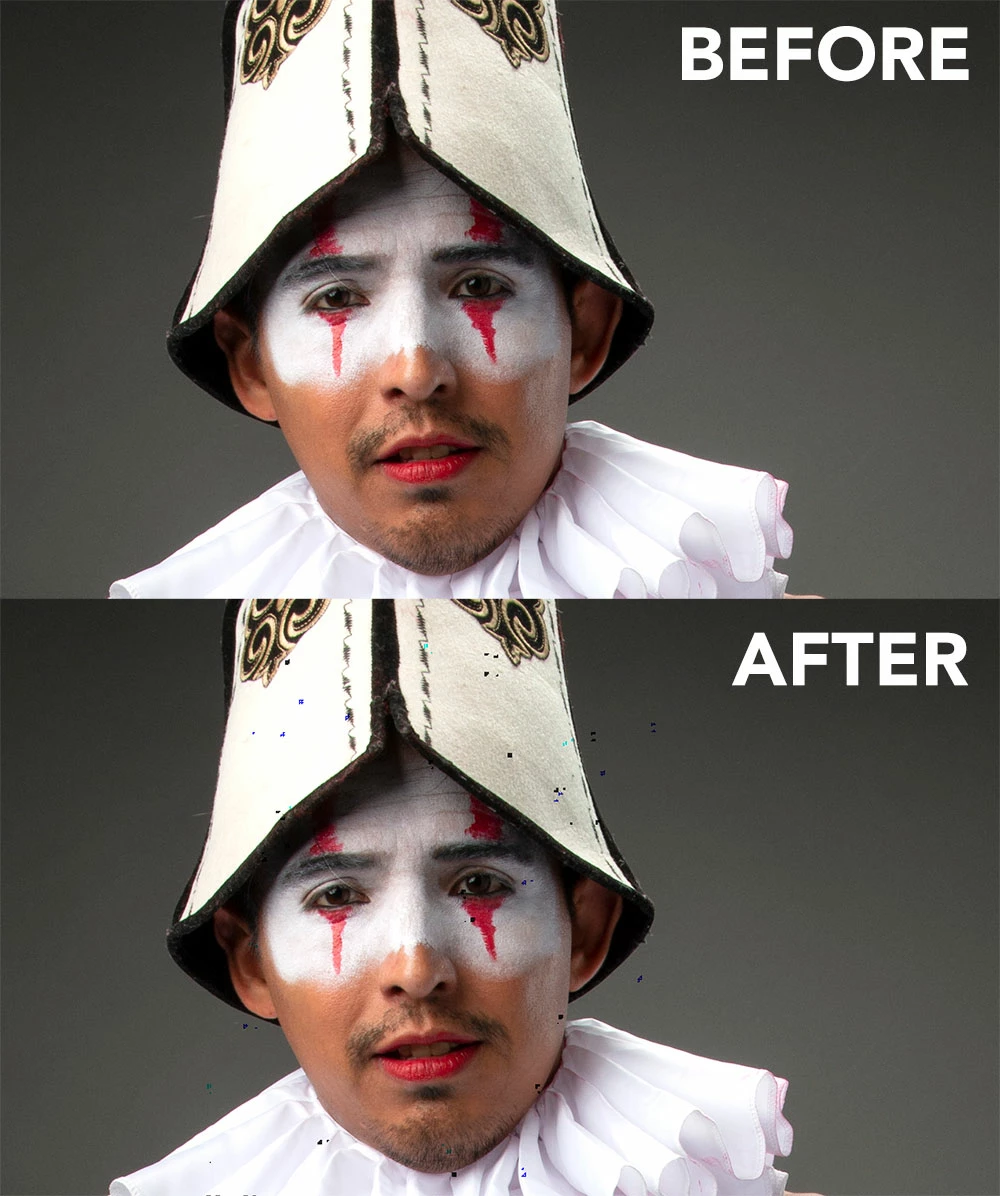
Liquify is creating black pixels when used.

I have tried to optimize performance but I still get the same error.

I have a super fast machine, so is not a RAM error. Liquify was working normally before Mojave OS.

In the image below, I have slightly adjusted the smile of the subject.
This topic has been closed for replies.
Correct answer Jeff Arola

This doesnt work for me.


Apple has just released the 10.14.1 Mojave update so install that and see if the Liquify issue is solved.

66 replies

Participant
January 11, 2019

I've found the best way to deal with this glitch is not to turn off graphics acceleration or use the option key when using liquify.

Instead, use the history state prior to the liquify and paint it out with the history brush.  The areas that have been liquified where the dots appear I use the spot healing brush.

This is quicker than using the spot healing brush by itself because you don't need to be as exacting.

Hopefully this is fixed soon.  Pretty annoying when you are working on a batch of images.

JNphotography
Participant
January 11, 2019

Tech had me do the click trick mentioned above but it's so slow I just can't. I am dying.

gener7
Community Expert
Community Expert
January 11, 2019

If there isn't a compelling reason to use v 20, install and use 19.1.7 That way you don't have to shut off the GPU.

Participant
January 7, 2019

10.14.2 - The same problem ((((((

Known Participant
January 7, 2019

10.14.2 (18C54) and artifacts are back!

CarlosGordillo
Known Participant
January 7, 2019

Hello all affected by this annoying digital dirt: Any notice from Adobe or from Apple about this?

CarlosGordillo
Known Participant
January 2, 2019

NOTE: THIS WORKS WELL IN LIQUIFY EXCEPT FOR THE FACE TOOL, SINCE THE FACE TOOL USES GRAPHICS PROCESSOR

I don't want downgrade my OS to Mojave 10.14.1 so:

1.- I created two simple actions: one for enable Use Graphics Processor and other for disable it quickly and easily

2.- With Use Graphics Processor enabled I make normally the liquify work and click OK

3.- Next I make Undo (Command + z)

4.- Run my action to disable Use Graphics Processor and

5.- Control + Command + f (or select the first item from the filter menu) and voila

6.- Run my action to enable again Use Graphics Processor

Apple (or Adobe), hurry up please!

loriac51634063
Participant
January 7, 2019

Where do you find the options to change the 'graphics processor'???

Known Participant
January 10, 2019

Go to photoshop --> preferences --> performance and uncheck "use graphics processor".

All are correct that the latest Mojave update messed this up, but if you turn off graphics processor, it seems to fix the digital dirt issue.

Participant
January 2, 2019

mojave 10.14.2 updates having same black pixel problem ..we cannot degrade moajve to 10.14.1

CarlosGordillo
Known Participant
December 21, 2018

NOTE: THIS WORKS WELL IN LIQUIFY EXCEPT FOR THE FACE TOOL, SINCE THE FACE TOOL USES GRAPHICS PROCESSOR

I don't want downgrade my OS to Mojave 10.14.1 so:

1.- I created two simple actions: one for enable Use Graphics Processor and other for disable it quickly and easily

2.- With Use Graphics Processor enabled I make normally the liquify work and click OK

3.- Next I make Undo (Command + z)

4.- Run my action to disable Use Graphics Processor and

5.- Control + Command + f (or select the first item from the filter menu) and voila

6.- Run my action to enable again Use Graphics Processor

NOTE: in fact we can resume the 4, 5, and 6 steps in only one action.

Apple (or Adobe), hurry up please!

marcd97343584
Participant
January 2, 2019

I have done the working method as Aziatselat cited in his commentary of 29 Oct 2018. First press the option key then go to liquify and do the job and clic ok. In my case, this also works. Attention not all actions are possible (Liquify face> problem not solved). Maybe try. You have nothing to lose.

My system: Imac Mojave 10.14.2 AMD Radeon R9 M380 2048 MB Photoshop CC version 20.0.1

Participating Frequently
January 2, 2019

This issue is back again from the last Mac OS update in December!

Anghelov

On Wed, Jan 2, 2019 at 4:52 AM marcd97343584 <forums_noreply@adobe.com>

GillV
Participating Frequently
December 18, 2018

yes, it was all sorted and today I've got the problem back. 10.14.2

Participant
December 14, 2018

It's true. At 10.14.2 the problem is back

I hope that adobe will react on time

iMac (Retina 5K, 27-inch, Late 2014)

3,5 GHz Intel Core i5

AMD Radeon R9 M290X 2048 MB

Participant
December 17, 2018

10.14.2 will bring back the problem!

Macbook Pro mid 2015