
Participant
October 7, 2020
Répondu

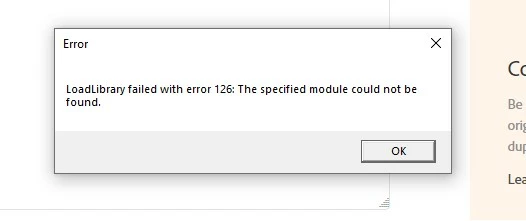
LoadLibrary failed with error 126: the specified module could not be found.

I keep getting this error window each time i start any of my Adobe Apps: Photoshop, Illustrator, InDesign. Can't figure out how it's affecting my work yet, 

any thoughts on how to fix this?


Thank you kindly

Andrea
 

Meilleure réponse par AbhishekJ

This issue generally found on the systems in which AMD Graphic card is installed.
For Windows 10: Follow the below steps to be double sure if the issue is with AMD.

Please open Run command (Windows key + R key), type devmgmt.msc in the box and press enter -> expand display adapter tab -> right click on graphic card -> update drivers -> click on browse from my computer -> click on the blue option for let me pick from a list.

From there you need to click on Microsoft Basic display adapters and click on next to install them.

For Mac Operating System, contact AMD to reinstall GPU from scratch.

21 commentaires

Participant
January 21, 2022

THANK YOU - This worked. I was about to return my laptop I was so angry. But this solved my issue. Even HP supprot couldn't do it! They told me to just disable the stupid AMD driver every time I wanted to use Photoshop. Not the best solution. Never buying another laptop with an AMD driver, that is for sure! Thanks again!

Participant
July 13, 2021

You may need more RAM. At minimum 16 gig. 32 is better


AbhishekJRéponse
Adobe Employee
June 17, 2021

This issue generally found on the systems in which AMD Graphic card is installed.
For Windows 10: Follow the below steps to be double sure if the issue is with AMD.

Please open Run command (Windows key + R key), type devmgmt.msc in the box and press enter -> expand display adapter tab -> right click on graphic card -> update drivers -> click on browse from my computer -> click on the blue option for let me pick from a list.

From there you need to click on Microsoft Basic display adapters and click on next to install them.

For Mac Operating System, contact AMD to reinstall GPU from scratch.

Participant
October 14, 2021

Perfect! This was exactly the information I needed to solve the problem. Windows actually gave me an error saying that it couldn't install the Microsoft Basic display adapters, but then it worked anyway.

Participant
February 26, 2021

I was having the same issue and after reading this thread switched ports for my monitor. That fixed the problem.

Participant
February 22, 2021

SOLVED FOR ME: I had the same problem. Photoshop 2019 worked just fine, but 2020 and 2021 wouldn't open without the "LoadLibrary failed" error popping up and then they would freeze when I tried to use them. I took the newer icons off my home screen and continued to use 2019, which worked. Until Photoshop updated again and deleted 2019 in the process. That left me with only Photoshop 2021 and therefore a non-functional Photoshop. I searched this thread and found the answer: update the graphics software. I'm using AMD Radeon Graphics Processor (0x682B) on a Dell Optiplex 7050. I ran control panel, found my graphics, searched it online, downloaded the AMD updating app, which scanned my system and recommended the update software, then I downloaded and installed it. I had to reboot a couple times in the process, but, after that, no more error message when opening Photoshop. Keeping my fingers crossed.

Participant
February 23, 2021

I did what I have read so far and updated the AMD Radeon RX 480 graphic card driver. Photoshop v 22.11 finally can be opened without any error!

February 12, 2021

I updated Win10 because I discovered that Windows Search was not working. The regular update didn't work for that and it required a different Win10 update(?). After updating, I had the same problems discussed here with my PhotoshopCS6 (64bit). I didn't test the other applications. After much cussing and, I admit, terroristic thoughts directed at Microsoft, I tried all manner of things until my brain somehow recalled having seen just the word "Intel" somewhere in this posting. I went to Task Manager and 'End Task'ed all intel listings. Photoshop works great now...well, about the same as it worked prior to my passing through the valley of the shadow of Microsoft Updates, ever a perilous place to be...Perhaps how to use "C:\Windows\System32\ copy atio6axx.dll .dl" could be more clearly described also...

Participant
February 4, 2021

I am having the same issue and the above information does not fix the problem. Adobe need to fix the issue or refund my money


Participant
January 12, 2021

 I had the same problem on my computer running Windows 10, and it started after I downloaded the 2021 version of Photoshop Elements. (Before that I had the 2020 Photoshop Elements trial and 2019 Premiere Elements installed.)


Here is what worked for me:

I went to AMD's Support page:

https://www.amd.com/en/support

Then I downloaded the package at the top of the page: "Auto-Detect and Install Updates for Radeon Graphics and Ryzen Chipset Drivers for Windows."

That took a few minutes to install and my computer had to reboot a couple times. After that, I no longer got the error 126 messages when I opened Photoshop Elements or Premiere Elements.


Before I downloaded the fix on AMD's website, I had tried going into the Device Manager on Windows 10 and updating my display adapters there -- my computer is running AMD Radeon (TM) RX 560 and Intel (R) HD Graphics 630. When I right-clicked each one and selected "update driver," the machine told me both were already updated. So that was a dead end.


Anyway, I haven't seen this solution posted on these forums, so I thought I'd add it in case it helps anyone. I am happy to pay it forward because forums like this have bailed me out many times whenever I've had to do computer troubleshooting.


Cheers,

Nick

Participant
January 12, 2021
Thank you Nick for your post ...I'll give that a try! Again, thanks.
John
Participant
December 20, 2020

I read it in a comment, but just incase anyone else is still having this issue.  All I had to do was move the hdmi cable to a different port.. and problem solved!

Participant
December 31, 2020

This basically resolve it for me too, the key was switching the primary monitor to a different graphics card.  The drivers were up to date, I think there is a compatability issue with my Intel card.  The AMD card didn't have the issue.

Dave

Participant
December 18, 2020

I fixed it by switching the ports that my monitors were plugged into. Then updated the video drivers. Unfortunately it took painful unnecessary hours of research and Adobe tech support wasn't very helpful via phone or chat. They did a remote session and simply said "your monitors aren't supported by Photoshop" and left me hanging with the solution to replace the monitors. Yeah, PS worked fine all this time and suddenly stopped working, and my $2,000 monitors are the problem. 

Participant
December 20, 2020

This worked!  Thanks!

paulb69806646
Participant
May 1, 2021

I agree with this solution as well, and it worked for me by swapping ports to my two desktop monitors.  I worked with Adobe Support, and they were quite helpful on other issues, but they did not offer this as a possible solution for the Error 126 issue.  In fact, they suggested that I might look in to getting a new (expensive) graphics card.  So ... for those of you experiencing LoadLibrary Error 126, try a simple port swap to begin.