

Answered
Lost Tool Bar
With the new update I no longer have my toolbar. I went to Windows Toolbar and it's check but it's not on the screen and I can't figure out how to get it back..thanks

With the new update I no longer have my toolbar. I went to Windows Toolbar and it's check but it's not on the screen and I can't figure out how to get it back..thanks
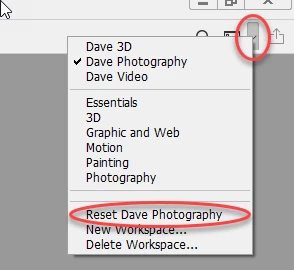
Gener7's advice is good, but before resetting preferences - I would try resetting the workspace. Only if that does not work do the preference reset.
Go to the right of the options bar - click the down arrow and in the menu select your workspace then choose reset your workspace
Dave
Already have an account? Login
Enter your E-mail address. We'll send you an e-mail with instructions to reset your password.
 AdChoices