
M: Marquee and Hand tool snapping to corners.
Hi Everyone.
Just to get this out of the way: I'm running Windows 10 (everything up to date), Photoshop CC 21.1.1, and an Ugee tablet (think poor-man's Cintiq).
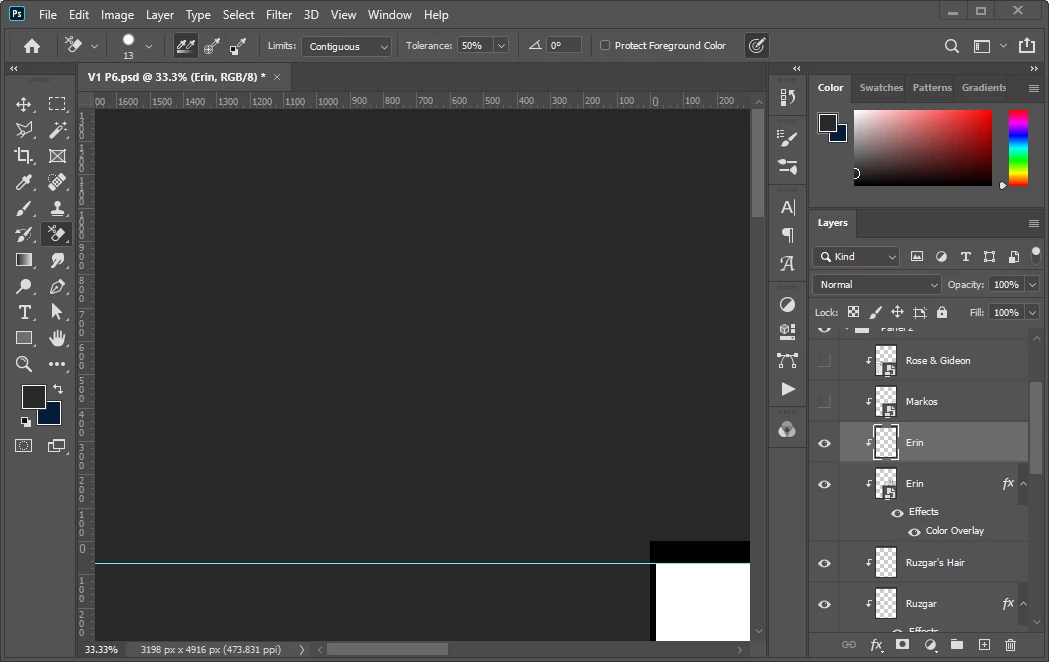
When I launch photoshop to draw, things work fine for a while, but after about 20 mintes, when I use the hand tool (space, H, or by clicking on the tool) to move to another portion of the artwork, it starts snapping to the upper left. I could try dragging down, and it's even more up and left. If I keep trying to use the hand tool to move my view of the canvas, it ends up looking like this:
I've already tried turning on-and-off various swiping, scrolling, and overscrolling settings.
If I re-start the program, it works fine...for about 20 minutes, and then we're back to funky snapping.
I noticed other hand-tool errors were solved with the update, but like I said, this version of Photoshop is as up-to-date as possible. I've updated pretty much everything on my computer.
Is there something I'm missing? Anyone else struggling with this glitch?
[Moderator note: PS-49375]


 AdChoices