theopolymorphos
Participant
July 31, 2026
Answered

Make AI optional

  • July 31, 2026
  • 7 replies
  • 90 views

Let me be absolutely clear. 

I have ZERO interest in using generative AI tools in Photoshop or anywhere else. 

And yet, every time I open Photoshop I am assaulted with pop up windows trying to get me to use these tools that I do not want. The features and buttons are displayed prominently in many different windows, it is virtually impossible to ignore or avoid. It creates a very negative user experience having these things shoved down my throat all the time. 

Going forward, Adobe should give users a simple checkbox option to indicate whether we want these tools or not. For those who don't, they should be disabled completely. No pop ups, no reminders, no prompts, nothing. 

I like to use Photoshop to jump back and forth between my Mac desktop and iPad. Despite some bugs and issues, the experience has mostly been good until AI started taking over. I don't want to switch, but at this point, I am already considering alternatives. 

Please take note of this user feedback and take it seriously. I can't be the only one. 

Correct answer Srishti Bali

Hi ​@theopolymorphos 


Thank you for sharing your feedback. We appreciate you taking the time to share your thoughts. That said, Photoshop doesn't currently have a global "AI Off" or "AI-Free" setting.

Upvote here for this feature request: 

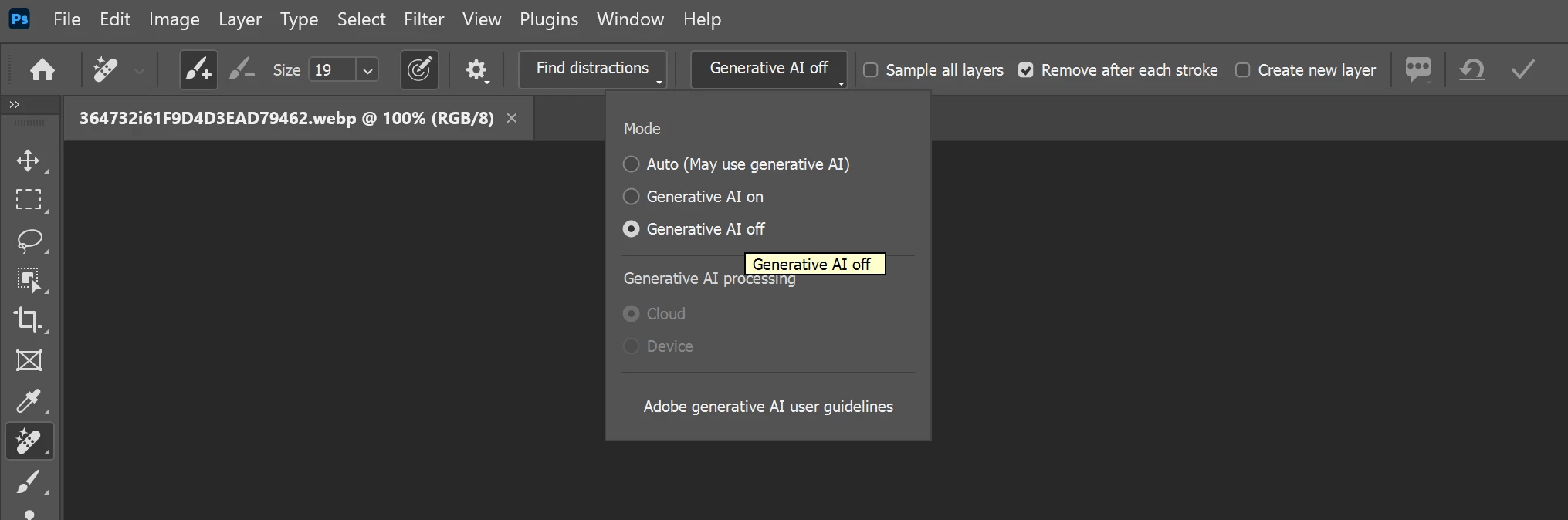
However, for certain tools that support both AI-assisted and traditional workflows, you can choose not to use Generative AI. For example, with the Remove Tool:

  1. Select the Remove Tool.
  2. In the Options bar at the top of the workspace, locate the Mode or Generative AI setting.
  3. Set it to Generative AI Off to use the non-generative removal method instead.


Please note that this setting is tool-specific, not application-wide. Features such as Generative FillGenerative Expand, and Generate Image are AI-based features, but they are optional and can simply be left unused if you prefer a non-AI workflow.

7 replies

Srishti Bali
Community Manager
Srishti BaliCommunity ManagerCorrect answer
Community Manager
August 27, 2026

Hi ​@theopolymorphos 


Thank you for sharing your feedback. We appreciate you taking the time to share your thoughts. That said, Photoshop doesn't currently have a global "AI Off" or "AI-Free" setting.

Upvote here for this feature request: 

However, for certain tools that support both AI-assisted and traditional workflows, you can choose not to use Generative AI. For example, with the Remove Tool:

  1. Select the Remove Tool.
  2. In the Options bar at the top of the workspace, locate the Mode or Generative AI setting.
  3. Set it to Generative AI Off to use the non-generative removal method instead.


Please note that this setting is tool-specific, not application-wide. Features such as Generative FillGenerative Expand, and Generate Image are AI-based features, but they are optional and can simply be left unused if you prefer a non-AI workflow.

Thanks, Srishti Bali | Community & Engagement Strategist, Digital Imaging | Adobe
Stefan_HQ
Inspiring
August 1, 2026

Last I checked it IS optional. You do not need to use it. 
I agree that default settings and less “sell up” of the AI stuff should be toned down. You are spot on with the current throat showing.

Still, sure you might have zero interested in using it. Most likely I have features in Photoshop you use that I have zero interest in using.

And no we should not have check box for those tools, If so then we need to have checkboxes for all features, one can’t cherrypick. And no they should not be disabled. 
About the reminders and “look look at me I am an AI feature” popups. There I am totally on board with you.


c.pfaffenbichler
Community Expert
Community Expert
August 1, 2026

One can also already hide tools and menu items via Edit > Toolbar and Edit > Menus.

Stefan_HQ
Inspiring
August 4, 2026

Exactly. To me this ticket is very odd, as said then it should be applied to every feature. Its like buying or renting a product and wanting to remove feature set. I fully support toning down AI feature “pushes” at start up and such. Then again those ARE new features so naturally they will be there. 

theopolymorphos
Participant
July 31, 2026

Thanks for the link, helpful context, but I did not find there a solution to my problem. 

c.pfaffenbichler
Community Expert
Community Expert
July 31, 2026

It's an existing feature request, so you can, if you think it reflects your wishes to at least some degree, add your vote.