

angryf84
Inspiring
October 31, 2023
Question

Minimized Pallets not working and Color Pallet not registering changes

  • October 31, 2023
  • 3 replies
  • 254 views

When I have a pallett minimized and click on any of the pallett icons it just clicks through to the desktop (huge pain for me on a small screen when all the space is critical).


If i open the minimized pallet via the WINDOW menu I can interact with it and even collapse it but once it's a small icon the "click thru" bug happens again.


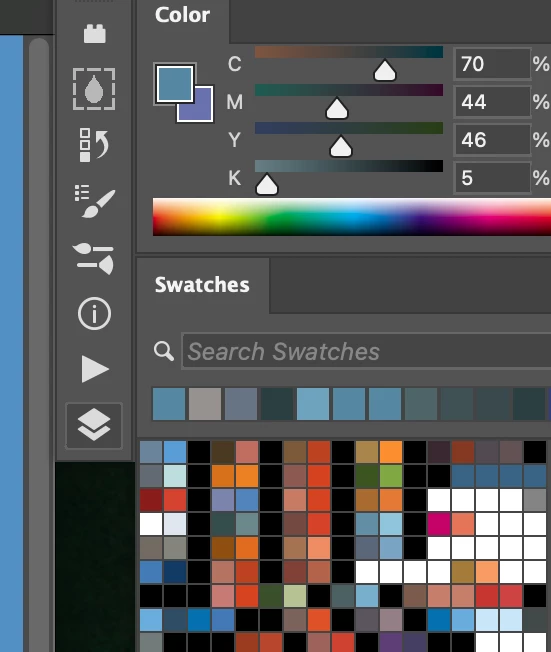
My Color Pallet also doesn't register the color I eyedrop with the sliders.


Mac osX 16.1 and PSD 25.1
 

This topic has been closed for replies.

3 replies

angryf84
angryf84Author
Inspiring
November 8, 2023

It looks like Mac OSX 14.1.1 (23B81) Sonoma has fixed some of my problems... the click thru dosen't happen now, yay!

The sliders on my CMYK COLOR Pallet still dosen't register my color changes.

angryf84
angryf84Author
Inspiring
November 1, 2023

Thank you...


so the two solutions from those links are to use APPLICATION FRAME for the click thru bug and unintall then reinstall ver 25 (back from 25.1) for the slider problem.


These work but the click thru bug even under APPLICATION FRAME on using "Full screen mode with menu bar" still happens... so just a heads up


gotta turn off auto update on Adobe Apps again... 😕😕


**note** I didn't do the uninstall and reinstall because it's too much of a pain and I'm going to wait it out

Ged_Traynor
Community Expert
Community Expert
November 1, 2023