


Participant
July 27, 2020
Answered

Missing workspace

  • July 27, 2020
  • 2 replies
  • 373 views

Hi, I'm not sure if this is called the workspace. When I open photoshop I see the screen of my Mac and only the side bars and properties on the right of the screen.  Menus above but nothing in the middle.  Sorry difficult to explain but maybe the screenshot will help to explain.
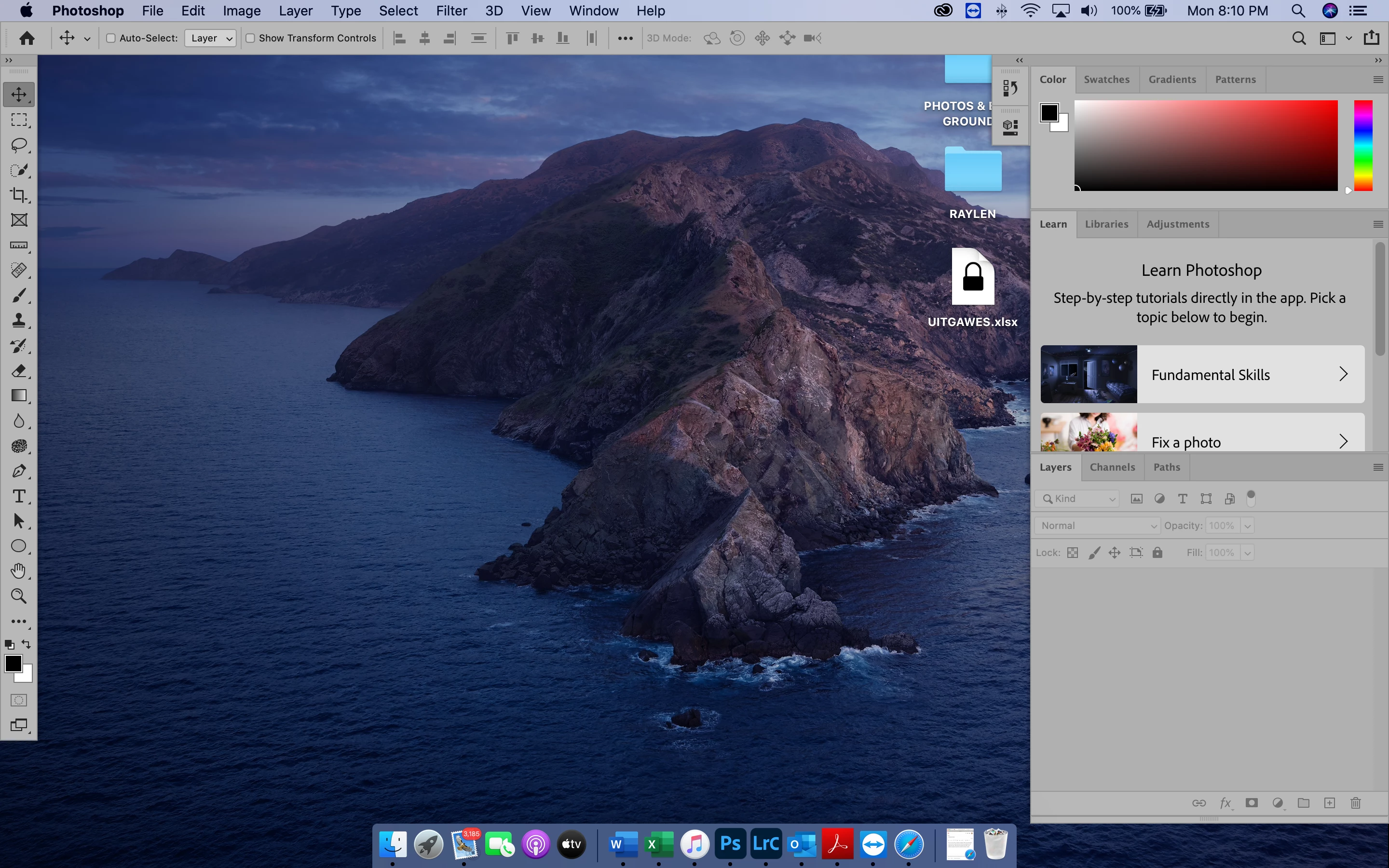
 

Also the bottom part of Photshop is missing

    This topic has been closed for replies.
    Correct answer Kevin Stohlmeyer

    Go to Window and turn on your Application Frame

    2 replies

    Participant
    July 29, 2020

    Thank you!  This solved my problem.  The application frame now activated.


    Kevin Stohlmeyer
    Community Expert
    Kevin StohlmeyerCommunity ExpertCorrect answer
    Community Expert
    July 27, 2020

    Go to Window and turn on your Application Frame