Participating Frequently
August 3, 2010
Answered

Move Tool does not move layer when dragging with Wacom tablet

  • August 3, 2010
  • 39 replies
  • 107432 views

I am using the trial version of CS5 (probably going to upgrade at the end of the trial), and I've only found one thing about it that I don't like more than CS3. This is VERY VERY annoying, and I'm not sure if it's a glitch, or just a preference that needs to be reset:

  When using the move tool, I will move something and it will just snap back to where it originally was. When it snaps back, it might move a few pixels over in the direction I was dragging, but it is definitely not moving to where I want it to go. The only way to get things to move the way I want to is by Free Transform...but it's annoying, when you're trying to design a layout, to have to free transform every element you want to move, first.

I'm guessing that this is a glitch because sometimes it happens and sometimes it doesn't...it's pretty random. I've tried turning Snap on and off, and nothing changes. Any idea how to fix/change this?

~Mike

Message title was edited by: Brett N
    This topic has been closed for replies.
    Correct answer numeroeins

    Hello,

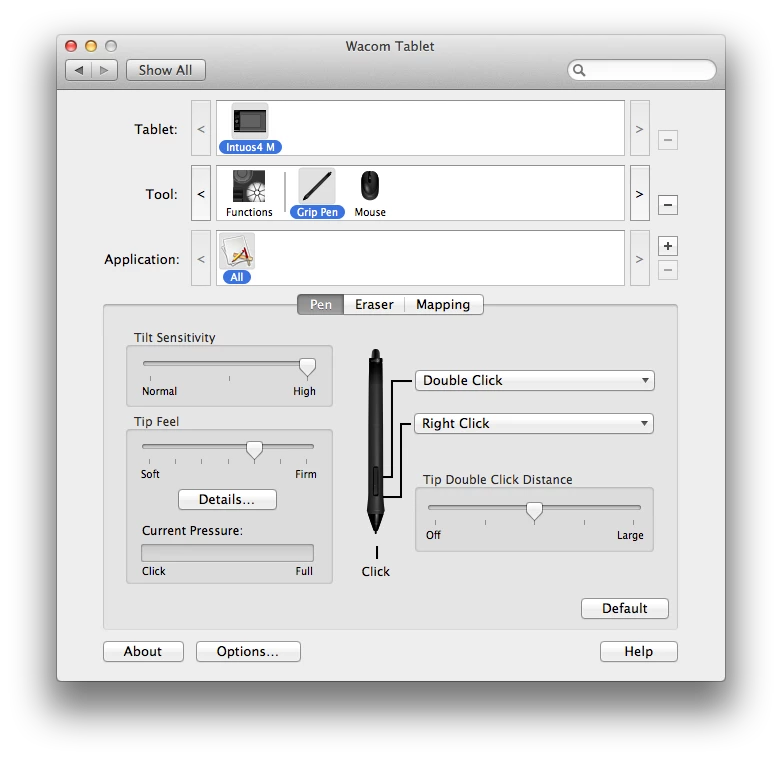
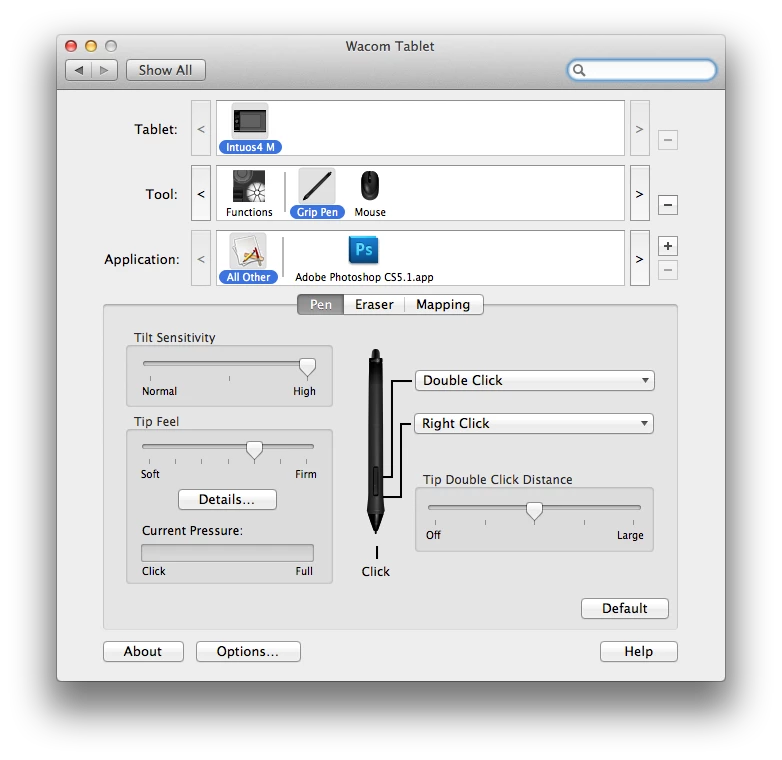
    I think I may have found the culprit. I started using Adobe PS CS 5 Extended the same day I received the Wacom Intuso 4 (about one year ago) and NEVER had a problem until last month when I added Adobe PS CS5 into the application section, see below.

    This is the ONLY change that I made to my wacom settings beside the typical button layout.

    I just tested this out. I removed the Adobe Photoshop CS5 from the field Application field and restarted Photoshop WITH the tablet plugged in. Now, I can use both the track pad and the tablet. See below:

    Just to test my finding, I readded the application BACK to the application field (Photoshop was shut down; pen and mouse three feet away) and modified my settings like I wanted, then I started Photoshop.

    At first, I was able to use the track, but as soon as I used the pen, the track pad stopped functioning properly and the "jump back" problem started again.

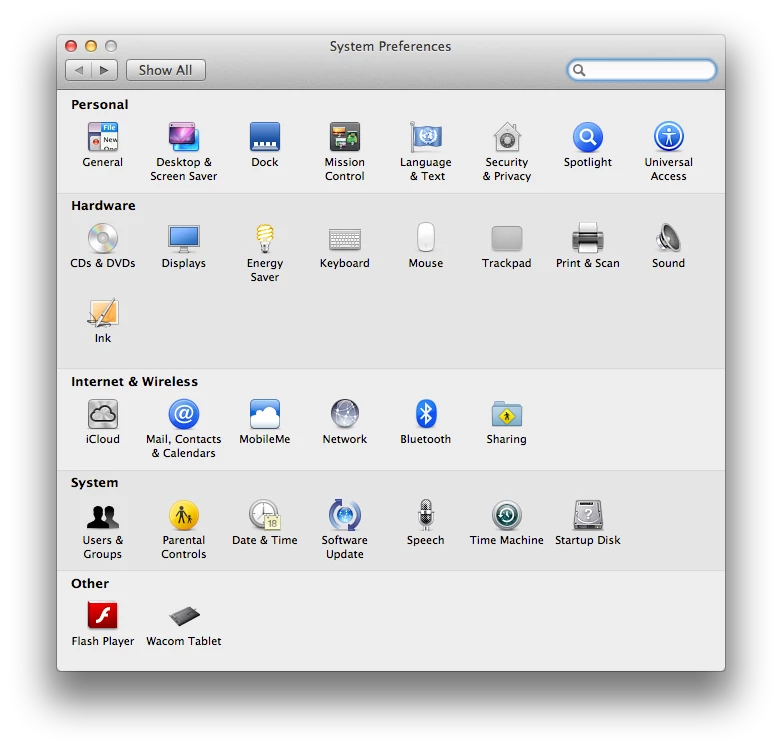
    I only have Flash Player and Wacom in the other field on System Preferences, see below.

    In this case it doesn't matter weather the pen is sitting on the tablet or not. Once Photoshop is removed from the Application field of the Wacom settings, the track pad and tablet work in harmony.

    I hope this works out for you and helps Adobe/Wacom find a solution/fix to the problem.

    Regards,

    Brandon

    Message was edited by: numeroeins

    Message was edited by: numeroeins

    39 replies

    Participant
    March 5, 2012

    Hate this glitch!  CS5, Intuous 4, and Macbook running Lion.

    Participating Frequently
    February 3, 2012

    Still happens now and then to me. Just quit out of photoshop and restart and it corrects the problem.

    PECourtejoie
    Community Expert
    Community Expert
    February 3, 2012

    Strube, are you also using a wacom tablet?

    Participating Frequently
    February 5, 2012

    Yes. The one that I have problems with is at work and it is close to my speakers and pen. And, it seems it happens more often then not when it is windy outside. Maybe it has something to do with static electricity. I'll ask our IT consultant if he has ever heard of this problem with other designers and get back with you all.

    Kallithea
    Known Participant
    February 3, 2012

    I too have this problem, and it's very annoying. I'm using a Wacom Intuos 4 tablet and an Apple magic trackpad with Photoshop CS5.1 on a mac running Lion Server 10.7.3.

    hirshmonAuthor
    Participating Frequently
    February 3, 2012

    No, there hasn't been...you'd think Adobe would be able to figure out such a thoroughly documented and widespread problem by now.

    I just got a new computer, and I can confirm that the problem still occurs - it's not computer specific.

    January 2, 2012

    Same here......   disconnect the cintiq and restart photoshop and the move tool & trackpad line works.  PLEASE FIX THIS!

    November 24, 2011

    Hi everyone,

    I'm experiencing the same problem with the snapping using Photoshop CS5 with the Wacom Intuos 4. Objects will not move properly after a while of usage, resulting to having to shut down the program and start again (problems starts again shortly after).

    Has there been a solid solution to this problem yet?

    Specs:

    - Latest Wacom driver installed

    - Lion latest version

    - Photoshop CS5 (latest installment)

    - No additional apps besides internet browsing

    Participant
    October 25, 2011

    Hi Thanks for bringing this issue. I am having same issue when I plugged in my Intuos4 with Photoshop. If Intuos is unplugged everything is working normal but when I plug it in, I can't move stuff with my trackpad (still able to move with pen and arrow keys) along with other issues people are reporting here.

    Please fix this issue ASAP.

    Thanks, Harjinder

    Participant
    October 4, 2011

    I am still seeing this issue using Photoshop CS5 v12.0.4 x64 with the latest Wacom Bamboo driver v.5.2.5-3.

    Grant H
    Community Expert
    Community Expert
    October 4, 2011

    are u running Lion?  Wacom drivers not compatable with Lion.
    G

    [Moderator] Recent Wacom drivers (since Driver 6.1.6-4 from 22 Nov 2010) are compatable with Lion (10.7), Snow Leopard (10.6), and Leopard (10.5).

    Participant
    October 5, 2011

    No, I'm running on Snow Leopard 10.6.8 on a 2010 Macbook Pro.

    Participant
    July 29, 2011

    I think the best option is moving by "Ctrl+t"

    Participant
    June 16, 2011

    Exact same problem again here. Latest everything installed and no extras/plugins. I have an Intuos tablet though.

    The tablet and my magic mouse work fine - it's just the trackpad.

    This has to be a PS bug surely? Command-T transform works fine, as does dragging out a selection marque.