

Participant
August 31, 2020
Answered

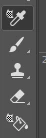
operation of the eyedropper tool and fill
  • August 31, 2020
  • 2 replies
  • 362 views

 which mode is enabled? how do I disablethis mode? A full reset doesen't help

 

This topic has been closed for replies.
Correct answer

Hi

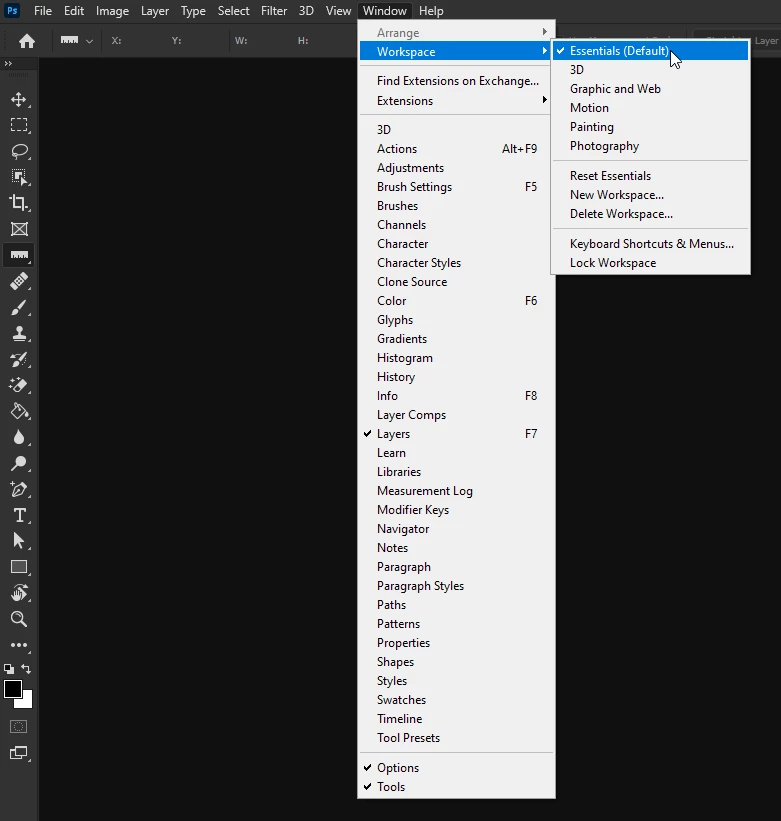
Looks like you're in the 3D Workspace, go to Window > Workspace and select Essentials
 

2 replies

Correct answer
August 31, 2020

Hi

Looks like you're in the 3D Workspace, go to Window > Workspace and select Essentials


Participant
August 31, 2020

Thank you. A lot 🙂 

c.pfaffenbichler
Community Expert
Community Expert
August 31, 2020

Please provide a meaningful description (including a meaningful screenshot, not just some snippet) of what the issue is. 


You apparently selected the Color Sampler Tool which is used to create Color Samplers in images and does not have anything to do with filling a Selection or Layer directly. 

August 31, 2020

Isn't that the 3D Material Eyedropper Tool


c.pfaffenbichler
Community Expert
Community Expert
August 31, 2020

I do apologize, I was indeed mistaken,