
Participant
May 23, 2016
Answered

P: How to fix Photoshop Scratch Disks Full Error?

  • May 23, 2016
  • 49 replies
  • 597262 views

I am running Photoshop CC on my MacBook Air with macOS Sierra. Every time I attempt to open Photoshop through any means, the following message appears: "Could not initialize Photoshop because the scratch disks are full", and Photoshop does not open. I tried clearing space from my Mac in general including several GB worth of apps and removing several cache files, but nothing seems to work. I also tried holding down the command and option keys to reveal the Scratch Disk Preferences, and it lets me select the Startup and MacIntosh HD. Again, nothing worked. Anyone know how to fix this message, and/or clear scratch disk space?
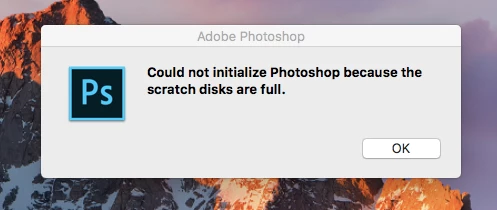
 

{Moderator note: Edited the thread title PS-65057}

Correct answer Mohit Goyal

Hi all,


We're sorry for the scratch disk issue. Take a look at the following troubleshooting article which can help you to resolve the "Scratch disk is full" error: Troubleshoot scratch disk full errors in Photoshop


Please have a look and let us know if that helps.


Thanks,

Mohit

49 replies

Participant
February 25, 2025

Now on the 5th variant of the latest reforming of Photoshop. Happens year after year, sometimes beneficial, sometimes just annoying, but why oh why does every time it update I lose all my presets such as which disks to use as scratch disks?  Buggers my daily routine - I know it is a minor task, but I can live without Photoshop creating minor tasks to interrupt my creative flow, thankyou.


Grrrrr.....

D Fosse
Community Expert
Community Expert
February 25, 2025

@patricktheart 

If you lose your preferences in minor dot updates, something's wrong, like not having full administrator privileges in your user account.


With a major whole-number version update, preferences do not carry over, they never have. There is an option to migrate preferences, but I don't recommend it because of the high risk of accumulated errors carrying over as well.


As for actions, brushes, anything that can be saved out - save out and keep it in a safe place. Then it can always be easily reloaded.

Participant
September 22, 2024
tttt.jpg
Participant
August 30, 2024

this creative cloud driven revised photoshop is starting to look really comparable to the web browser equivelent and potential successor to photoshop imo. gimp is also completly free and runs withought exspansive program disk size needs. adobe needs to remember that this program runs in a partition or fixed storage size . exspanding storage shouldnt effect its startup. cs6 is the exact same program. so maybe i should end my subscription after paying thirdy dollars monthly for the past two years on a eleven year old macbook that still prefourms excelently and has more than enough of a spec list for photo editing in a laptop. an i7 16gb and intel onboard graphics are more than enough for future proofing the creative suite photoshop version - that was better. so im done!

Participant
August 3, 2024

photoshop 7 is so old it fails with that message if your scratch disk is bigger than 1TB.  Nothing you can do but find a smaller disk or upgrade.

Participant
April 19, 2024

This was ages ago but, I've just gone and got a Mac today. I have 450gb storage free and I then Installed photoshop and it came up with "scratch disk full" I then go onto my storage and my storage is full. Why? Why's photoshop using 450gb of storage???

Legend
April 19, 2024

Photoshop likely isn't using 450Gb of scratch space. Go the the Apple menu, About This Mac. Depending on OS version it may have a storage tab or you may have a More Info button that takes you to the Settings app where you can see info about storage. Disk Utility also can give you info.

https://support.apple.com/guide/mac-help/change-storage-settings-mchl3d437fbc/mac

https://support.apple.com/guide/disk-utility/get-detailed-information-about-a-disk-dskutl1005/mac


You can also use an app like OmniDiskSweeper, DaisyDisk, or GrandPerspective to analyze disk usage.

https://www.omnigroup.com/more

https://www.insanelymac.com/blog/best-disk-space-analyzers-mac/


Participant
April 11, 2024

The inches >  pixels helped thank you so much 🙂

Participant
February 22, 2024

i had the same problem when my local disk space left was 5.61GB. After creating more free space now totaling to 11GB, the program was able to open


D Fosse
Community Expert
Community Expert
February 22, 2024

11 GB is still nothing. 11 GB can be gone in seconds. And then you quickly have bigger problems than Photoshop.


You need to think on a whole different level. A bare minimum for Photoshop to work efficiently is 100 GB - but my advice is 250 GB and up. Then you're reasonably safe.


Advanced raster image editing requires huge amounts of memory, much more than any RAM you may have installed. So temporary working data are written to disk, aka scratch disk.


Every history state, for every open document, potentially adds the full starting file size. Smart objects and other advanced functions have additional overhead.


Participant
July 12, 2023

So, as I also had this "Scratch disk Full" error with PhotoShop 7 on Windows10-64bit yesterday, and ALL the given solutions are NOT working, here is mine that works:
The problem isn´t in the presence of a "drive bigger than 1TB", it is due to "drive with more than 1 TB free of space" !
So just make an i.e. \TEMP2 folder on that concerning harddrive, and fill it up with some stuff until the free space is less than ca. 950 GB.
That´s it. Works like a charm for me.

Nancy OShea
Community Expert
Community Expert
July 12, 2023
quote

I also had this "Scratch disk Full" error with PhotoShop 7 on Windows10-64bit.

By @acrobatica

===============

<shaking head> What a sloppy solution!  Just get newer software already. </shaking heading>


The whole point of having a computer with 1 or more TBs of free HD space is improved storage capacity & performance. Compared to current Photoshop (see below), PS7 is an ancient relic.  It's unfit for use with modern equipment. Clinging to aged-out software with half-baked workarounds makes absolutely no sense.  Not when you can do so much more with latest Photoshop + Lightroom for a paltry  $10/month.  🤔 🤔  https://www.adobe.com/creativecloud/photography.html


Nancy O'Shea— Product User & Community Expert
Participant
July 20, 2023

I just solved the problem in a minute, so what ?

Participant
December 28, 2022

I am having this problem too.  When I press option/command to try to move scratch disk to alternative hard drive this comes up and doesn't give me any option to change disk.  Any ideas?  I can't get into PS at all.  I have cleared up a lot of my hard drive but still won't let me in.  Help!   Typically in the middle of some work. so need it to work!

Legend
December 28, 2022

First of all, with only 3.5GB free on your startup drive, your computer could crash. Make sure you have given Photoshop permission to access external drives and definitely clear up space before things go very, very wrong.

Known Participant
July 12, 2023

For some reason Photoshop doesn't even see my two external LaCie drives. So nothing works to help this.


siobhanf11160300
Participant
November 20, 2022

Good Morning, I am starting a new photoshop project & but message comes up saying scratch discs are full?

kind regards


Siobhān Ferguson

D Fosse
Community Expert
Community Expert
November 20, 2022

Please show a screenshot of Edit > Preferences > Scratch disks:


Generally, raster image editing moves massive amounts of data around, much more than any RAM you may have installed. This temporary working data has to go somewhere, so it's written to disk. That's the scratch disk.


For casual work with small files, you can get away with 30 - 50 GB. For serious work, you should have 500 GB - 1 TB.