
kathyv29656185
Participant
March 13, 2023
Answered

P: Photoshop 24.3 Strobes in Black and White when Opening files

  • March 13, 2023
  • 200 replies
  • 504693 views

when attempting to open a photo in Photoshop on my HP Laptop, details below, the photo appears in the layers tab bottom right, but not in the workspace /desktop: It is a constant Black / White strobe. The desktop /workspace flashes Black and white

.
Processor Intel(R) Core(TM) i7-8550U CPU @ 1.80GHz 1.99 GHz
Installed RAM 16.0 GB (15.9 GB usable)

System type 64-bit operating system, x64-based processor

Edition Windows 10 Pro
Version 21H2
Installed on ‎24/‎03/‎2021
OS build 19044.2604
Experience Windows Feature Experience Pack 120.2212.4190.0
Correct answer Ged_Traynor

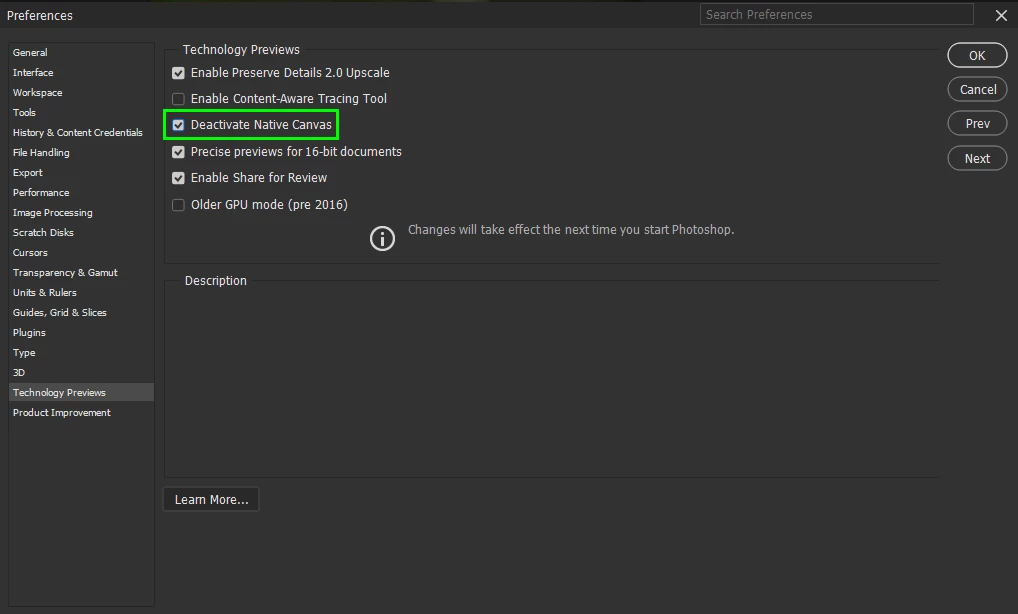
@Elisa29995820fb2q go to Edit > Preferences > Technology Previews and enable this option, then restart Photoshop

200 replies

Participant
March 29, 2023

I need urgent help. After the update to photoshop, my worksheet is constantly black and white. I can't use it. What should I do to fix the situation?

Participant
March 29, 2023

I went through all of the recommended solutions here with an Adobe Chat techie, nothing worked, so we unistalled 24.3 and went back to 24.2.1. It works fine, without strobing. But, Adobe keeps sending me daily messages -- now a week later -- to update to 24.3. I am afraid that will lead to the same problem, unless they have surreptitiously fixed it. I don't want to waste the time to do another install/reinstall. Any thoughts?

Kevin Stohlmeyer
Community Expert
Community Expert
March 29, 2023

@SamDavidPhoto the posted solutions have worked for most everyone else. Can you go to Photoshop Help Menu/System Info and copy/paste details in a reply? Post only once as the system takes time to process the large amount of data. 

Participant
March 29, 2023

Thanks for getting back to me, Kevin. As noted, with the help of Tech
Support I uninstalled 24.3 and went back to 24.2.1. which works perfectly.
He told me to wait for an update to 24.3. Adobe Creative Cloud keeps
sending messages to upgrade to 24.3. Given it doesn't indicate it's an
updated version I don't want to do it if the problem isn't fixed. I don't
have time to go through the uninstall/reinstall process again and keeping
24.3 with a workaround doesn't seem something I want to do.

Sam Ostrow
[removed by moderator]

Participant
March 29, 2023

Phtotoshop Version off the app is 24.3  Windows 10 Home version 21H2 
Als ik een bestand open op mijn laptop (bijv .jpg) opent het bestand niet in mijn documentenvenster maar je ziet dat  venster zwart wit knipperen. In het tabje van de navigator zie ik het bestand je wel. He instalalatie en GPU uitschakelen hilep niet

When I open on my laptop a file .jpg or other picture file. The file does open in the navigator but not in the document window  there you see a blinking white/black screen. All the other (Adobe) programs on the laptop are working good. And also under my account at my standard PC I have no problems. 
Basic steps, open Photoshop, open a .jpg on my laptop. Expected result the documentwindow displays the file I want working.

Ged_Traynor
Community Expert
Community Expert
March 29, 2023

@Fotografie DuinWit go to Edit > Preferences > Technology Previews and enable this option, then restart Photoshop

Participant
March 30, 2023

Funiconou!!!!
Muito Obrigado!!!

March 29, 2023

Hallo, die neuste Version Update von Photoshop funktioniert bei mir nicht, beim öffnen einern Datei erscheint nur eine blitzende weiße Fläche. Wennn ich die Vorgängerversion installiere funktioniert es wieder. Wenn ich das aktuelle Update wiederhole tritt der gleiche Fehler auf.

Ged_Traynor
Community Expert
Community Expert
March 29, 2023

@20992047 enable this option in preferences and restart Photoshop

Participant
March 29, 2023

Adobe Photoshopumda yeni veya herhangi bir dosyayı açmak istediğime dosya beyaz siyah ekran şeklinde pır pır yapıyor ve hiçbir görüntü gelmiyor.


Ged_Traynor
Community Expert
Community Expert
March 29, 2023

@Goxu enable this option in preferences and restart Photoshop

Participant
March 29, 2023

Uploaded jpeg.file will not open in Photoshop 2023 version 243 on my HP Pavillion 15 Notebook PC, Windows 10 Home. Only gets a greyish flashing/blinking, quite disturbing. 

First time in almost twenty years I have this problem and do not have any idea how to solve this.

Grateful if you have a solution...

Ged_Traynor
Community Expert
Community Expert
March 29, 2023

@Agneta291298293c2f enable this option in preferences and restart Photoshop

Participant
March 30, 2023
Thanks! Now it´s working!
Participant
March 28, 2023

Quando tento importar um arquivo no photoshop, ele importa aparentemente da maneira correta e a camada aparece ali normalmente. Porém, a imagem maximizada para eu fazer as edições, não aparece. A tela fica simplesmente piscando, alternando entre uma piscada preta e uma branca. Seguem duas fotos para exemplificar o problema. 

Kevin Stohlmeyer
Community Expert
Community Expert
March 28, 2023

Hi @Mário29121402xin6 Reset your Photoshop preferences manually. Note: Reinstalling/updating does not automatically reset them so you could be installing over bad preference files:
https://helpx.adobe.com/photoshop/using/preferences.html#reset-preferences


Then go to Photoshop Preferences/Technology Preview and check “Disable Native Canvas” and  “Use Older GPU Mode (2016)”. 

Iryna.I
Participant
March 28, 2023

Hello, today I updated Photoshop to version 24.3. When I create a new file, the screen flashes.

Kevin Stohlmeyer
Community Expert
Community Expert
March 28, 2023

Hi @Iryna.I Try resetting your Photoshop preferences manually.
https://helpx.adobe.com/photoshop/using/preferences.html#reset-preferences

If that does not resolve then go to Photoshop Preferences/Technology Preview and check “Disable Native Canvas”. Then check “Use Older GPU Mode (2016)”. 

Participant
March 28, 2023

Hola, que tal! 

He estado teniendo problemas con la versión 24.3 de Photoshop. Después de actualizarla, abró una foto o creo un lienzo en blanco y el espacio donde se debería visualizar la foto o lienzo parpadea en estrobo. Se me hace algo curioso por que el filtro de Camera RAW funciona bien. 

Gracias 

Ged_Traynor
Community Expert
Community Expert
March 28, 2023

@Salvador291206756xb2 enable this option in preferences and restart Photoshop

Participant
March 28, 2023

Merhaba,

Son surum PS kullanıyorum.  jpg uzantılı dosya yukledimimde dosya acılmıyor, beyaz bir ekran yanıp sonuyor ?


kglad
Community Expert
Community Expert
March 28, 2023

open photoshop>edit>preferences>technology preview>check "disable native canvas" restart photoshop


in the future, to find the best place to post your message, use the list here, https://community.adobe.com/


p.s. i don't think the adobe website, and forums in particular, are easy to navigate, so don't spend a lot of time searching that forum list. do your best and we'll move the post if it helps you get responses.


<moved from using the community>