
kathyv29656185
Participant
March 13, 2023
Answered

P: Photoshop 24.3 Strobes in Black and White when Opening files

  • March 13, 2023
  • 200 replies
  • 504693 views

when attempting to open a photo in Photoshop on my HP Laptop, details below, the photo appears in the layers tab bottom right, but not in the workspace /desktop: It is a constant Black / White strobe. The desktop /workspace flashes Black and white

.
Processor Intel(R) Core(TM) i7-8550U CPU @ 1.80GHz 1.99 GHz
Installed RAM 16.0 GB (15.9 GB usable)

System type 64-bit operating system, x64-based processor

Edition Windows 10 Pro
Version 21H2
Installed on ‎24/‎03/‎2021
OS build 19044.2604
Experience Windows Feature Experience Pack 120.2212.4190.0
Correct answer Ged_Traynor

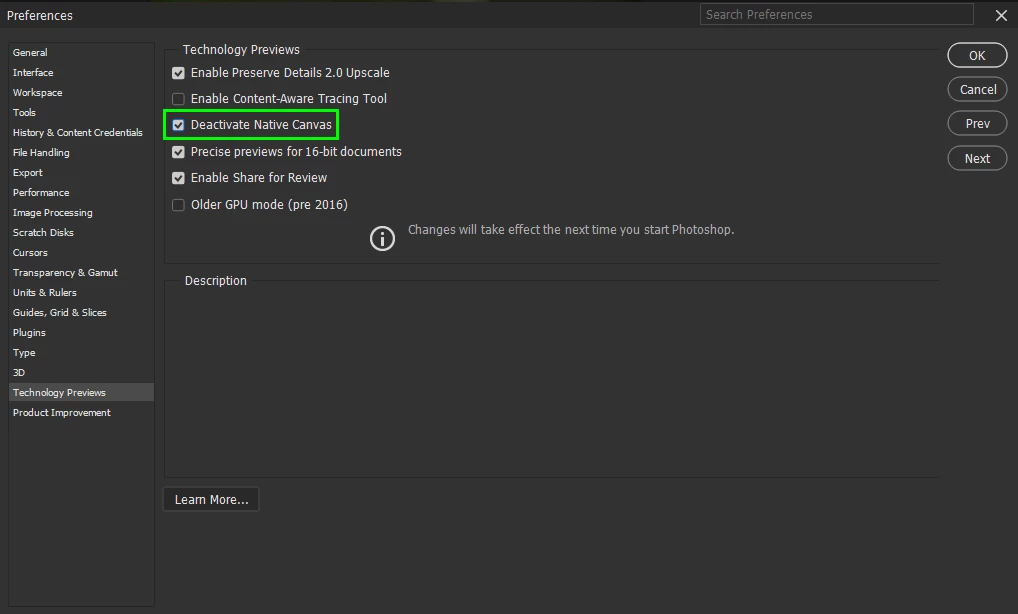
@Elisa29995820fb2q go to Edit > Preferences > Technology Previews and enable this option, then restart Photoshop

200 replies

Duck Man
Participating Frequently
March 28, 2023

Hi Everyone - hope you are all well.

I have a problem. When I open a PSD and or a JPG and or a PSD file in Photoshop the file seems to load OK except that I get a flashing white screen in the Photoshop screen. I can still see Photoshop but cannoth work on any files. This is happening on my main computer only. My laptop with Photoshop is working perfectly. I uninstallled Photoshop from my computer and then re-installed it and still have the same problem. I am sure that I had the graphics card updated about 5 to 6 months ago.

Please can anyone help with this problem. 

Thank you in advance for any help and advice you can give.

Take care out there.

Cheers.

Jeff.

Kevin Stohlmeyer
Community Expert
Community Expert
March 28, 2023

Hi @Duck Man Start by resetting your Photoshop preferences manually. Note: Reinstalling does not automatically reset them so you could be installing over bad preference files:
https://helpx.adobe.com/photoshop/using/preferences.html#reset-preferences

If that does not resolve then go to Photoshop Preferences/Technology Preview and check “Disable Native Canvas”. Then check “Use Older GPU Mode (2016)”. 

Duck Man
Participating Frequently
April 1, 2023

Hi Kevin


Hope you are well.

Thanks so much for your help and advice, I reset all preferances and tried PS but still had the strobing problem so I took your advice and reset the native canvas's and all is working fin now.

Sorry for the delay in replying, just a lot going on at the mo and only just got the chance to sit at my desktop and solve the problem, with yourt advice, Cheers.

Jeff.


Participant
March 28, 2023

PS 2023 won't import or open.  t's just a blinking white screen


Participant
March 28, 2023

Same here...

Participant
March 28, 2023

I had the Photoshop 24.3 version installed, after working fine with it before, one day I couldn't open files nor create new ones as the canvas screen had a very rapid, black and white flashing. I was able to fix it by installing a later version.

Ged_Traynor
Community Expert
Community Expert
March 28, 2023

@M2493821223ne enable this option in preferences and restart Photoshop

Participant
March 28, 2023

No Desktop,  ao abrir qualquer arquivo a tela só fica branca piscando. Achei até que fosse placa de vídeo, mas aí testei com outra placa e continuou e tb no Ilustrator não acontece esse erro. Ou seja, é do PS. Só consegui trabalhar a hora que baixei versões anteriores.

Kevin Stohlmeyer
Community Expert
Community Expert
March 28, 2023

Hi @carla25295823ua44 

Try resetting your Photoshop preferences manually.
https://helpx.adobe.com/photoshop/using/preferences.html#reset-preferences

If that does not resolve then go to Photoshop Preferences/Technology Preview and check “Disable Native Canvas”. Then check “Use Older GPU Mode (2016)”. 

Participant
March 28, 2023

This is a very serious issue - it is not good enough to say sorry. I suffer from photosenitivity and having experienced this issue it has made me sick.  Thankfully the OLD GPU preferences fixes the problem, but such a serious fault should never have occured. It is putting peoples health at risk, it could trigger a epileptic siezure.  Adobe please make sure your users are protected and safe guarded.

kglad
Community Expert
Community Expert
March 28, 2023

@Landii 


these are user-to-user forums.


 for applicable apps, you can make (some) suggestions to adobe here, https://helpx.adobe.com/ie/x-productkb/global/how-to-user-voice.html


for others, use https://www.adobe.com/products/wishform.html

Participant
March 28, 2023

Hello Experts
Tegnap frissítettem a Photoshopot v24.3-ra, azóta bármit megnyitok, a fájlból semmi nem látszik a munkaterületen, csak feketén-fehéren villog. Ha mozgatom az egeret, gyorsabban villog. Hogyan lehet ezt a hibát kijavítani?
Köszönöm

Ged_Traynor
Community Expert
Community Expert
March 28, 2023

@Pozsa Jozsef enable this option in preferences and restart Photoshop

Participant
March 28, 2023

Bonjour

Depuis ce matin lorsque j'ouvre photoshop avec une photo mon ecran "espace de travail ou se trouve la photo" clignote en noir et blanc non stop la photo ne s'intalle pas !!! mon gpu est à jour !!!


que faire ? merci de votre aide 


bien cordialement, Jean-Claude 

Ged_Traynor
Community Expert
Community Expert
March 28, 2023

@J2C enable this option in preferences and restart Photoshop

Participant
March 28, 2023

I foolishly assumed that when Photoshop issued a bug fix it would return the Rulers functionality.  Instead is renders both versions totally non-functional.  Both versions simply reapidly flicker a totally white canvas.


I have tried Editing in Photoshop from within Lightroom.

I have rebooted by pc and opened only Photoshop and then atttempted to open a previously created psd.

I then tried to open a single jpg.


All three attempts ended with a strobe-light effect of the flickering white canvas area.  The tools and menus are visible but no photo.


The has rendered Photoshop as totally non-functional.  It cannot be used for any purpose.


Thanks, Adobe, for the stab in the back during the height of busy season!

kglad
Community Expert
Community Expert
March 28, 2023

open photoshop preferences>technology preview>check "disable native canvas"

restart photoshop


======••=======
in the future, to find the best place to post your message, use the list here, https://community.adobe.com/


p.s. i don't think the adobe website, and forums in particular, are easy to navigate, so don't spend a lot of time searching that forum list. do your best and we'll move the post if it helps you get responses.


<moved from cc desktop bugs>>

visual_multitalent0D44
Participant
March 27, 2023

Estou com Problemas desde da ultima Atualização do PSfotoshop 

quando vou passa a foto ela não a tela fica Piscando em preto e branco, Poderia me ajudar Por Favor

ja tem uns dias que estar assim, não consigo Trabalhar desse jeito que estar

kglad
Community Expert
Community Expert
March 27, 2023

open photoshop preferences>technology preview>check "disable native canvas"

restart photosh


in the future, to find the best place to post your message, use the list here, https://community.adobe.com/


p.s. i don't think the adobe website, and forums in particular, are easy to navigate, so don't spend a lot of time searching that forum list. do your best and we'll move the post if it helps you get responses.


<moved from using the community>

Participant
March 27, 2023