
kathyv29656185
Participant
March 13, 2023
Answered

P: Photoshop 24.3 Strobes in Black and White when Opening files

  • March 13, 2023
  • 200 replies
  • 504695 views

when attempting to open a photo in Photoshop on my HP Laptop, details below, the photo appears in the layers tab bottom right, but not in the workspace /desktop: It is a constant Black / White strobe. The desktop /workspace flashes Black and white

.
Processor Intel(R) Core(TM) i7-8550U CPU @ 1.80GHz 1.99 GHz
Installed RAM 16.0 GB (15.9 GB usable)

System type 64-bit operating system, x64-based processor

Edition Windows 10 Pro
Version 21H2
Installed on ‎24/‎03/‎2021
OS build 19044.2604
Experience Windows Feature Experience Pack 120.2212.4190.0
Correct answer Ged_Traynor

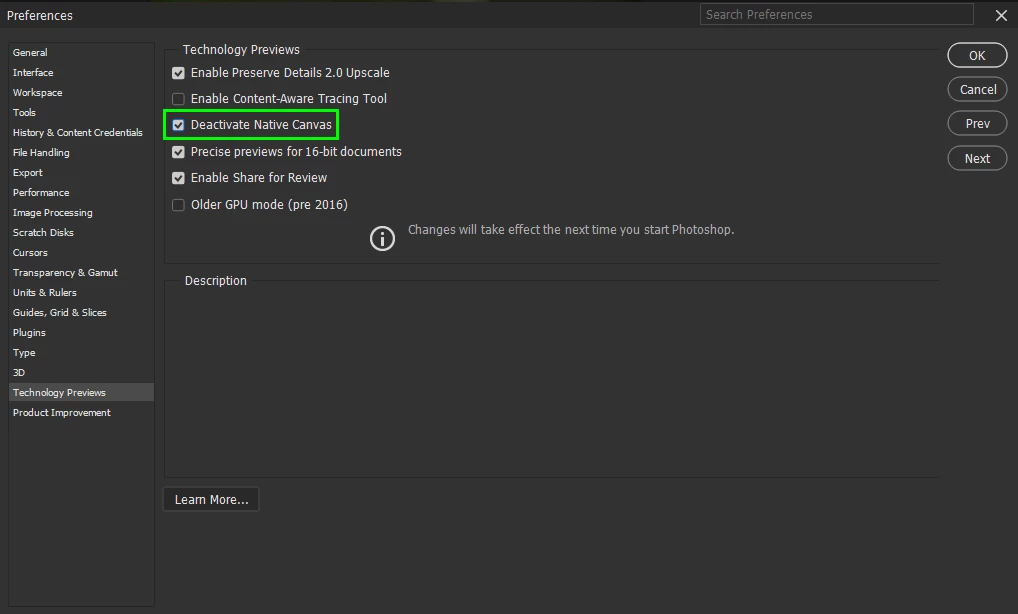
@Elisa29995820fb2q go to Edit > Preferences > Technology Previews and enable this option, then restart Photoshop

200 replies

Participant
March 27, 2023

I recently purchased a subscription to PS 2023. It worked fine until recently. Now I only get black-and-white flashes on the screen when I open or start a project.  How can I fix this?

kglad
Community Expert
Community Expert
March 27, 2023

@DeWitt29102964oowp  @Mnsh1444 


open photoshop preferences>technology preview>check "disable native canvas"

restart photosh

Participant
March 27, 2023

I've just reinstalled Photoshop 2023 for Windows. But now files won't open. They just flash rapidly.

kglad
Community Expert
Community Expert
March 27, 2023

@romneytansley 


open photoshop preferences>technology preview>check "disable native canvas"

restart photosh


in the future, to find the best place to post your message, use the list here, https://community.adobe.com/


p.s. i don't think the adobe website, and forums in particular, are easy to navigate, so don't spend a lot of time searching that forum list. do your best and we'll move the post if it helps you get responses.


<moved from using the community>

Participant
March 27, 2023

I am not sure what's going on, but here goes:

1) Lightroom works great

2) Photoshop was working Thursday

3) I was having wireless mouse issues Thursday evening but resolved it (I think)

4) Friday saw on Adobe Cloud that Photoshop needed an update, so I installed it

5) NOW THE PROBLEM: When I try to open a file in Photoshop, whether it's new file, a file I was able to open Thursday, or a file from Lightroom, it's FLASHING within the file tab a black and white screen! 

I can see the file is trying to open (a thumbnail of it is in the layers tab), but it WON'T open. 

6) all other programs are working fine (I'm on a Dell desktop)


I have tried:

1) restarted my computer

2) unplugged and uninstalled the wireless mouse (temporarily using a USB mouse)

3) uninstalled and reinstalled photoshop 

4) completely turned off my computer and even unplugged it a few minutes, restarted

5) ran Bitdefender for ove 3 hours and no viruses were found


PLEASE HELP! I have clients to edit this week. 

Kevin Stohlmeyer
Community Expert
Community Expert
March 27, 2023

Hi @Heather50B9 Go to Photoshop Preferences/Technology Preview and check “Disable Native Canvas”. Then check “Use Older GPU Mode (2016)”. 

SCM-B-Dock
Participant
March 31, 2023

Kevin,

Ensure this gets to your Adobe Rep.

So Adobe are you just trying to make us sick? I haven't had a black/white flash like that ever. Very very very disturbing.

Technology Previews should be reserved for those being informed and allowed to enable not on by default.

Grow up as a Corporation and steward of software development.

Accessibility was not at your QA for that update rolled out to users. I would be shocked if you weren't sued for such a blantant disregard.

Participant
March 27, 2023

Buenas tardes estimados, mi consulta se debe a que al momento de abrir alguna imagen en Adobe Photoshop, se tilda toda el contenedor de la imagen, haciendo que una pantalla blanca y negra manifiesten este error en constante parpadeo. Quería saber si se trata de un error de actualizaciòn o algo. Desde ya me parece muy inoportuno este error ya que muchos profesionales trabajamos con estos programas como parte de nuestra vida laboral y profesional, y la verdad me desalienta mucho saber que se larguen actualizaciones de este tipo, y no saber si tiene pronta solución o no, ya que si se tratara de una urgencia, esto en algunos àmbitos podría generar grandes perdidas, tanto de recursos, como de oportunidades laborales, clientes e incluso ingresos económicos. Desde ya agradezco su pronta respuesta.

Marcelo

kglad
Community Expert
Community Expert
March 27, 2023

open photoshop>edit>preferences>technology preview>check "disable native canvas" restart photoshop


in the future, to find the best place to post your message, use the list here, https://community.adobe.com/


p.s. i don't think the adobe website, and forums in particular, are easy to navigate, so don't spend a lot of time searching that forum list. do your best and we'll move the post if it helps you get responses.


<moved from using the community bugs>

Participant
March 27, 2023

Ciao a tutti, ho un problema con photoshop con l'ultima versione, come provo ad aprire un file in photoshop mi si apre un foglio bianco che si muove tutto e non riesco ad effettuare nessuna operazione, è un problema dell'aggiornamento? premetto che non uso giornalmente photoshop quindi non si se il problema è di adesso come ha istallato l'ultima versione da qualche giorno o c'è gia da un po...spero che qualcuno mi aiuti, non riesco a mettermi in contatto con l'assistenza di adobe. 


Kevin Stohlmeyer
Community Expert
Community Expert
March 27, 2023

Hi @Ap Foto Go to Photoshop Preferences/Technology Preview and check “Disable Native Canvas”. Then check “Use Older GPU Mode (2016)”.

Participant
March 27, 2023

Hii. 

After the last update in photoshop V24.3 on PC .. when i try to open any decument. it's flashing and can't do any thing or see the content of the file or the artbotd.. what happen?

kglad
Community Expert
Community Expert
March 27, 2023

open photoshop>edit>preferences>technology preview>check "disable native canvas" restart photoshop


in the future, to find the best place to post your message, use the list here, https://community.adobe.com/


p.s. i don't think the adobe website, and forums in particular, are easy to navigate, so don't spend a lot of time searching that forum list. do your best and we'll move the post if it helps you get responses.


<moved from cc desktop bugs>

Participant
March 27, 2023

My protoshop is flickering after update to 24.3....???!'

kglad
Community Expert
Community Expert
March 27, 2023

open photoshop>edit>preferences>technology preview>check "disable native canvas" restart photoshop


in the future, to find the best place to post your message, use the list here, https://community.adobe.com/


p.s. i don't think the adobe website, and forums in particular, are easy to navigate, so don't spend a lot of time searching that forum list. do your best and we'll move the post if it helps you get responses.


<moved from cc desktop bugs>

Participant
March 27, 2023

Seit dem neuesten Update, kann ich keine Dateien bearbeiten, z.B DNG wird nicht erkannt. Auch andere Formate gehen nicht mehr zu öffnen die ich auf meinen Festplatten gespeichert habe.
Am Samstag gfunktionierte Alles ohne Probleme. Kann man keine Fotos mehr speichern wie bisher, speichern in der Cloud oder auf dem PC?

kglad
Community Expert
Community Expert
March 27, 2023

<moved from cc services>

Participant
March 27, 2023

With the new update, after the start Photoshop and start whatever (create new image or open an old to edit), window blinking black and white. Nothing helps...uninstalled and reinstalled Photoshop, restarted my pc...nothing...

See attached file.

Any advice?


Czarek

Participant
March 27, 2023

This worked for me: 
Edit > Preferences > Technology preview, you will find an option labeled as "Deactivate native canvas", check mark it
I hope this help

Participant
March 29, 2023

Thanks a lot! Problem resolved.

Czarek

bernds54142754
Participant
March 27, 2023

Seit dem letzten Update öffnet sich kein Foto mehr, der Bildschirm flackert ständig in weiß.

jane-e
Community Expert
Community Expert
March 27, 2023

@bernds54142754 


Do this: Preferences > Technology Previews > Enable "Deactivate Native Canvas" > Restart Photoshop


Jane