
kathyv29656185
Participant
March 13, 2023
Answered

P: Photoshop 24.3 Strobes in Black and White when Opening files

  • March 13, 2023
  • 200 replies
  • 504697 views

when attempting to open a photo in Photoshop on my HP Laptop, details below, the photo appears in the layers tab bottom right, but not in the workspace /desktop: It is a constant Black / White strobe. The desktop /workspace flashes Black and white

.
Processor Intel(R) Core(TM) i7-8550U CPU @ 1.80GHz 1.99 GHz
Installed RAM 16.0 GB (15.9 GB usable)

System type 64-bit operating system, x64-based processor

Edition Windows 10 Pro
Version 21H2
Installed on ‎24/‎03/‎2021
OS build 19044.2604
Experience Windows Feature Experience Pack 120.2212.4190.0
Correct answer Ged_Traynor

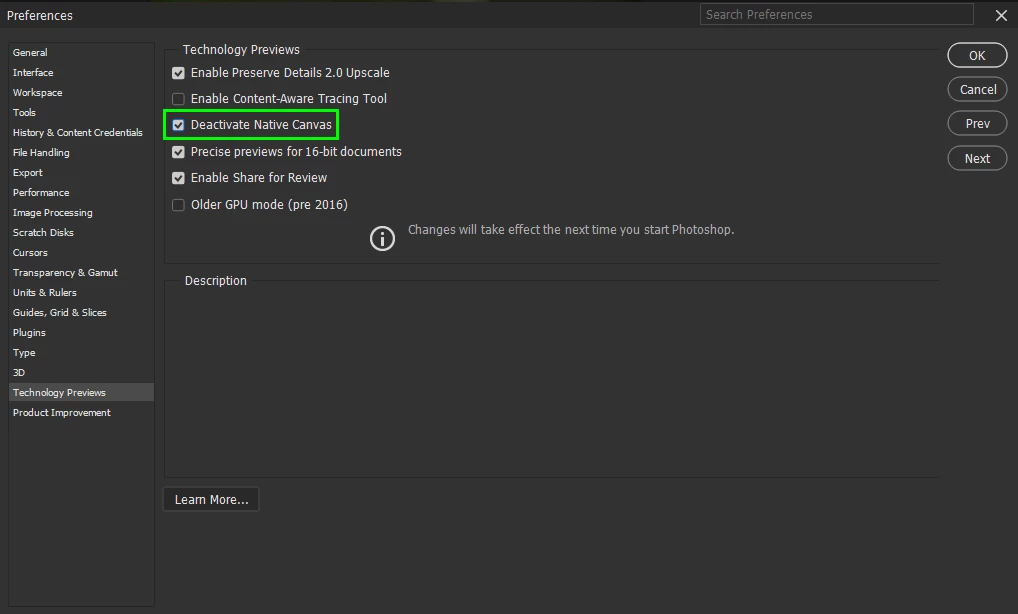
@Elisa29995820fb2q go to Edit > Preferences > Technology Previews and enable this option, then restart Photoshop

200 replies

Participant
March 25, 2023

Since an automatic Photoshop update of today 25/03/2023 I can't open any jpg file I've been using without problems in Photoshop before. All images open with an eternal black and white flicker. I can save the files under another name and the windows image seems correct, but Photoshop is unable to visualize it correctly. And no, the files are not corrupt, they open in any program except Photoshop. Sad quality control.

kglad
Community Expert
Community Expert
March 25, 2023

open photoshop>edit>preferences>technology preview>check "disable native canvas" restart photoshop


in the future, to find the best place to post your message, use the list here, https://community.adobe.com/


p.s. i don't think the adobe website, and forums in particular, are easy to navigate, so don't spend a lot of time searching that forum list. do your best and we'll move the post if it helps you get responses.


<moved from cc desktop bugs>

Participant
March 25, 2023

This fixed the problem which happened out of the blue with Photoshop 2023 two days ago.

Participant
March 25, 2023

Hello,

Look at this message of Pete Green. I had the same problem and  it was resolveld with a simple clic.

"

Apologies for the flashing/strobing you're experiencing when opening files, this tends to affect older graphics cards (GPU) that don't support all of the aspects of DirectX 12. 


  1. The first thing to try would be, enable the Older GPU option in Preferences > Technology Previews > “Use Older GPU Mode (pre 2016)”
  2. If still having trouble, try enabling the "Deactivate Native Canvas" option also in Technology Previews


Regards,

PG"

Participant
March 24, 2023

Gracias, Pete.Green. me funcionó. regards

Participating Frequently
March 24, 2023

Worked for me. Thank you.


Participant
March 24, 2023

Both Pete Green suggestions worked, separately.  Thanks, but I hope you can fix this permanently. It just started a few days ago, so I didn't really like going back to 2016??

kglad
Community Expert
Community Expert
March 24, 2023

ps seems to be having some problems with its mac releases starting with 24.2 requiring rosetta and then the quick update to that with 24.3 which fixed the rosetta issue but triggered a slew of strobe-like problems.

Participating Frequently
March 26, 2023
There is a workaround that works for Windows 10, don't know if it works for
Mac but worth a try
Try this,
In Edit/preferences/Technology previews 1. click Older GPU mode (pre 2016)
2. click Deactivate native canvas.
Worked for me. Worth a try.

Dave T.
Participant
March 24, 2023

Photoshop funktioniert nach heutigem Update auf v 24.3 nicht mehr.
Der Fehler zeigt sich sofort nach öffnen eines Bildes, indem der Bereich des Bildes innerhalb des Photoshop Programmes nur noch hell -Dunkel aufleuchtet, vor diesem Update lief Photoshop einwandfrei.
Kann ich das Update wieder rückgängig machen ?

kglad
Community Expert
Community Expert
March 24, 2023

open photoshop>edit>preferences>technology preview>check "disable native canvas" restart photoshop


=============================================================

in the future, to find the best place to post your message, use the list here, https://community.adobe.com/


p.s. i don't think the adobe website, and forums in particular, are easy to navigate, so don't spend a lot of time searching that forum list. do your best and we'll move the post if it helps you get responses.


<moved from using the community bugs>

Participating Frequently
March 24, 2023

Úlltima actualización de Photoshop v24.3, error al abrir la imagen empieza a parpadear la pantalla

kglad
Community Expert
Community Expert
March 24, 2023

open photoshop>edit>preferences>technology preview>check "disable native canvas" restart photoshop


<moved from cc desktop bugs>

Participating Frequently
March 24, 2023

Muchas gracias y muy util la información, problema resuelto

Participant
March 24, 2023

Preferences > Technology Previews > "Deactivate Native Canvas.

Participant
March 24, 2023

I have recently installed the latest Photosop and image files are no longer opening. This has been replced with a white flashing screen. Please advise.

kglad
Community Expert
Community Expert
March 24, 2023

with ps v24.2, open photoshop>edit>preferences>technology preview>check "disable native canvas" restart photoshop


or use ps v24.3


=======================================================

in the future, to find the best place to post your message, use the list here, https://community.adobe.com/


p.s. i don't think the adobe website, and forums in particular, are easy to navigate, so don't spend a lot of time searching that forum list. do your best and we'll move the post if it helps you get responses.


<moved from cc desktop bugs>