
kathyv29656185
Participant
March 13, 2023
Answered

P: Photoshop 24.3 Strobes in Black and White when Opening files

  • March 13, 2023
  • 200 replies
  • 504702 views

when attempting to open a photo in Photoshop on my HP Laptop, details below, the photo appears in the layers tab bottom right, but not in the workspace /desktop: It is a constant Black / White strobe. The desktop /workspace flashes Black and white

.
Processor Intel(R) Core(TM) i7-8550U CPU @ 1.80GHz 1.99 GHz
Installed RAM 16.0 GB (15.9 GB usable)

System type 64-bit operating system, x64-based processor

Edition Windows 10 Pro
Version 21H2
Installed on ‎24/‎03/‎2021
OS build 19044.2604
Experience Windows Feature Experience Pack 120.2212.4190.0
Correct answer Ged_Traynor

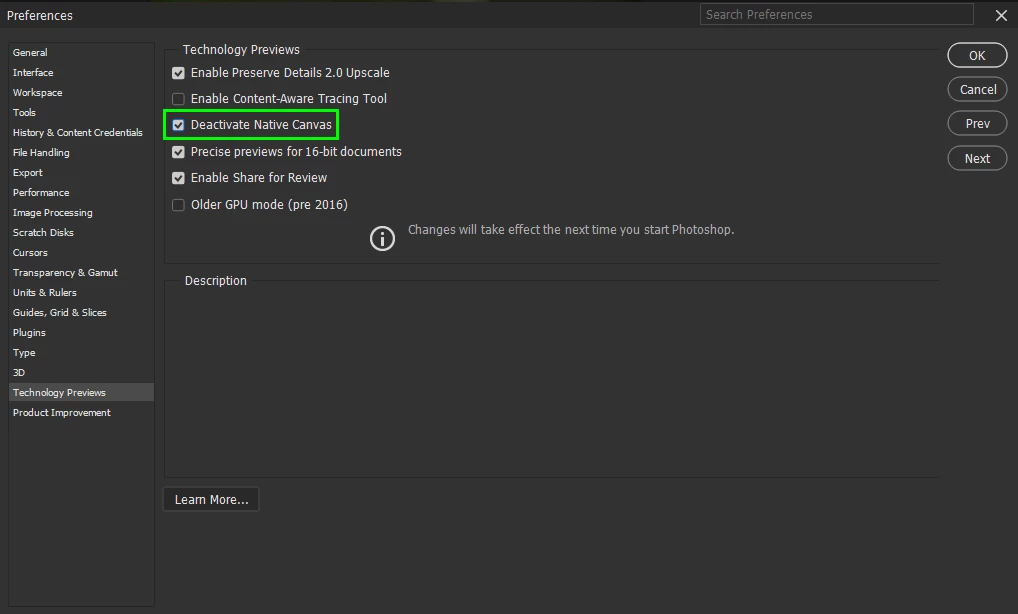
@Elisa29995820fb2q go to Edit > Preferences > Technology Previews and enable this option, then restart Photoshop

200 replies

Ruyblas
Participating Frequently
March 24, 2023

Bonjour à tous,

Plusieurs bugs :

Adobe Ps 2023 ( (24.3.0) :
1- Impossible d'ouvrir fichier  ou créer nouveau  fichier . Un clignotement blanc apparaît. Désinstallation dans Programmes et fonctionnalités et réinstallation mise à jour dans AdobeCC ne règlent pas le problème.
2- Règles des  pixels (px, cm, pouces, etc.) n'apparaît pas malgré la case cochée Affichage des règles (problème identifié dans version précédente de Adobe Ps 2023, avant dernière mise à jour qui ne fonctionne pas)

Adobe Ps 2022 ( (23.5.5)) :

1- Pastille rouge (indication de la dureté) du pinceau, du tampon, etc. n'apparaît plus


Merci pour l'assistance et la résolution de ces bugs 
Cordialement

jane-e
Community Expert
Community Expert
March 24, 2023
Unable to open file or create new  file . A white flashing appears
By @Ruyblas


Try this: Preferences > Technology Previews > "Deactivate Native Canvas"


Jane


Ruyblas
Participating Frequently
March 24, 2023
Hello Jane,

Thank you for your answer.
I follow your instructio. It's OK.

Bernard

[image: image.png]
Participant
March 24, 2023

Good day. 


I installed the latest PhotoShop updates yesterday, ver 24.3  

Ever since I did this, as soon as I open an image in any format even PDF, the screen starts to flash black and white. Note this only happens in the block where the image is meant to appear, the rest of the screen is fine. I can even see my tools for PS, just not the image I need to work on. 

Participant
March 24, 2023

Good morning!
I'm going through the same problem!

Participant
March 24, 2023

Bonjour,

J'ai Windows 10.

J'ai suivi le conseil de PG et ça fonctionne bien à nouveau.

JP

Participant
March 24, 2023

     I have Photoshop 24.3.0 installed on the two similar desktops I have, one in each of the two different cities in which I live and work.  Both run Windows 10 and NVidia GTX 750 TI video cards connected with three monitors.  A Windows 10 update occurred recently as did the installation of Photoshop 24.34.0.

     I arrived last night in City 2 and loaded Photoshop to edit some images.  The screen opened clear white, and then began blinking back and forth between black and white like a strope lamp.  I restarted my computer and the problem persisted.  I checked the video card by opening pages on the Internet and running videos —everything normal.
     Today, Day Two, Photoshop remains unchanged and inoperable.  I uninstalled and reinstalled it — no improvement.

     Is it a glitch from Microsoft or from Adobe?  Has anyone else had a similar problem?

Participant
March 24, 2023

I have same problem. Dear Adobe, please fix it as soon as possible. 

Participant
March 24, 2023

After installing the latest update 24.3 on my PC, when I open an image file (TIFF or jpg) it displays as a flashing white image, see attached.  is anyone else having this issue after the latest update. how to fix this? 

any help much appreciated.  tks

Bojan Živković11378569
Community Expert
Community Expert
March 24, 2023
Participant
March 24, 2023

still not working for me even after the updates - on 24.3.0

Inspiring
March 23, 2023

HO FATTO L'AGGIORNAMENTO IERI SERA E DOPO AVER RIAVVIATO, IL PROGRAMMA NON VEDE PIù LE FOTOGRAFIE E LO SCHERMO LAMPEGGIA BIANCO A INTERMITTENZA, E DOPO QUALCHE SECONDO IL PROGRAMMA SI AUTO CHIUDE. SISTEMA WINDOWS 10 PRO

TheDigitalDog
Inspiring
March 23, 2023
Author “Color Management for Photographers" & "Photoshop CC Color Management/pluralsight"
Participant
March 23, 2023

Mam problem z otwieraniem i tworzeniem plików w photoshopie. Kiedy próbuję otworzyć stary plik to wyświetla się czysty biały ekran, który nie ma krawędzi, tak jakby żadnego pliku tam nie było a na podglądzie dokładnie widać  jaka praca sie tam znajduje.( zdjęcie 1) Ponadto kiedy próbuję  stworzyć nowy plik to żadne narzędzie nie działa  ale widzę, że kiedy ich używam tworzą się nowe warstwy. Odinstalowanie i zainstalowanie programu nic nie zmieniło.

Kevin Stohlmeyer
Community Expert
Community Expert
March 23, 2023

HI @Julka29035930dhy5  Go to Photoshop Preferences/Technology Preview and check “Disable Native Canvas”. Then check “Use Older GPU Mode (2016)”. 

Fabio Andriolo
Participating Frequently
March 23, 2023
Until today I managed to live without the rules that the penultimate Photoshop update caused. 
Today I did the last update and when I open any file in Photoshop my monitor blinks non-stop as in a stroboscopic effect.


Ged_Traynor
Community Expert
Community Expert
March 23, 2023

@Fabio Andriolo enable this option in preferences and restart Photoshop

Participant
March 23, 2023

I cant use photoshop since thursday, everythime i try to open anything the ps screen will go turn on and off

Ged_Traynor
Community Expert
Community Expert
March 23, 2023

@Mar____tina enable this option in preferences and restart Photoshop