
kathyv29656185
Participant
March 13, 2023
Answered

P: Photoshop 24.3 Strobes in Black and White when Opening files

  • March 13, 2023
  • 200 replies
  • 504683 views

when attempting to open a photo in Photoshop on my HP Laptop, details below, the photo appears in the layers tab bottom right, but not in the workspace /desktop: It is a constant Black / White strobe. The desktop /workspace flashes Black and white

.
Processor Intel(R) Core(TM) i7-8550U CPU @ 1.80GHz 1.99 GHz
Installed RAM 16.0 GB (15.9 GB usable)

System type 64-bit operating system, x64-based processor

Edition Windows 10 Pro
Version 21H2
Installed on ‎24/‎03/‎2021
OS build 19044.2604
Experience Windows Feature Experience Pack 120.2212.4190.0
Correct answer Ged_Traynor

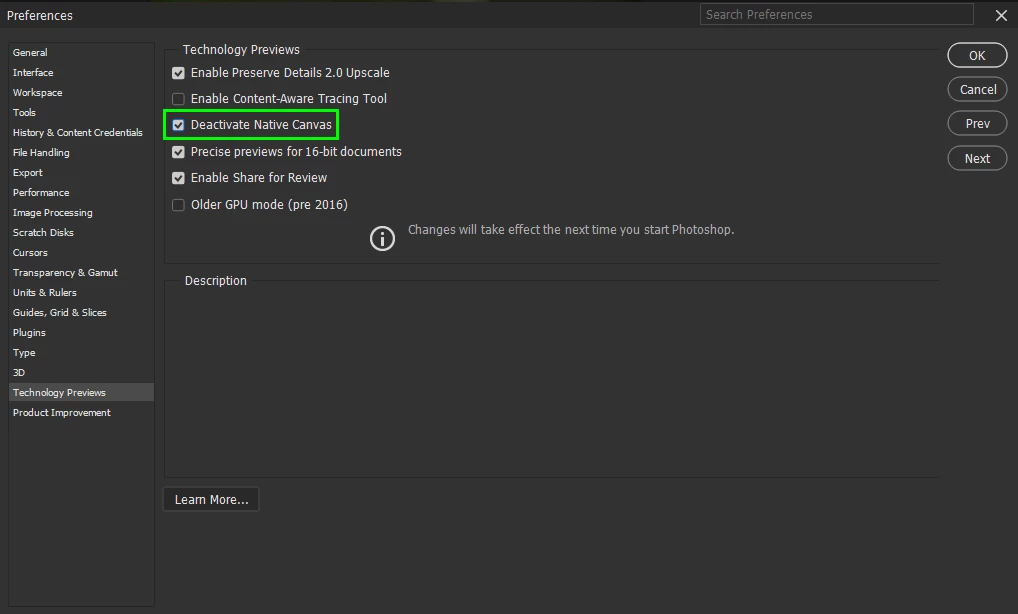
@Elisa29995820fb2q go to Edit > Preferences > Technology Previews and enable this option, then restart Photoshop

200 replies

Participant
April 20, 2023

Hi, I've updated photoshop and when I open an image it's just flashing like a strobe light, no image is appearing. 

Is there a fix for this? I've uninstalled and re-installed and stil the same thing. I've had to go back to the previous version which work fine. 

v. 24.4.1 

Windows 10


kglad
Community Expert
Community Expert
April 20, 2023

open photoshop preferences>technology preview>check "disable native canvas"

restart photoshop


in the future, to find the best place to post your message, use the list here, https://community.adobe.com/


p.s. i don't think the adobe website, and forums in particular, are easy to navigate, so don't spend a lot of time searching that forum list. do your best and we'll move the post if it helps you get responses.


<moved from using the community>

Participant
April 21, 2023

Thanks for your help and advice! Much apreciated.

Participant
April 20, 2023

Prior to Photoshop 24.3 all was well, after 24.3 and 24.4 the program starts fine, but when a new page is created or a image file is opened the tab screen continuously flashes and will eventually go black. The recent page shows the image that was opened correctly, but will not display in the tab frame.


I am using a Win10 22H2 computer with the most recent Nvidia drivers.

Participant
April 21, 2023

Hola, yo tengo el mismo problema, quiero ingresar y la pestaña empieza a parpadear y no me permite trabajar sobre la misma. Lo desintale e instale y el problema persiste.

Participant
April 20, 2023

Just wanted to say Thank You.  Got my HP 440 with P4000 GPU working again with PhotoShop. 

Participant
April 19, 2023

I haven't used Photoshop in a few weeks, but there have been CC updates in the meantime. When I opened a file tonight, a flashing blank white screen appeared, like a strobe light. I tried opening other recent files, with the same result. The actual file doesn't open—it's just the strobe light thing. Any idea what's going on? I'm using Windows 10 with the latest version of Photoshop CC. Thanks.

Jeff Arola
Community Expert
Community Expert
April 19, 2023

In photoshop go to Edit>Preferences > Technology Previews and check Disable Native Canvas, then restart Photoshop

Adobe Employee
April 18, 2023

Apologies for the experience. This was a known issue with the Photoshop 2023 version.
You can try to use the older GPU mode from the Edit > Preferences > Technology Previews > Check Older GPU mode (Pre 2016).

Participant
April 18, 2023

Bonjour,

Impossible d'ouvrir les photos avec Photoshop, l'écran clignote avec un message (joint), pouvez vous m'aidé à résoudre ce problème. 

D'avance merci pour une réponse

Bien cordialement

Participant
April 17, 2023

Al intenrar abrir una imagen, esta no carga y la pantalla se queda parpadeando/titilando, a alguien mas le sucede lo mismo, alguien me puede ayudar?

Participant
April 17, 2023

Screen flickers after updating

Neural filter gives error regarding graphics card driver

CShubert
Community Manager
Community Manager
April 17, 2023

Hi @Krishna09071951 


Go to Preferences > Technology Previews... and check "Disable Native Canvas" - then restart Photoshop. Does the problem still occur? 


Participant
April 16, 2023

Photoshop開啟檔案後出現閃爍畫面


出現黑白閃爍畫面


使用Camer raw 畫面又正常


Jeff Arola
Community Expert
Community Expert
April 16, 2023

In photoshop go to Edit > Preferences > Technology Previews and enable Deactivate Native Canvas, then restart Photoshop

CSO1809
Participant
April 15, 2023

Quando abro um arquivo com a opção "gráficos do processador" ativada, a tela de pintura fica piscando rapidamente. Alterando entre uma tela preto e branco, me impossibilitanto de fazer qualquer coisa, inclusive podendo ser um risco para pessoas com epilepsia fotossensível. Já atualizei o windows, o driver da placa de vídeo, mas até agora não teve atualização do photoshop, por isso desconfio fortemente que esse bug seja do programa. Já até reinstalei, mas não resolveu. Por favor corrijam logo isso pois trabalhar com a opção "gráficos do processador" desativada atrapalha bastante.

Jeff Arola
Community Expert
Community Expert
April 16, 2023

In photoshop go to Edit > Preferences > Technology Previews and enable Deactivate Native Canvas, then restart Photoshop


Then try to enable Graphics Processor and restart photoshop.