
kathyv29656185
Participant
March 13, 2023
Answered

P: Photoshop 24.3 Strobes in Black and White when Opening files

  • March 13, 2023
  • 200 replies
  • 504684 views

when attempting to open a photo in Photoshop on my HP Laptop, details below, the photo appears in the layers tab bottom right, but not in the workspace /desktop: It is a constant Black / White strobe. The desktop /workspace flashes Black and white

.
Processor Intel(R) Core(TM) i7-8550U CPU @ 1.80GHz 1.99 GHz
Installed RAM 16.0 GB (15.9 GB usable)

System type 64-bit operating system, x64-based processor

Edition Windows 10 Pro
Version 21H2
Installed on ‎24/‎03/‎2021
OS build 19044.2604
Experience Windows Feature Experience Pack 120.2212.4190.0
Correct answer Ged_Traynor

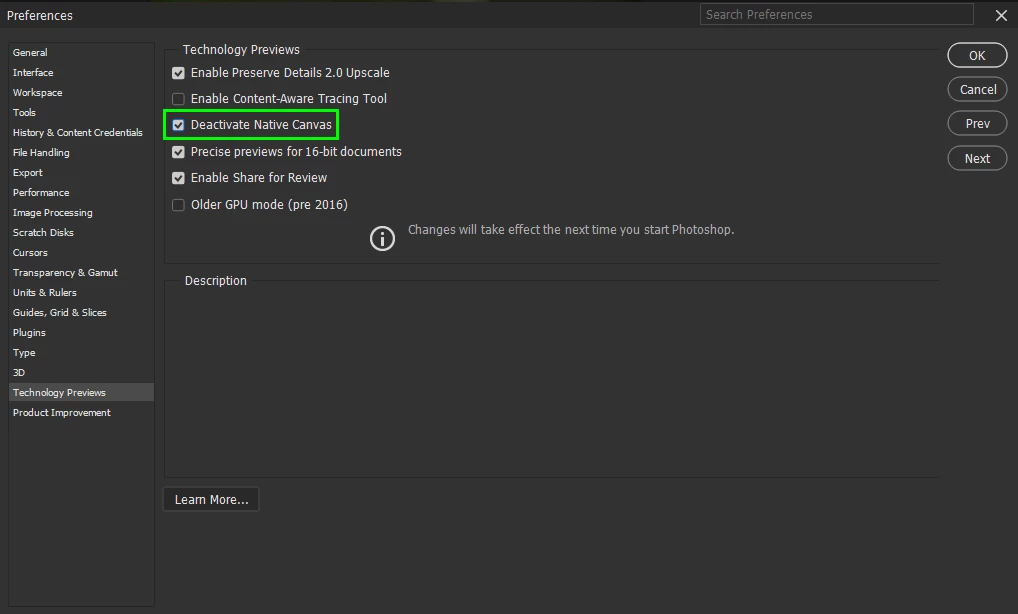
@Elisa29995820fb2q go to Edit > Preferences > Technology Previews and enable this option, then restart Photoshop

200 replies

Participant
April 14, 2023

Thank you

juliaf55800402
Participant
April 17, 2023

I had the issue, i have a nvida geoforce gtx 660 graohics card, checking both settings fixed it for me

juliaf55800402
Participant
April 17, 2023

FYI my graphics card is supposed to support directX runtime 12

NB, colourmanagement
Community Expert
Community Expert
April 14, 2023

@Ümit294044469ceu or try this

Pete.Green

Adobe Employee Mar 22, 2023

Copy link to clipboard


Hi All,


Apologies for the flashing/strobing you're experiencing when opening files, this tends to affect older graphics cards (GPU) that don't support all of the aspects of DirectX 12.


For Windows:

  1. Enable the Older GPU Mode option in Preferences > Technology Previews > “Use Older GPU Mode (pre 2016)"
  2. Check if there's a GPU driver update available and update if so


For macOS:

  1. Update to a newer or latest macOS version (to update the GPU driver which accompanies macOS updates)
  2. Uncheck "Automatic graphics switching" found in System Preferences > Battery > Battery


If you're still having issues after trying these troubleshooting steps, the next recommendation would be to look into updating your graphics card (GPU) to something a bit more modern.


Regards,

PG


https://community.adobe.com/t5/photoshop-ecosystem-discussions/p-photoshop-strobes-black-and-white-when-attempting-to-open-a-photo-in-24-3/m-p/13671396/page/5#M717961


I hope this helps
neil barstow, colourmanagement net - adobe forum volunteer - co-author: 'getting colour right'
google me "neil barstow colourmanagement" for lots of free articles on colour management

Participant
April 14, 2023

When Photoshop tries to open a default file, the screen flashes in black and white, the drivers are up to date, the application is up to date, I couldn't solve the problem, I would appreciate your help.

AxelMatt
Community Expert
Community Expert
April 14, 2023

Goto to "Preferences" > "Technology Previews" and enabling "Deactivate Native Canvas".

Restart Photoshop and check.


My System: Intel i7-8700K - 64GB RAM - NVidia Geforce RTX 3060 - Windows 11 Pro 25H2 -- LR-Classic 15 - Photoshop 27 - Nik Collection 8 - PureRAW 5 - Topaz Photo
Participant
April 14, 2023

la pantalla del archivo abierto me parpadeaba y no me dejaba hacer nada ...

por si a alguien le sirve lo resolvi deshabilitando usar procesador grafico en preferencias/rendimiento ...

Participating Frequently
April 12, 2023

Hello, my name is Willys, I'm from Brazil and today, 04/11/2023, I went to open photoshop to scan an illustration, it opened normally, but the desktop keeps blinking non-stop and I can't work.


I've uninstalled and reinstalled, restarted the computer and nothing works.


Last time I used it, it worked fine.


Another thing is that I went to check my workspaces that I had saved and they were all gone (perhaps because I had uninstalled and reinstalled photoshop?) which makes no sense, because if once configured and saved this cannot happen.


Can anyone tell me what's going on?


 I got this help response:

open photoshop>edit>preferences>technology preview>check "disable native canvas"

then restart photoshop


and responded after executing the guidance tip:

Hello, thanks for the help. I followed the guidelines, "disable native canvas", but it was already disabled and did not return to normal. This never happened, could it be another problem?


Unfortunately I haven't been able to solve it yet and I need it to be able to study, because I'm stopped. Does anyone else know what could be going on?

TheDigitalDog
Inspiring
April 12, 2023

Next thing to try: in Preferences > Technology Previews > “Use Older GPU Mode (pre 2016); better? 

Author “Color Management for Photographers" & "Photoshop CC Color Management/pluralsight"
barrys13891719
Participating Frequently
April 12, 2023

I have issues with creating new files or opening existing files because I get only a very flashing white background. I have reinstalled my build with the latest one and I can't make this work. Could anyone please help with any info? Really appreciated!

NB, colourmanagement
Community Expert
Community Expert
April 12, 2023

@barrys13891719 

check this thread: 

https://community.adobe.com/t5/photoshop-ecosystem-discussions/p-photoshop-strobes-black-and-white-when-attempting-to-open-a-photo-in-24-3/m-p/13671396/page/5#M717961


there's a successful solution there from

Pete. Green

Adobe Employee Mar 22, 2023


Hi All,


Apologies for the flashing/strobing you're experiencing when opening files, this tends to affect older graphics cards (GPU) that don't support all of the aspects of DirectX 12.


For Windows:

  1. Enable the Older GPU Mode option in Preferences > Technology Previews > “Use Older GPU Mode (pre 2016)"
  2. Check if there's a GPU driver update available and update if so


For macOS:

  1. Update to a newer or latest macOS version (to update the GPU driver which accompanies macOS updates)
  2. Uncheck "Automatic graphics switching" found in System Preferences > Battery > Battery


If you're still having issues after trying these troubleshooting steps, the next recommendation would be to look into updating your graphics card (GPU) to something a bit more modern.


Regards,

PG


I hope this helps
neil barstow, colourmanagement net - adobe forum volunteer - co-author: 'getting colour right'
google me "neil barstow colourmanagement" for lots of free articles on colour management

barrys13891719
Participating Frequently
April 12, 2023

Thank you for your quick help! It worked!!

Participant
April 11, 2023

Hi, when I attempt to open an old photo or create a new image on clipboard the screen flashes in a blinding white strobe like manner. It's impossible to see or do anything.  Can anyone help?  Cheers, Alice

kglad
Community Expert
Community Expert
April 11, 2023

open photoshop>edit>preferences>technology preview>check "disable native canvas"

then restart photoshop


<moved from enterprise&teams>

Participant
April 11, 2023

Hello!


For some reason, I haven't been able to open my RAF. Every time I try the screen starts flickering in black and white. After that, it just happens with any file (JPG, DNG, RAF)


Does anyone know the reason?

Thank you all!

Bojan Živković11378569
Community Expert
Community Expert
April 11, 2023

Try to check Preferences > Technology Previews > Deactivate Native Canvas. If thats not enough check Older GPU mode (pre 2016). Always restart Photoshop.

Participating Frequently
April 11, 2023

It's been a few weeks since I have worked on photos in Lr on this laptop PC.  I tried to export one and when I export I call for Photoshop to add a border.  Very routine and I've done it for years.  But this time, when Ps tried to open the image after it had been exported, the screen went black, and then started flashing black white black white black white like a strobe light.  The speed varied.  Ultimately I closed the image and selected an older image to which I had done the same export routine:  Export, have Ps open automatically, add a border, close and save.  But with the older image among the grid of Recently Worked On, the same think happened.  I went to my Creative Cloud, and it tells me that my version 24.3.0 is up-to-date.  Any ideas what is happening?

Peru Bob
Community Expert
Community Expert
April 11, 2023

Preferences > Technology Previews > Deactivate Native Canvas

Participant
April 10, 2023

Bonjour,

Je veux ouvrir une photo sur PS et celle-ci se charge mais rien ne s'affiche. Le dossier est blanc et clignotte sans jamais voir le contenu de la photo !! quelqu'un a t-il une idée de ce qui se passe ?

merci à vous

Ranjisha Sengupta
Legend
April 10, 2023

Hi @Martial24526147mm6q 


Thanks for your patience.

Please Go to Preferences > Technology Previews... and check "Disable Native Canvas" - then restart Photoshop.

Does the problem still occur? 

We have investigated the error, and it has also been found reproducible on our end. This is acknowledged, and currently, workarounds to this are available in this discussion: https://community.adobe.com/t5/photoshop-ecosystem-discussions/p-photoshop-strobes-black-and-white-when-attempting-to-open-a-photo-in-24-3/td-p/13648622.


Best,

Ranjisha