
kathyv29656185
Participant
March 13, 2023
Answered

P: Photoshop 24.3 Strobes in Black and White when Opening files

  • March 13, 2023
  • 200 replies
  • 504683 views

when attempting to open a photo in Photoshop on my HP Laptop, details below, the photo appears in the layers tab bottom right, but not in the workspace /desktop: It is a constant Black / White strobe. The desktop /workspace flashes Black and white

.
Processor Intel(R) Core(TM) i7-8550U CPU @ 1.80GHz 1.99 GHz
Installed RAM 16.0 GB (15.9 GB usable)

System type 64-bit operating system, x64-based processor

Edition Windows 10 Pro
Version 21H2
Installed on ‎24/‎03/‎2021
OS build 19044.2604
Experience Windows Feature Experience Pack 120.2212.4190.0
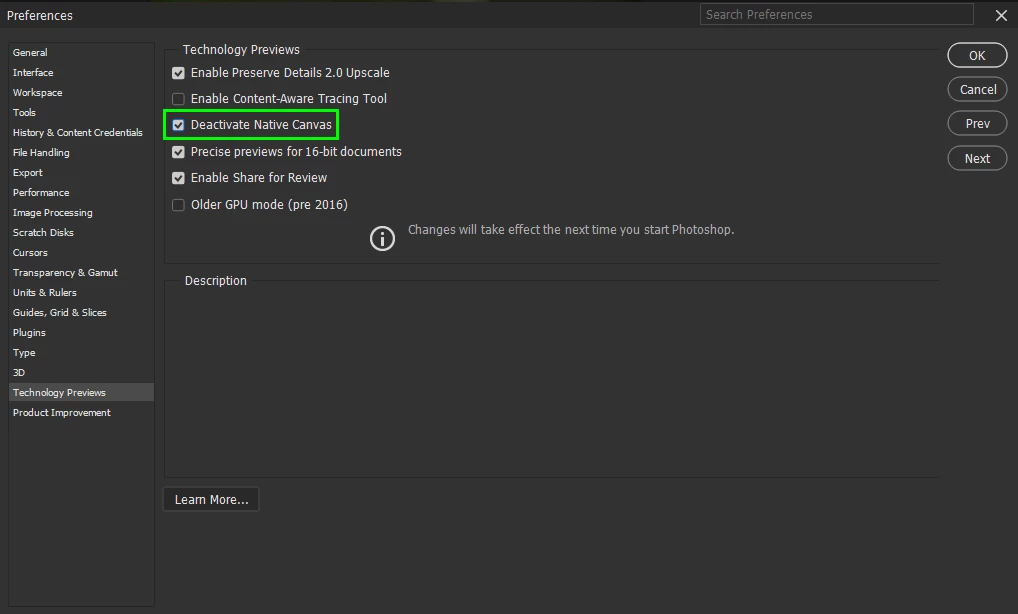
Correct answer Ged_Traynor

@Elisa29995820fb2q go to Edit > Preferences > Technology Previews and enable this option, then restart Photoshop

200 replies

Participant
March 23, 2023

Fiz atualização do photoshop e a tela fica piscando diretamente. Dessa forma não permite a utilização do programa. O que devo fazer?

kglad
Community Expert
Community Expert
March 23, 2023

open photoshop preferences>technology preview>check "disable native canvas"

restart photoshop


===================================

in the future, to find the best place to post your message, use the list here, https://community.adobe.com/


p.s. i don't think the adobe website, and forums in particular, are easy to navigate, so don't spend a lot of time searching that forum list. do your best and we'll move the post if it helps you get responses.


<moved from using the community bugs>

Participant
March 26, 2023

Excellent!! It worked for me!


March 23, 2023

Hallo lezer,


Vanmorgen kreeg ik een update van adobe Photoshop cc, en bij het openen van dit kreeg  een wit knipperde beeld scherm? wat moet ik doen.

Dit is ook bij Beta (Photoshop) https://henkstraatman.myportfolio.com/adobe-photoshop 


Ged_Traynor
Community Expert
Community Expert
March 23, 2023

@11780078 enable this option in preferences and restart Photoshop

guy goffeh16756908
Participant
March 23, 2023

I updated to Photoshop 24.3. Now the work-area flashes (black and white) when I Ioad an images. Can't see any images.


Participant
March 23, 2023

I am in the same situation.

HELP!!!!!!!

kglad
Community Expert
Community Expert
March 23, 2023

@guy goffeh16756908 @Luigi29028771jvyc 


open photoshop preferences>technology preview>check "disable native canvas"

restart photoshop

Participant
March 23, 2023

Seit dem heutigen update kann ich kein Foto mehr laden, es flackert der Bildschirm!! Was tun?

Ranjisha Sengupta
Legend
March 23, 2023

Hi @dagmar29027550ka4q 


Thanks for your patience. We have investigated the error, and it has also been found reproducible on our end. This is acknowledged and will be worked on by developers in future updates. Currently, workarounds to this are available on the Adobe Community Forums. Please check this discussion and please upvote https://community.adobe.com/t5/photoshop-ecosystem-discussions/p-photoshop-strobes-black-and-white-w...


Best,

Ranjisha

Participating Frequently
March 23, 2023

Hi

no possibility to open the files and files .psd on windows 10 with the new version that I load the 22 March

thanks to have a return

Ged_Traynor
Community Expert
Community Expert
March 23, 2023

@cortesi290265365bl7 what exactly happens when you try to open files

Participant
March 23, 2023

PS Just updated to 24.3 and when PS opens file , flashes the screen. Every file does the same. Any Help? Thanks

Ged_Traynor
Community Expert
Community Expert
March 23, 2023

@Giannis F enable this option in preferences and restart Photoshop

Participant
March 23, 2023

waste of time. none of this works and now I have a program that is totally useless and I am paying for it. Time Adobe got its finger out and rectified this error.

kglad
Community Expert
Community Expert
March 23, 2023

@Beermeupscotty, did you:


update your graphic's drivers?

open photoshop preferences>technology preview>check "disable native canvas"?

restart photoshop


Known Participant
April 21, 2023

Yess ! Thank You !

torgnye79790414
Participant
March 23, 2023

Impossible to open picture in Photoshop after update, 

Working area flashing


Ranjisha Sengupta
Legend
March 23, 2023

Hi @torgnye79790414 


Thanks for reporting this.

We have seen similar issues reported by other users. Are you on Windows or macOS? 

Please enable this option in preferences and restart Photoshop

This issue is acknowledged and will be worked on by developers in future updates. Currently, workarounds to this are available on the Adobe Community Forums. Please check this discussion and please upvote: https://community.adobe.com/t5/photoshop-ecosystem-discussions/p-photoshop-strobes-black-and-white-when-attempting-to-open-a-photo/td-p/13648622/page/5


Best,

Ranjisha

Known Participant
April 21, 2023

Yess, it is !

Pete.Green
Community Manager
Community Manager
March 22, 2023

Hi All,


Apologies for the flashing/strobing you're experiencing when opening files, this tends to affect older graphics cards (GPU) that don't support all of the aspects of DirectX 12.


For Windows:

  1. Update Photoshop to version 24.5 or later
  2. Enable the Older GPU Mode option in Preferences > Technology Previews > “Use Older GPU Mode (pre 2016)"
  3. Check if there's a GPU driver update available and update if so


For macOS:

  1. Update Photoshop to version 24.5 or later
  2. Update to a newer or latest macOS version (to update the GPU driver which accompanies macOS updates)
  3. Uncheck "Automatic graphics switching" found in System Preferences > Battery > Battery


If you're still having issues after trying these troubleshooting steps, the next recommendation would be to look into updating your graphics card (GPU) to something a bit more modern.


Regards,

PG


[steps edited to provide clarity per OS]

Inspiring
March 23, 2023

Was having same problem (flashing strobe) when trying to open a pic (after download and install of latest update to ps).  Enabled "older gpu mode" per instruction in reply by PG.  It worked!  Thankyou PG.

barrys1618002
Participating Frequently
March 22, 2023
There have been several posts regarding this problem. For me, on Win 10, I simply reverted to the previous version and all was fine.

Barry