
kathyv29656185
Participant
March 13, 2023
Answered

P: Photoshop 24.3 Strobes in Black and White when Opening files

  • March 13, 2023
  • 200 replies
  • 504683 views

when attempting to open a photo in Photoshop on my HP Laptop, details below, the photo appears in the layers tab bottom right, but not in the workspace /desktop: It is a constant Black / White strobe. The desktop /workspace flashes Black and white

.
Processor Intel(R) Core(TM) i7-8550U CPU @ 1.80GHz 1.99 GHz
Installed RAM 16.0 GB (15.9 GB usable)

System type 64-bit operating system, x64-based processor

Edition Windows 10 Pro
Version 21H2
Installed on ‎24/‎03/‎2021
OS build 19044.2604
Experience Windows Feature Experience Pack 120.2212.4190.0
Correct answer Ged_Traynor

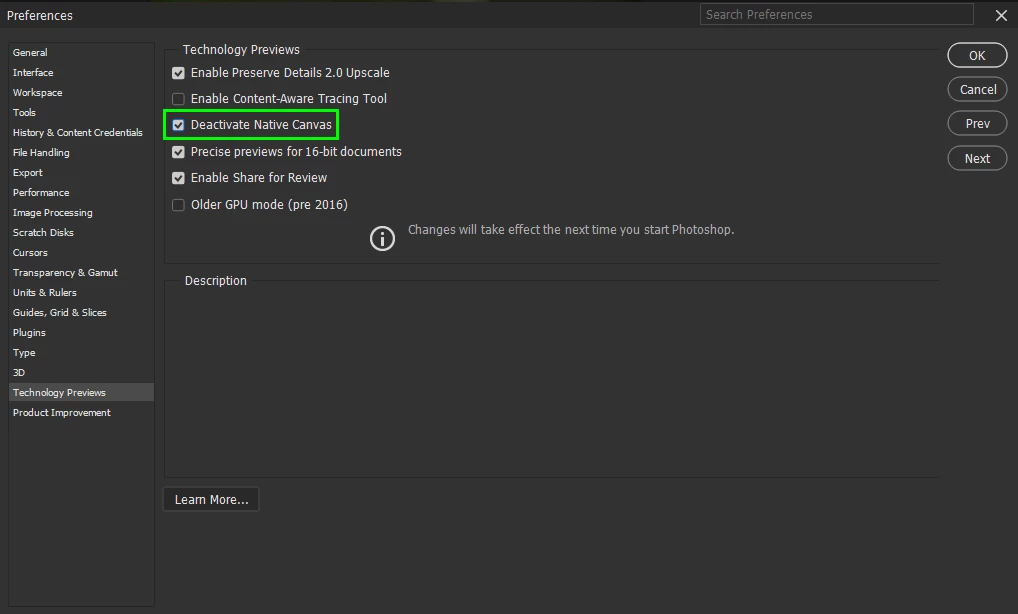
@Elisa29995820fb2q go to Edit > Preferences > Technology Previews and enable this option, then restart Photoshop

200 replies

peterk48491532
Participant
March 22, 2023

Nach Update von V24.2.1 auf V24.3.0 flackert das Datei-Fenster nach öffnen einer PSD bzw. Datei neu erstellen. Nach downgrade auf V24.2.1 funktioniert PS wieder fehlerfrei. Es lassen sich PSD Dateien öffnen/ neu erstellen und bearbeiten.

Ged_Traynor
Community Expert
Community Expert
March 22, 2023

@peterk48491532 this issue seem to be affecting a lot of people, see this related thread, for the time been you may need to revert back to version 24.2.1

https://community.adobe.com/t5/photoshop-ecosystem-bugs/canvas-flickering-violently/idi-p/13669564


Edit: try enabling this option in preferences and restarting Photoshop to see if it helps

Participant
March 22, 2023

Hi! I've just installed the last Photoshop update... but it happens something very strange when I open any .psd or I try to create a new file. I attach you a video. Please, fix this soon. I can't work in this way.

Thanks.


{Thread title updated by moderator}

Participating Frequently
March 17, 2023

Con una de las últimas actualizaciones de la versión Beta de Photoshop, al abrir un nuevo documento, la hoja de trabajo parpadea (blanco y negro) y no se puede hacer nada. Sólo quitando el uso de tarjeta gráfica se soluciona el problema.


Alguna sugerencia?

Kevin Stohlmeyer
Community Expert
Community Expert
March 17, 2023

Hi @José Moyano instead of disabling the graphics card, go to Photoshop Preferences/Technology Preview and check “Disable Native Canvas”. Then check “Use Older GPU Mode (2016)”. 

yevah31811871
Participating Frequently
March 22, 2023

After updating Adobe Photoshop, I got problems: opening any file, or creating a new file, instead of the artboard & layers, appeared black and white color screen. How to solve this problem? Thanks in advance!


Kevin Stohlmeyer
Community Expert
Community Expert
March 22, 2023

Hi @yevah31811871 Go to Photoshop Preferences/Technology Preview and check “Disable Native Canvas”. Then check “Use Older GPU Mode (2016)”.

Participant
March 22, 2023

Bonjour à toutes et à tous,


J'ai un soucis sur Photoshop 2023, lorsque que j'ouvre sur nouveau (pour commencer une travail), la page blanche clignote, et malgré avoir désinstallé Photoshop et réinstallé. Ceci me le fait depuis ce matin, de la dernière mise à jour. Quelqu'un saurait à quoi c'est dû?


Merci à toutes et à tous.


Ged_Traynor
Community Expert
Community Expert
March 22, 2023
Participant
March 22, 2023

I think there are some bug in the latest update.

When I load picture the screen don't show the picture it BLINK WHITE the whole time


Pleace help

Ged_Traynor
Community Expert
Community Expert
March 22, 2023
Participant
March 22, 2023

Bonjou,

Ce jour, j'ai effectué la mise à jour de Photoshop et depuis dès que j'ouvre mes fichiers le logiciel fait des flashs et n'ouvre pas ces derniers.

edita4154580
Participant
March 22, 2023

Hej, jag har upptäckt samma problem nu på morgonen när jag öppnade Photoshop och ville öppna några av mina sparade filer! 

Participant
March 22, 2023

Acabo de actualizar a la versión 24.3 esperando que corrigiera los problemas con la visualización de las reglas y resulta que ahora no muestra las imágenes, saliendo un parpadeo en blanco/negro en su lugar. Antes se podía trabajar, ahora ni eso.

Ged_Traynor
Community Expert
Community Expert
March 22, 2023
Participant
March 22, 2023

Version where the problem occurs: v24.3
Usage environment: Windows 11 Pro


The problem occurs in the following steps


(1) Launch Photoshop.
(2) Create a new document.
As soon as the canvas is created, the image flickers violently.


Or


(1) Launch Photoshop.
(2) Drag and drop the image file you wish to edit into Photoshop.
The image is not displayed, and instead a violent flickering of black and white occurs.

Ged_Traynor
Community Expert
Community Expert
March 22, 2023

Hi

Other people have reported this issue, issues like that are usually related to the GPU driver, have you try updating that from the manufacturers website.

Gianni Manca
Participant
March 22, 2023

 ho installato l'ultima versione di photoshop ma quando apro il programma lo schermo flash on off

Participating Frequently
March 22, 2023

Need help!
I've opened PS today and its all just white strobe flashes. Yesterday everything was okay and the program reported no problems. I closed computer regularly.
I have the newest version of PS installed.
I've reinstalled it twice and closed computer two times already. I've removed all previos settings and preferences.

Graphic card is good - everything else is working: Illustrator, After Effects ...

What's going on?

Participating Frequently
March 22, 2023

Ok, so what finally helped was installation of the previous version: 24.2.1