
kathyv29656185
Participant
March 13, 2023
Answered

P: Photoshop 24.3 Strobes in Black and White when Opening files

  • March 13, 2023
  • 200 replies
  • 504683 views

when attempting to open a photo in Photoshop on my HP Laptop, details below, the photo appears in the layers tab bottom right, but not in the workspace /desktop: It is a constant Black / White strobe. The desktop /workspace flashes Black and white

.
Processor Intel(R) Core(TM) i7-8550U CPU @ 1.80GHz 1.99 GHz
Installed RAM 16.0 GB (15.9 GB usable)

System type 64-bit operating system, x64-based processor

Edition Windows 10 Pro
Version 21H2
Installed on ‎24/‎03/‎2021
OS build 19044.2604
Experience Windows Feature Experience Pack 120.2212.4190.0
Correct answer Ged_Traynor

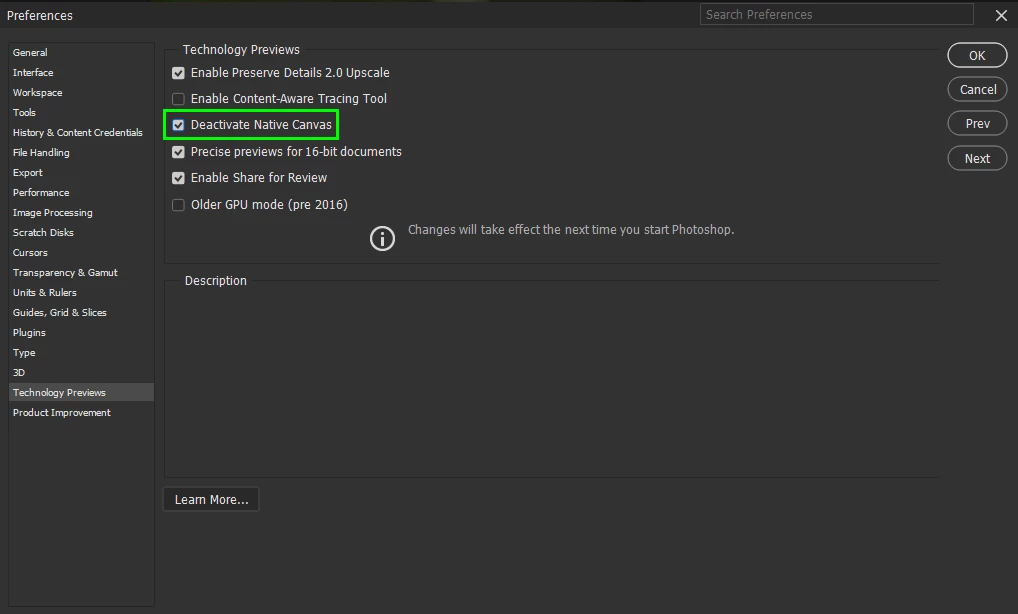
@Elisa29995820fb2q go to Edit > Preferences > Technology Previews and enable this option, then restart Photoshop

200 replies

Participant
April 23, 2023

When I start Photoshop 2023, my screen blinks and flashes all the time and I can't open any archive.  I am an Creative Cloud member and had been using a laptop Assus that has Windows 10 and until download the new version, the program works perfectly.   The Graphic processor is compatible.  Suggestions?  Thank you.

Jeff Arola
Community Expert
Community Expert
April 23, 2023

In photoshop go to Edit > Preferences > Technology Previews and enable Deactivate Native Canvas, then restart Photoshop

Rocio_Lopez-Bretzlaff
Known Participant
April 23, 2023

I installed the Photoshop (Beta) version, and when I tried to open an image using this beta app, I get the problem of the strobbing in black and white, however, if I open the regular Photoshop version which is up to date (24.4.1) there is no problem opening images. My system configuration is as follows:


Processor: Intel(R) Core(TM) i7-3770K CPU @ 3.50GHz 3.50 GHz
Installed RAM: 32.0 GB
System type: 64-bit operating system, x64-based processor

Display adapters (graphic card?): AMD Radeon HD 7800 Series

Edition Windows 10 Pro, Version 21H2


I really would like to try this beta's version new features. Any ideas of how to solve this problem with Photoshop Beta version will be much appreciated.  THANKS!

Rocío López-Bretzlaff
Rocio_Lopez-Bretzlaff
Known Participant
April 23, 2023

I solved the problem following the advice of one of the members, of checking the box "Deactive Native Canvas" in the Preferences> Technology Previous, menu.

Thanks to the Adobe member that provided this solution!


Rocío López-Bretzlaff
Michel LAnge
Participant
April 23, 2023

Bonjour
Suite à la dernière mise à jour de Photoshop, sous windows 10, je ne peux plus ouvrir d'image.

L'application semble se lancer correctement, mais lorsque je tente d'ouvrir une image, j'ai un clignotement stroboscopique noir et blanc dans la fenêtre image.
J'ai fait les mises à jour du processeur graphique et le statut détecte par Photoshop est détecté compatible. Si je reviens à la version antérieure, tout fonctionne normalement.

Participant
April 23, 2023

Im having the same problem! But when i get to the old version the problem continues!!

Participant
April 22, 2023

Dobrý den,


poslední dvě aktalizace PS mi sice fotografii načtou, ale místo fotografie začne monitor černobíle blikat. Přestane až po vypnutí možnosti používat grafický procesor, což práci zpomalí. Mohu poprosit o radu. 

System windows 10, Nivida K 2100 m.

Starší verze fungují bez problému.


Děkuji za radu.

Participant
April 22, 2023

Everytime i try to open or use photoshop it acts like a strobe light. i have closed photoshop, shutdown computer, uninstall then re install and nothing is working. any help is appreciated. thank you

Jeff Arola
Community Expert
Community Expert
April 22, 2023

In photoshop go to Edit > Preferences > Technology Previews and enable Deactivate Native Canvas, then restart Photoshop

Participant
April 21, 2023

Thanks this worked, after two months of attempting several options 

Participant
April 21, 2023

When I open photoshop everything is normal.  When I open an image the page flashes white and won't open the image.https://youtu.be/rQVvuUpgiDw 

Ranjisha Sengupta
Legend
April 21, 2023

Hi @Lois L 


We're aware of this issue & the team is working on a fix.

Go to Edit > Preferences > Technology Previews and enable Deactivate Native Canvas option, then restart Photoshop.


Please check this community discussion to try the workarounds available:


Thanks for your patience!


Best,

Ranjisha

Nikos29528053ba0h
Participant
April 21, 2023

Hello people the last few days i have a problem when i have upload a photo in the photoshop the window is open but there is no photo just flashing the screen white and black , if i go to the filter and open it with the  camera raw is ok but if i go back to photoshop there is only black . Have enyone the same problem `?


Tnank you .

Participant
April 21, 2023

With my online subscription, I updated my Photoshop to 2023 version. When I tried to open a PSD file created with an older version it doesn't open. It keeps giving me a flashing white page. So I tried to start a new file and it did the same thing -- white flashes, white flashes, white flashes. Basically I cant use Photoshop 2023 at all. I searched online for a solution. I read something that says under"File", go to  "Preference", then go to "Performance", uncheck the "Use Graphics Processor". THAT ACTUALLY WORKS! I was able to open psd files from old version and was able start a new file. I can actually use Phoshop 2023! Unfortunately, I just purchased a phoshop plug-in that requires the "Use Graphics Processor" to be check on. Is there a fix to this? If not, can I go back to an older version, like 2020, 2021 or 2022, and how to do that?


Roland

D Fosse
Community Expert
Community Expert
April 21, 2023

You can recheck use graphics processor, and instead go to Preferences > Technology Previews > Older GPU mode.


This is caused by new graphics functions in PS that don't play well with older GPUs. If at some point you get a new GPU you won't have this problem.

Participant
April 21, 2023

For me it work with:

  • Deactivate Native Canvas Checked and Older GPU Not Checked
  • Deactivate Native Canvas Not Checked and Older GPU Checked
  • Both Checked


Asus laptop with Windows 11, Core i7 and Nvidia GeForce GTX 950M