


Participant
May 23, 2024
Question

P: Photoshop 25.9.0 Generative fill not working (something went wrong, please try again)

  • May 23, 2024
  • 63 replies
  • 49228 views

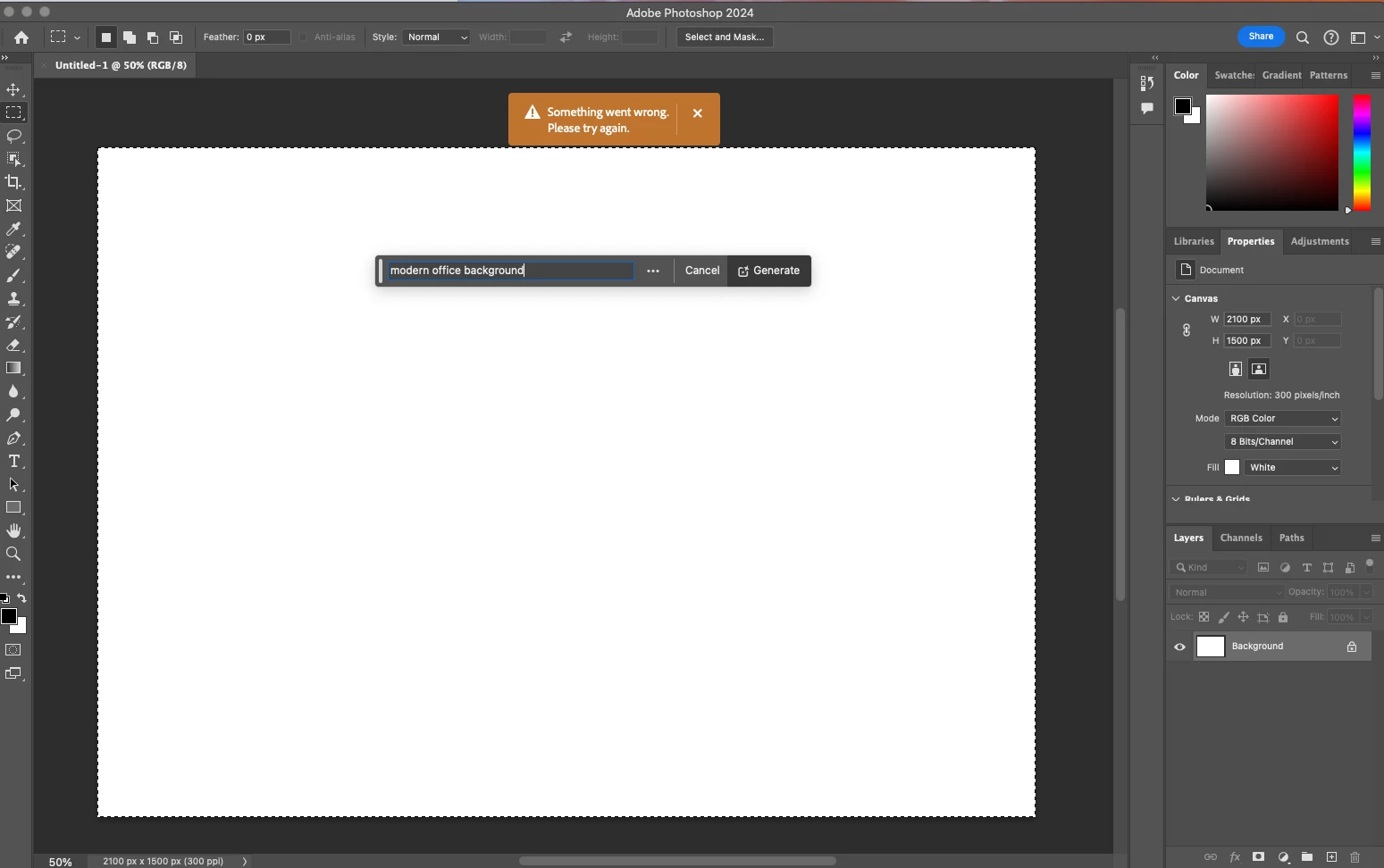
Every time I try Generative expand or fill the progress bar pops up, gets 1/3rd of the way through then it errors out with a message that says "Something went wrong, please try again"

I've unintalled and reinstalled photoshop, and this issue still persists. How can I fix this so that genertive fill will work again? I rely on this tool heavily to fix images so they work for publications and i need this to be fixed.
 

63 replies

Participant
May 23, 2024

Installed the PS Beta, it's working there. <hands in air>

Participating Frequently
May 23, 2024

Same here. The progress bar starts and then stops halfway with no results. Expand does the crop bit but won't do the generative bit.

kirynp57461627
Known Participant
May 23, 2024

Same here. It's not a version issue as I hadn't updated and still got the same message. After updating to 25.9 same thing.

jamnotjelly
Participant
May 23, 2024

same problem here, come on Adobe, get this fixed.

Participant
May 23, 2024

Same issue. Can someone please reboot the AI server?

Participant
May 23, 2024

GOT THE SAME PROBLEM, SEEMS LIKE PHOTOSHOP IS TRYING HARD TO LOSE CLIENTS.TO ME IT SEEMS LIKE THEY ARE DOING SO MUCH TO CENSORE PEOPLES USE OF THEIR PRODUCT THAT THEY WANT ARTIST TO DO WHAT PHOTOSHOP WANTS AND NOT WHAT THEIR CREATIVE MIND HAS CREATED. FOR ANY ARTIST THIS PROGRAM IS USELESS. OR YOU DO AS THEY SAY OR YOU JUST STOP USING IT PERIOD. 

Participant
May 23, 2024

I have been using Photoshop for awhile but suddenly today, cannot use the AI generative fill or AI replace features. I get the message in orange, "“Something went wrong. please try again later.” I saw similar threads, but the answer either wasn't clear or was for a Mac. I am on PC, with Windows 10 Pro v. 22H2, and OS build 19045.4412. These have not changed since I began using Photoshop.  


I have tried the following fixes:

 - Updating Photoshop to the latest version (25.9)

- Uninstalling and then re-installing Photoshop

- Downgrading to a lower version (24.7)

- Trying Photoshop Beta instead

- Launching Photoshop with the Shift key held to open, to skip loading optional and third-party plugins

- Shutting down the computer and turning it on again

Participant
May 23, 2024

Edit: I also went to Users/[user name]/AppData/Roaming/Adobe/Adobe Photoshop [version]/Adobe Photoshop [version] Settings, and dragged that folder to the desktop so that new preferences files will be created in their original location, per the below. 


Preferences in Photoshop (adobe.com)

Known Participant
May 23, 2024

Adobe needs to provide answers for this stuff. It's a workflow breaking problem. A money problem.

Participant
May 23, 2024

Came here to write a new post about the problem after spending the last HOUR trying to fix it.  Upgraded to 25.9 and if I remember correctly, I was using generative fill for a couple images just fine after the update before it suddenly stopped working.  Tried downgrading to the previous version, closing and resetting CC, logging out and in again, restarting a couple times, allowing PS and CC through Windows Defender - nada.  Doesn't matter whether I write a prompt or leave it blank - same error.  Ack!!  Also didn't realize how much I'd been relying on generative fill until now but yes I need it fixed 🙂

Inspiring
October 25, 2024

How did you fix it?  Mine was working amazingly until the last updates a few days ago.  The only thing that I use it for mostly is to remove objects that are on astroturf.  All of a sudden it's not matching the surrounding astro turf well.  I've tried a remote session with Adobe and well over an hour later, it's still just not right.  

The issue starts with Lightroom Classic doesn't appreciate it when you have 2 Graphics cards on your computer. If you turn both off then the masking tool is fine. If you pick one or pick auto, then using a brush mask, the cursor will bounce all over the screen like a pinball. The newest LRC won't allow me to copy my presets and paste them onto the new image. Because of this, I can't use the newest LRC and, therefore, can't use the newest Photoshop. UGH!!!  If Adobe fixes this latest LRC update, maybe I can be more productive again...


Participant
May 23, 2024

Getting the exact same error, cleared prefs, updated, still happening.