sbn85
Known Participant
June 17, 2026
Question

P: PS v27.8 new home screen

  • June 17, 2026
  • 24 replies
  • 334 views

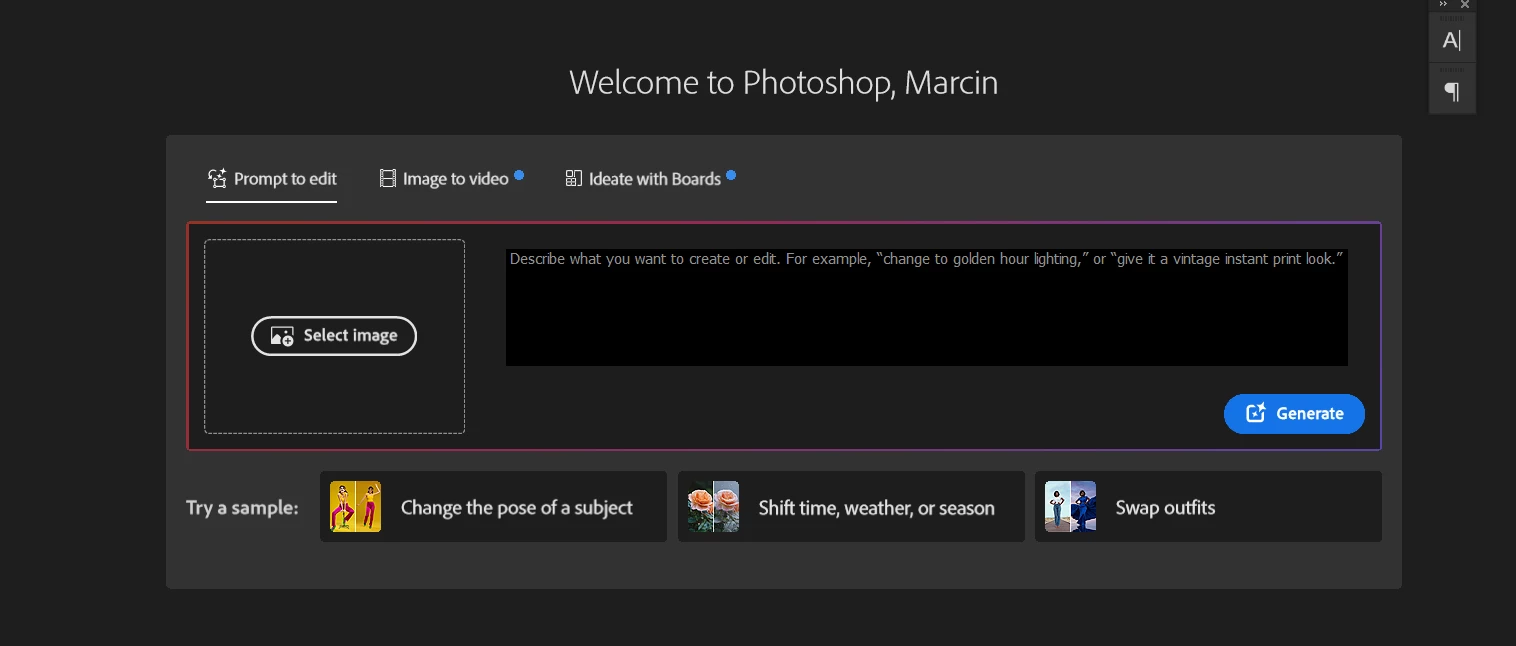
How to disable/hide this thing in home screen of photoshop?
 

    24 replies

    jax339225111uat
    Participant
    June 20, 2026

    This is absolutely ridiculous. I use PS as a tool. Pushing my work off the screen to display ads I care nothing about is a sure way to make me look for PS alternatives. Fix this!!!

    jane-e
    Community Expert
    Community Expert
    June 20, 2026

    @KevinSkem wrote: “Currently I feel it necessary to turn off the home screen completely.”


    That’s what I’ve done.


    Jane

    Community Expert
    June 20, 2026

    Please see here:


    Moderators, @Mohit Goyal,  please merge this with the following existing post:

    P: PS v27.8 new home screen | Adobe DME


    My System: Intel i7-8700K - 64GB RAM - NVidia Geforce RTX 3060 - Windows 11 Pro 25H2 -- LR-Classic 15 - Photoshop 27 - Nik Collection 9 - PureRAW 6 - Topaz Photo AI
    KevinSkem
    Participant
    June 20, 2026

    The new AI section on the homescreen takes up half of my screen. I only want to see my recent documents (like it was a couple of days ago). Currently I feel it necessary to turn off the home screen completely.

    Known Participant
    June 19, 2026

    v26.11.6

    I tried the [ use legacy document ] doesn’t change anything….

    Will be nice to have it back as it was. only see the recent document and nothing else..


    benoit Kapture foto
    jane-e
    Community Expert
    Community Expert
    June 19, 2026

    @Kapture benoit wrote: I tried the [ use legacy document ] doesn’t change anything


    See the post from staff (marked in yellow):

    https://community.adobe.com/questions-712/p-ps-v27-8-new-home-screen-1628247?postid=7686803#post7686803

    “Currently, there is no Preferences setting to hide or disable this”


    For the interim, I’ve disabled the Home Screen in Preferences.


    Jane


    bellevue scott
    Inspiring
    June 18, 2026

    To avoid seeing this abomination that Adobe is calling a “new Home Screen Experience”, uncheck the auto show home screen in the Settings → General area. 


    Participating Frequently
    June 18, 2026

    This is a genuinely horrendous change. We’re already having gen AI forced down our throats enough without having this in our face every time, and then also having to scroll down to find our documents.

    I’m hanging on by a thread already, so I’ll likely be cancelling my sub if this isn’t changed.

    jane-e
    Community Expert
    Community Expert
    June 18, 2026

    @Anshul_Saini wrote: Your feedback matters! If you'd prefer an option to hide or minimize this section of the Home Screen. We'd love to hear that feedback.


    Count me in as needing the ability to hide this new monstrosity.

    I’ll miss seeing previews of my Recents list, but have now disabled the Home Screen in Preferences.


    Jane


    Anshul_Saini
    Community Manager
    Community Manager
    June 18, 2026

    Hi Everyone,

    Thank you for reaching out about the updated Home Screen in Photoshop. What's happening is that
    with the Photoshop version 27.8 (June 2026) update, the product team introduced a redesigned Home Screen experience.


    We understand that not everyone wants to interact with the Home Screen in the same way. Currently, there is no Preferences setting to hide or disable this.

    The existing preference under Edit > Preferences > General > "Auto Show the Home Screen" controls whether the Home Screen appears at all when no documents are open. Still, it does not control the content shown within the Home Screen itself. The new tabbed creative experience is part of the Home Screen content and doesn't have a separate on/off switch at this time.
     

    This new experience is being rolled out gradually. Some users may see it while others don't; this is intentional as we monitor feedback and performance. If you're not seeing it, your account may not be in the current rollout group yet.


    Your feedback matters! If you'd prefer an option to hide or minimize this section of the Home Screen. We'd love to hear that feedback. I can report this directly to the Photoshop product team on your behalf.
     

    We appreciate you taking the time to share your experience.


    Best,

    Anshul Saini

    barry.k
    Participant
    June 18, 2026

    Just adding my +1 that the new home screen provides a very frustrating user experience. I have zero desire to use any generative AI tools whatsoever and do not appreciate being shown a large “Prompt to edit” tab upon opening Photoshop, with no way to hide or collapse the section. I would like the ability to hide the “new tabbed creative experience” and Featured sections altogether, or at least return the ability to collapse these extra sections.

    Ever since the Home Screen was first introduced, the thumbnails in the Recent section have been a very nice, visual way to bounce between files. Pushing them down the page to the point where only one row is visible, with the text cut off, is just needless friction. I’ll be disabling Auto Show the Home Screen and returning to good ol’ File > Open Recent, I guess.

    Trevor.Dennis
    Community Expert
    Community Expert
    June 18, 2026

    I only see it in the release version (it’s not in the beta version).  I can’t see from your screen shot, but I have a Hide Suggestions button that turns it off.


    Ged_Traynor
    Community Expert
    Community Expert
    June 18, 2026

    Hi Trevor, this is what I have in the release 27.8 version, looks different from your screenshot, is that a Beta screenshot you posted


    Trevor.Dennis
    Community Expert
    Community Expert
    June 18, 2026
