
Participant
July 5, 2024
Question

P: Remove Tool missing on Windows ARM

  • July 5, 2024
  • 40 replies
  • 5338 views

I'm using Photoshop 25.9.1 on one of the newly released copilot+ PC with SnapDrag. So far the software is working fine but I can not find "remove tool" anywhere. Is this a bug or that feature has not been yet ported on ARM?


This is the menu displayed at the moment:
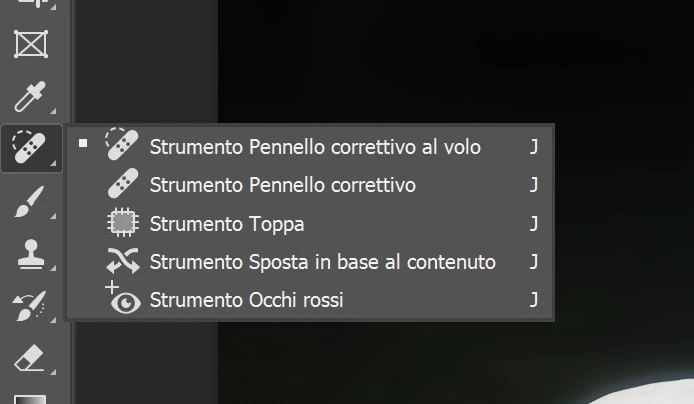
 

40 replies

Participant
September 26, 2025

Hi,


I'm new to Ps, and the remove tool hasn’t shown up for me in the app. I can see it in the web version, though. I’ve checked the Extra Tools section and also reset the Essential Workflow, but neither of these helped. 


Any suggestions? Thanks!

System Info:


Adobe Photoshop Version: 26.11.0 20250918.r.18 a87e57f arm64 (final, Release)
Number of Launches: 17
Operating System: Windows 11 64-bit
Version: 11 or greater 10.0.26100.6584
System architecture: Snapdragon(R) X 10-core X1P64100 @ 3.40 GHz, NEON, DOTPROD, HybridCPU(6:4)
Physical processor count: 10
Processor speed: 2976 MHz
Built-in memory: 15985 MB
Free memory: 10236 MB
Memory available to Photoshop: 11764 MB
Memory used by Photoshop: 70 %
Crash Handler: Adobe
DCX Version: 9.11.1
SAM SDK Version: 14.3.2
ACP.local Status:
- SDK Version: 5.8.2
- Core Sync Status: Reachable and compatible
- Core Sync Running: 7.7.0.5
- Min Core Sync Required: 4.3.66.28
Live Edit Client SDK Version: v5.3.2
Adobe Firefly: Please use any generative AI feature to view the latest version.
OpenColorIO version: 2.4.2
NGL Version: 1.42.0.5
Chalkboard: Disabled.
Chalkboard Doc Create: Disabled.
D3D12Warp renderer: Disabled.
Precise Color Management for HDR Display: Disabled.
Alias Layers: Disabled.
Highbeam: Disabled.
Image tile size: 1024K
Image cache levels: 4
Font Preview: Large
HarfBuzz Version: 8.4.0
TextEngine: ATE 7.9.0 (d611361)
======= GPU
Native API stable: True
OpenCL API stable: True
GPUDeny: 0
GPUForce: 0
useGPU: 1
useOpenCL: 1
isGPUCapable: 1
isGPUAllowed: 1
GPUName: Qualcomm(R) Adreno(TM) X1-85 GPU
GPUVendor: QUALCOMM
Qualcomm(R) Adreno(TM) X1-85 GPU UNKNOWN, QUALCOMM
IsNativeGPUCapable: 1
IsOpenCLGPUCapable: 1
HasSufficientRAM: 1
GPU accessible RAM: 8,508 MB
Required GPU accessible RAM: 1,500 MB
UseGraphicsProcessorChecked: 1
UseOpenCLChecked: 1
Windows remote desktop: 0
Windows available feature level: 12.1
Windows required feature level: 12.0
Windows has required feature level: 1
Display: 1
Display Bounds: (0, 0) -> (3840, 2160)
Display scale: 1.25
Main Display
Display Type: SDR
Display Profile: sRGB IEC61966-2.1
------- Sniffer output
[0 ms]
Launch GPUSnifferThread

[0 ms]
Start GetSnifferResult

[1 ms]
Start RunAllAPIs

[1 ms]
C:\Program Files\Adobe\Adobe Photoshop 2025\sniffer.exe -baseTimeMS=110093 -comment=Photoshop Version: Adobe Photoshop 26.11.0 20250918.r.18 a87e57f arm64

[516 ms]
Start sniffer 2025-09-25 16:56:40
# Photoshop Version: Adobe Photoshop 26.11.0 20250918.r.18 a87e57f arm64
C:\Program Files\Adobe\Adobe Photoshop 2025\sniffer.exe -baseTimeMS=110093 -comment=Photoshop Version: Adobe Photoshop 26.11.0 20250918.r.18 a87e57f arm64

{90 ms}
Start platform native
# displays: 1
Display 0
Display: \\.\DISPLAY1
Main: TRUE
Built in: FALSE
Stereo: FALSE
Bounds: (0, 0) -> (3,840, 2,160)
Dimensions: (3,840 2,160)
Display scale: 1.25
Physical size: (0 0)
Pixel size: (0 0)
Dynamic range: (0 1)
Attached Device: (DeviceID name=Qualcomm(R) Adreno(TM) X1-85 GPU index=0)

# devices: 1
Device 0
Name: Qualcomm(R) Adreno(TM) X1-85 GPU
Preferred: TRUE
Power Envelope: UNKNOWN
Attachment: UNKNOWN
# attached displays: 1
\\.\DISPLAY1
GPU accessible RAM: 8,508 MB
VRAM: 128 MB
Dedicated System RAM: 0 MB
Shared System RAM: 8,380 MB
API version: 12.1 (12.1)
Device version: 12.0 (12.0)
Vendor name: QUALCOMM
Driver date: 2025-06-02 000000.000000-000
Driver age: 3 months
Driver version: 31.0.112.0
Supports UMA: SUPPORTED
D3D-ID: 909329200
End platform native
{159 ms}

{159 ms}
Start platform OpenCL
# displays: 0

# devices: 2
Device 0
Name: Qualcomm(R) Adreno(TM) X1-85 GPU
Preferred: FALSE
Power Envelope: INTEGRATED
Attachment: UNKNOWN
# attached displays: 0
GPU accessible RAM: 8,380 MB
VRAM: 8,380 MB
Dedicated System RAM: 0 MB
Shared System RAM: 0 MB
API version: 3.0 (OpenCL 3.0 QUALCOMM build: 827.0)
Device version: 3.0 (OpenCL 3.0 Qualcomm(R) Adreno(TM) X1-85 GPU)
Vendor name: QUALCOMM
Driver date: UNKNOWN
Driver age: UNKNOWN
Driver version: UNKNOWN
Bandwidth: 65 GB / s
Compute score: 439.126
Device name string: Qualcomm(R) Adreno(TM) X1-85 GPU
Device vendor string: QUALCOMM
Platform name string: QUALCOMM Snapdragon(TM)
Platform vendor string: QUALCOMM

Device 1
Name: Qualcomm(R) Adreno(TM) X1-85 GPU
Preferred: TRUE
Power Envelope: INTEGRATED
Attachment: UNKNOWN
# attached displays: 0
GPU accessible RAM: 8,380 MB
VRAM: 8,380 MB
Dedicated System RAM: 0 MB
Shared System RAM: 0 MB
API version: 3.0 (OpenCL 3.0 D3D12 Implementation)
Device version: 3.0 (OpenCL 3.0 D3D12 Implementation)
Vendor name: MICROSOFT
Driver date: UNKNOWN
Driver age: UNKNOWN
Driver version: UNKNOWN
Bandwidth: 60,047 GB / s
Compute score: 130,246
Device name string: Qualcomm(R) Adreno(TM) X1-85 GPU
Device vendor string: Microsoft
Platform name string: OpenCLOn12
Platform vendor string: Microsoft
End platform OpenCL
{476 ms}

Exit code kExitNormal
End sniffer 2025-09-25 16:56:41
[kStatusNormal, kExitNormal]

[517 ms]
Finish RunAllAPIs

[523 ms]
Finish GetSnifferResult

------- Sniffer output
======= GPU
License Type: Subscription
Serial number: 90960318890618034439
GUIDBucket:
Composite Core GPU (comp_core_gpu): off
Composite Core Threads (MultithreadedCompositing): on
Composite Core UI (CompositingDocumentTabUI): off
Composite Core Feature Prefs (CompCoreFeaturePrefs): off

Application folder: C:\Program Files\Adobe\Adobe Photoshop 2025\
Temporary file path: C:\Users\myleh\AppData\Local\Temp\
Photoshop scratch has async I/O enabled
Scratch volume(s):
Startup, 474.7G, 185.6G free
Required Plugins folder: C:\Program Files\Adobe\Adobe Photoshop 2025\Required\Plug-ins\
Primary Plugins folder: C:\Program Files\Adobe\Adobe Photoshop 2025\Plug-ins\

Installed components:
ACE.dll ACE 2025/04/27-19:09:42 79.458e2f3 79.458e2f3
act_tracing.dll Adobe Common Toolkit 1.0.68
AdobeLinguistic.dll Adobe Linguistic Library 792708d
AdobeOwl.dll Adobe Owl 5.5.0
AdobePDFL.dll PDFL 2025/04/29-08:14:41 79.7bc3f9c 79.7bc3f9c
AdobePIP.dll Adobe Product Improvement Program 8.2.0.16
AdobeSVGAGM.dll AdobeSVGAGM 79.e3adea7 79.e3adea7
AdobeXMP.dll Adobe XMP Core 2025/03/06-19:12:03 79.9690a87 79.9690a87
AdobeXMPFiles.dll Adobe XMP Files 2025/03/06-19:12:03 79.9690a87 79.9690a87
AdobeXMPScript.dll Adobe XMP Script 2025/03/06-19:12:03 79.9690a87 79.9690a87
AGM.dll AGM 2025/04/27-19:09:42 79.458e2f3 79.458e2f3
AID.dll AID DLL 1.0.0.58
AIDE.dll AIDE 2025/04/09-06:36:00 79.1939c22 79.1939c22
ARE.dll ARE 2025/04/27-19:09:42 79.458e2f3 79.458e2f3
AXE8SharedExpat.dll AXE8SharedExpat 2025/03/06-19:12:03 79.4abff3a 79.4abff3a
AXEDOMCore.dll AXEDOMCore 2025/03/06-19:12:03 79.4abff3a 79.4abff3a
BIB.dll BIB 2025/04/27-19:09:42 79.458e2f3 79.458e2f3
BIBUtils.dll BIBUtils 2025/04/27-19:09:42 79.458e2f3 79.458e2f3
CoolType.dll CoolType 2025/04/27-19:09:42 79.458e2f3 79.458e2f3
CRClient.dll Adobe Crash Reporter Client DLL 26.5.0.202506270759_7140322
DirectML.dll DirectML Redistributable Library 1.13.1+240111-2204.1.dml-1.13.9b0890f
dnssd.dll Bonjour 3,0,0,2
dvaadameve.dll Adobe DVA 2025 25.2.0
dvaappsupport.dll Adobe DVA 2025 25.2.0
dvacore.dll Adobe DVA 2025 25.2.0
dvaevefactory.dll Adobe DVA 2025 25.2.0
dvametadata.dll Adobe DVA 2025 25.2.0
dvametadataapi.dll Adobe DVA 2025 25.2.0
dvametadataUI.dll Adobe DVA 2025 25.2.0
dvanet.dll Adobe DVA 2025 25.2.0
dvascripting.dll Adobe DVA 2025 25.2.0
dvastorage.dll Adobe DVA 2025 25.2.0
dvatemporalxmp.dll Adobe DVA 2025 25.2.0
dvaui.dll Adobe DVA 2025 25.2.0
dvauxphost.dll Adobe DVA 2025 25.2.0
dvauxpui.dll Adobe DVA 2025 25.2.0
dvavulcansupport.dll Adobe DVA 2025 25.2.0
dvaworkspace.dll Adobe DVA 2025 25.2.0
dynamic-torqnative.dll Unified Extensibility Platform uxp-9.0.2-uxp1-e0d9ef0
ExtendScript.dll ExtendScript 2022/08/18-12:50:45 82.4 82.4
icucnv74.dll International Components for Unicode Build 14.0.1.04ee3a5
icuin74.dll International Components for Unicode Build 14.0.1.04ee3a5
icuuc74.dll International Components for Unicode Build 14.0.1.04ee3a5
JP2KLib.dll JP2KLib 2025/03/06-19:12:03 79.6311509 79.6311509
libcrypto-3-arm64.dll The OpenSSL Toolkit 3.0.14
libssl-3-arm64.dll The OpenSSL Toolkit 3.0.14
LogSession.dll LogSession 8.2.0.16
Microsoft.AI.MachineLearning.dll Microsoft® Windows® Operating System 1.17.20240223.4.8f5c79c
MPS.dll MPS 2025/03/11-13:46:07 79.a22178b 79.a22178b
onnxruntime.dll Microsoft® Windows® Operating System 1.17.20240223.4.8f5c79c
opencv_world4110.dll OpenCV library 4.11.0
Plugin.dll Adobe Photoshop 2025 26.11
PSRes.dll Adobe Photoshop 2025 26.11
PSViews.dll Adobe Photoshop 2025 26.11
ScCore.dll ScCore 2022/08/18-12:50:45 82.4 82.4
SVGRE.dll SVGRE 79.9f41d70 79.9f41d70
VulcanControl.dll Vulcan Application Control Library 7.2.0.34
VulcanMessage5.dll Vulcan Message Library 7.2.0.34
WinRTSupport.dll Adobe Photoshop Windows RT Support 1.0.1.0
Unified Extensibility Platform uxp-9.0.2-uxp1-e0d9ef0
UPIC 2.6.0


Required plugins:

Accented Edges 26.11 - from the file “Filter Gallery.8bf”
Adaptive Wide Angle 26.11 - from the file “Adaptive Wide Angle.8bf”
Angled Strokes 26.11 - from the file “Filter Gallery.8bf”
Average 26.11 - from the file “Average.8bf”
Bas Relief 26.11 - from the file “Filter Gallery.8bf”
BMP 26.11 - from the file “Standard MultiPlugin.8bf”
Camera Raw 17.5 - from the file “Camera Raw.8bi”
Camera Raw Filter 17.5 - from the file “Camera Raw.8bi”
Chalk && Charcoal 26.11 - from the file “Filter Gallery.8bf”
Charcoal 26.11 - from the file “Filter Gallery.8bf”
Chrome 26.11 - from the file “Filter Gallery.8bf”
Cineon 26.11 - from the file “Cineon.8bi”
Clouds 26.11 - from the file “Clouds.8bf”
Color Halftone 26.11 - from the file “Standard MultiPlugin.8bf”
Colored Pencil 26.11 - from the file “Filter Gallery.8bf”
Conté Crayon 26.11 - from the file “Filter Gallery.8bf”
Craquelure 26.11 - from the file “Filter Gallery.8bf”
Crop and Straighten Photos 26.11 - from the file “CropPhotosAuto.8li”
Crop and Straighten Photos Filter 26.11 - from the file “Standard MultiPlugin.8bf”
Crosshatch 26.11 - from the file “Filter Gallery.8bf”
Crystallize 26.11 - from the file “Standard MultiPlugin.8bf”
Cutout 26.11 - from the file “Filter Gallery.8bf”
Dark Strokes 26.11 - from the file “Filter Gallery.8bf”
De-Interlace 26.11 - from the file “Standard MultiPlugin.8bf”
Dicom 26.11 - from the file “Dicom.8bi”
Difference Clouds 26.11 - from the file “Clouds.8bf”
Diffuse Glow 26.11 - from the file “Filter Gallery.8bf”
Displace 26.11 - from the file “Standard MultiPlugin.8bf”
Dry Brush 26.11 - from the file “Filter Gallery.8bf”
Entropy 26.11 - from the file “statistics.8ba”
Export Color Lookup Tables 26.11 - from the file “Export3DLUT.8be”
Extrude 26.11 - from the file “Standard MultiPlugin.8bf”
FastCore Routines 26.11 - from the file “FastCore.8bx”
Fibers 26.11 - from the file “Standard MultiPlugin.8bf”
Film Grain 26.11 - from the file “Filter Gallery.8bf”
Filter Gallery 26.11 - from the file “Filter Gallery.8bf”
Fresco 26.11 - from the file “Filter Gallery.8bf”
Glass 26.11 - from the file “Filter Gallery.8bf”
Glowing Edges 26.11 - from the file “Filter Gallery.8bf”
Grain 26.11 - from the file “Filter Gallery.8bf”
Graphic Pen 26.11 - from the file “Filter Gallery.8bf”
Halftone Pattern 26.11 - from the file “Filter Gallery.8bf”
Halide Bottlenecks 26.11 - from the file “HalideBottlenecks.8bx”
HDRMergeUI 26.11 - from the file “HDRMergeUI.8bf”
HSB/HSL 26.11 - from the file “Standard MultiPlugin.8bf”
IFF Format 26.11 - from the file “Standard MultiPlugin.8bf”
Ink Outlines 26.11 - from the file “Filter Gallery.8bf”
JPEG 2000 26.11 - from the file “JPEG2000.8bi”
Kurtosis 26.11 - from the file “statistics.8ba”
Lens Blur 26.11 - from the file “Lens Blur.8bf”
Lens Correction 26.11 - from the file “Lens Correction.8bf”
Lens Flare 26.11 - from the file “Standard MultiPlugin.8bf”
Liquify 26.11 - from the file “Liquify.8bf”
Matlab Operation 26.11 - from the file “ChannelPort.8bf”
Maximum 26.11 - from the file “statistics.8ba”
Mean 26.11 - from the file “statistics.8ba”
Measurement Core 26.11 - from the file “MeasurementCore.8me”
Median 26.11 - from the file “statistics.8ba”
Mezzotint 26.11 - from the file “Standard MultiPlugin.8bf”
Minimum 26.11 - from the file “statistics.8ba”
MMXCore Routines 26.11 - from the file “MMXCore.8bx”
Mosaic Tiles 26.11 - from the file “Filter Gallery.8bf”
Multiprocessor Support 26.11 - from the file “MultiProcessor Support.8bx”
Neon Glow 26.11 - from the file “Filter Gallery.8bf”
Note Paper 26.11 - from the file “Filter Gallery.8bf”
NTSC Colors 26.11 - from the file “NTSC Colors.8bf”
Ocean Ripple 26.11 - from the file “Filter Gallery.8bf”
OpenEXR 26.11 - from the file “Standard MultiPlugin.8bf”
Paint Daubs 26.11 - from the file “Filter Gallery.8bf”
Palette Knife 26.11 - from the file “Filter Gallery.8bf”
Patchwork 26.11 - from the file “Filter Gallery.8bf”
Paths to Illustrator 26.11 - from the file “Standard MultiPlugin.8bf”
PCX 26.11 - from the file “PCX.8bi”
Photocopy 26.11 - from the file “Filter Gallery.8bf”
Picture Package Filter 26.11 - from the file “ChannelPort.8bf”
Pinch 26.11 - from the file “Standard MultiPlugin.8bf”
Pixar 26.11 - from the file “Pixar.8bi”
Plaster 26.11 - from the file “Filter Gallery.8bf”
Plastic Wrap 26.11 - from the file “Filter Gallery.8bf”
Pointillize 26.11 - from the file “Standard MultiPlugin.8bf”
Polar Coordinates 26.11 - from the file “Standard MultiPlugin.8bf”
Portable Bit Map 26.11 - from the file “PBM.8bi”
Poster Edges 26.11 - from the file “Filter Gallery.8bf”
Radial Blur 26.11 - from the file “Standard MultiPlugin.8bf”
Radiance 26.11 - from the file “Radiance.8bi”
Range 26.11 - from the file “statistics.8ba”
Render Color Lookup Grid 26.11 - from the file “Export3DLUT.8be”
Reticulation 26.11 - from the file “Filter Gallery.8bf”
Ripple 26.11 - from the file “Standard MultiPlugin.8bf”
Rough Pastels 26.11 - from the file “Filter Gallery.8bf”
Save for Web 26.11 - from the file “Save for Web.8be”
Save for Web Drover 26.11 - from the file “Save for Web Drover.8be”
ScriptingSupport 26.11 - from the file “ScriptingSupport.8li”
Shear 26.11 - from the file “Standard MultiPlugin.8bf”
Skewness 26.11 - from the file “statistics.8ba”
Smart Blur 26.11 - from the file “Standard MultiPlugin.8bf”
Smudge Stick 26.11 - from the file “Filter Gallery.8bf”
Solarize 26.11 - from the file “Solarize.8bf”
Spatter 26.11 - from the file “Filter Gallery.8bf”
Spherize 26.11 - from the file “Standard MultiPlugin.8bf”
Sponge 26.11 - from the file “Filter Gallery.8bf”
Sprayed Strokes 26.11 - from the file “Filter Gallery.8bf”
Stained Glass 26.11 - from the file “Filter Gallery.8bf”
Stamp 26.11 - from the file “Filter Gallery.8bf”
Standard Deviation 26.11 - from the file “statistics.8ba”
Sumi-e 26.11 - from the file “Filter Gallery.8bf”
Summation 26.11 - from the file “statistics.8ba”
Targa 26.11 - from the file “Standard MultiPlugin.8bf”
Texturizer 26.11 - from the file “Filter Gallery.8bf”
Tiles 26.11 - from the file “Standard MultiPlugin.8bf”
Torn Edges 26.11 - from the file “Filter Gallery.8bf”
Twirl 26.11 - from the file “Standard MultiPlugin.8bf”
Underpainting 26.11 - from the file “Filter Gallery.8bf”
Vanishing Point 26.11 - from the file “VanishingPoint.8bf”
Variance 26.11 - from the file “statistics.8ba”
Water Paper 26.11 - from the file “Filter Gallery.8bf”
Watercolor 26.11 - from the file “Filter Gallery.8bf”
Wave 26.11 - from the file “Standard MultiPlugin.8bf”
WIA Support 26.11 - from the file “WIASupport.8li”
Wind 26.11 - from the file “Standard MultiPlugin.8bf”
Wireless Bitmap 26.11 - from the file “WBMP.8bi”
ZigZag 26.11 - from the file “Standard MultiPlugin.8bf”

Optional and third party plugins: NONE


Duplicate and Disabled plugins: NONE


Plugins that failed to load: NONE

Unified Extensibility Platform - Extensions:

Home Screen (Loaded) 10.0.0.38 - from the file "Required Folder"
CmdN: 1.26.27
FMS: 1.10.9
UAM: 1.3.1
UAB: 2.18.0-17
UAB4: 5.45.0-2
AXT: 1.0.5
Loaded at: 404 ms - launch time impact: 82 ms
ccx-timeline (Prepared) 3.1.12.0 - from the file "Required Folder"
CCX Commenting UXP Webview (Loaded) 30.20.1.0 - from the file "Required Folder"
Loaded at: 4171 ms - launch time impact: 0 ms
CCX Sharesheet UXP (Prepared) 30.29.3.0 - from the file "Required Folder"
CC Libraries Panel (Loaded) 4.12.60.0 - from the file "C:\Program Files\Common Files\Adobe/CEP/Extensions\CC_LIBRARIES_PANEL_EXTENSION_4_12_60\"
CAPTURE: 2.0.41 STOCK: 4.2.7
Loaded at: 414775 ms - launch time impact: 0 ms
Share Panel (Loaded) 1.0.23.0 - from the file "Required Folder"
Loaded at: 408 ms - launch time impact: 0 ms
In app notifications (Loaded) 10.0.211.0 - from the file "Required Folder"
Loaded at: 434 ms - launch time impact: 0 ms
Photoshop Adjustments Panel (Loaded) 2.3.9.0 - from the file "Required Folder"
Loaded at: 4172 ms - launch time impact: 2 ms
Photoshop UXP Export-As (Prepared) 5.12.5.0 - from the file "Required Folder"
Photoshop In App Messaging (Loaded) 4.8.8.0 - from the file "Required Folder"
Loaded at: 4172 ms - launch time impact: 0 ms
Information Alert (Prepared) 0.5.0.0 - from the file "Required Folder"
Photoshop Selection Feedback (Prepared) 0.5.0.0 - from the file "Required Folder"
Plugins Panel (Prepared) 1.6.9.0 - from the file "Required Folder"
Discover Panel (Loaded) 2508.130.0.11 - from the file "Required Folder"
Loaded at: 4174 ms - launch time impact: 2 ms
Neural Filters (Registered) 1.15.0.102 - from the file "Required Folder"
Scan time: 0 ms - entries: 25

Installed TWAIN devices: NONE

creative explorer
Community Expert
Community Expert
September 26, 2025

@maeve_4117 is with the oher 'retouching tools' — keyboard shortcut is 'J' 


You should have it as I can see you have ' Photoshop 2025 26.11' — Open your Adobe Creative Cloud Desktop App and ensure your version of Photoshop is fully updated. Sometimes, an uninstall/reinstall from the Creative Cloud app is necessary to force the download of all required components. If it's the updated version, maybe clar your preferences. 

Close Photoshop completely. Relaunch Photoshop while holding down Control Alt Shift (PC) or Command Option Shift (Mac). You will see a dialog box asking: "Delete the Adobe Photoshop Settings File?" Click Yes.  This will reset all your custom settings, including shortcuts, color settings, and custom workspaces. 


m
addacci
Known Participant
September 22, 2025

Photoshop v26.10.0 及びPhotoshop(Bata)arm版 V27.0.0 で、ツールバーに削除ツールが表示されません。
スポット修復、修復ブラシなどは表示されているのですが、まだArm版では対応できていませんか?
「ツールバーを編集」をのぞいてみても存在していません。
ちなみに、生成塗りつぶしは使用できています。

Participant
August 15, 2025

Hiya 


I am using Photoshop version 26.9. One day, my remove tool vanished and I can't seem to get it back. I have tried editing my toolbar, but nothing appears in the extra tools section. 


Weirdly, when I select an object, the 'remove' tool appears in the quick access toolbar, but when I click it, nothing happens.


Please let this is driving me insane. 


Thanks  

Ged_Traynor
Community Expert
Community Expert
August 15, 2025

@anthea_mIW try manually resetting your Photoshop preferences
https://helpx.adobe.com/ie/photoshop/using/preferences.html#Manually
Remember to back up your settings before doing the preference reset
https://helpx.adobe.com/ie/photoshop/using/preset-migration.html

Participant
August 15, 2025

That didnt work 😞

Participating Frequently
July 30, 2025

I have the same issue with my new Windows Surface ARM machine.  There is no removal tool.  This sucks big time.  When will Adobe fix this issue?  Also, Adobe still doesn't offer all products for ARM versioned machines.  I love my Windows Surface and don't understand why there is not a priority for their programs working with ARM machines. (FYI, I am finding that this is an issue with other products besides Adobe).  

Participating Frequently
July 24, 2025

The sad thing is the remove tool option works fine in both Lightroom and Camera Raw, in the Snapdragon/ARM Architecture, it's just that the Photoshop option is not there...

Participant
July 24, 2025

Too busy raising prices and introducing new features, how could they possibly have the time or interest to finish rolling out the features they already have? 

dnbnc
Participating Frequently
July 24, 2025

More  than a year and still missing. C´mon, just say: "Adobe will not develop Remove Tool for Photoshop on ARM devices". Stop with this non-sense. Adobe clearly doesn't care about ARM PCs.

dnbnc
Participating Frequently
July 23, 2025

Adobe is one of the culprits when people argue about Microsoft and Windows... Because Adobe (an others) do incomplete and buggy software... But rest assure, they surely made Remove Tool for Apple proccessors! Only for the 10% of the population that uses Apple laptops.

dnbnc
Participating Frequently
July 23, 2025

Tired of waiting for this important feature. Ther're no excuses to not updating it! All AI generated features work just fine... Adobe should explain WHY they don't want to add Remove Tool to Photoshop for ARM.

Imagine... it WORKS ON THE WEB right now, so why isn't working locally, on an ARM proccessor?

Participating Frequently
July 2, 2025

Any update on the Remove tool?  It is not just that there are other issues with Photoshop for Windows on ARM.  None of the third-party plugins are working or able to access and edit in Photoshop from Lightroom is disabled and not working...