Inspiring
November 4, 2021
Answered

P: Text changes do not update - Windows

  • November 4, 2021
  • 35 replies
  • 56072 views

I recently updated Photoshop to release 23.0. When I went to use the typing tool, it behaves oddly. The tool will create type, but nothing displays until I hit enter, then the typing displays. If you edit a line of text, it is the same thing. You do not see your edits until you hit enter. 


I searched around the web to try and find a solution to this. The closest answer I could find was to disable the GPU in the preferences > general > performance settings. However, the "Use Graphics Processor" is grayed ouot. The GPU is listed as "Unknow GPU (UNKNOWN)". I am running the native CPU graphiics processor, which is the Intel HD Graphics 4000 and I just updated it 10.18.10.5161. The problem with the text existed before and after the GPU update. 


How do I change the text settings so that I can see my typing in real time?


{PS-77978}

This topic has been closed for replies.
Correct answer Ged_Traynor

Hi

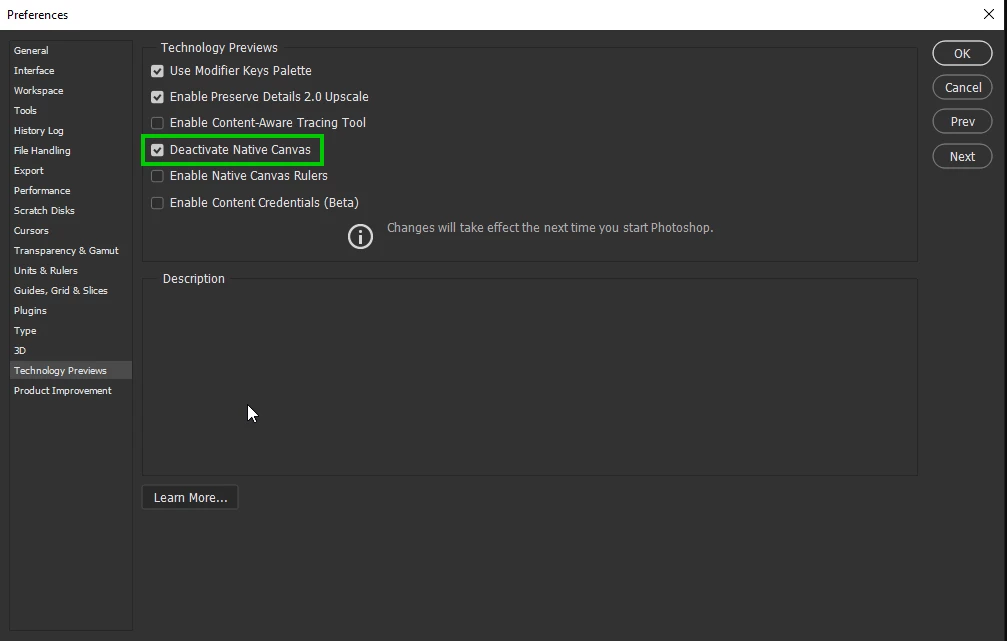
Try enabling this option in preferences and restarting Photoshop to see if it helps

35 replies

Participating Frequently
July 5, 2022

I had this same issue recently. I followed instructions in the reply and installed the file which allows visibility of the font to change through the drop down. However the issue still persists that hitting "T" to shortcut to text type does not work, it just goes back to my last selection. And using arrow keys to cycle through fonts still does not work. This seems to be a v 23.0 issue. 

Participating Frequently
July 5, 2022

I realize this isn't 23.0 but the latest version instead. 

Participating Frequently
September 23, 2022

Having the exact same problem.  Suddenly yesterday.  Working in the same document as a day earlier and now when I try to add or modify text screen turns black . Can see nothing to add or modify text and will only show up once entered.  I running PS 23.5.1 in and MacBook Pro 

Participating Frequently
May 16, 2022

Hi, I've had this issue for a while-since CC 2020 I think-but it became a critical issue after having to handle bulk files with texts. 


(I'm not using photoshop in English, so please understand that the settings might look/feel a little unfamiliar with yours.)


so here's the situation: more than 4 people co-work on the same PSD files, and the texts that were supposed to be seen were visible. However, I found two text layers not shown in one of the PSD files. (I thought the texts were omitted or missing by someone's mistake)


As you see in the image below, there is a group of texts and image and the opacity and fill is set to 100% and they are all visible according to the icon. 

(the individual layers in the group are also set to 100% opacity and fill.)


After I double-clicked one of the text layers, it became visible!!


I double-clicked the other text layers and it became visible too.

It's starting to become our serious concern because we need to produce a mass amount of products involving numerous text layers. The text layers remain invisible when we convert them to JPEGs too. Please investigate this case as soon as possible. I can provide a PSD file with the issue if it's needed.


Thank you.


Ged_Traynor
Community Expert
Ged_TraynorCommunity ExpertCorrect answer
Community Expert
May 16, 2022

Hi

Try enabling this option in preferences and restarting Photoshop to see if it helps

Participant
September 30, 2022

@Ged_Traynor thanks a lot. Solved my problem.

Participant
April 14, 2022
 

I am facing an issue with using Adobe Photoshop.

I am not able to create a text box. Whenever I type the text, it doesn't show the text on the screen. I am not able to type the text properly as well.

Searched the Internet for more than 1 hour and tried all the fixes but any of them didn't work. One of the fix said that I have to go to preferences and uncheck the graphic card option from the Performance panel. But Adobe Photoshop is unable to detect my Graphic card. Tried all the fixes on the internet for the the graphic card issue as well but didn't work.

My Graphic card : Intel (R) HD Graphics

Please help me out as soon as you can.

Participant
March 15, 2022

What's happening is (with Open GL on), it's highlighting entire portions of text, not the one word or two I want hightlighted. This happened after the recent update. I want simply want to highlight one word and it keeps highlighting everything before it. It takes a few tries until it actually works. 


I had to turn off Open GL to get the text to work. It's not perfect though: It's still super glitchy and leaves grey boxes as I highlight the next text box/word. Also leaves blank squares. I was able to save and text looks fine, but wow this is a pretty bad update. Please fix.


Jeff Arola
Community Expert
Community Expert
March 15, 2022

I would reset the photoshop preferences by going to Edit>Preferences>General, clicking on Reset Preferences on Quit and restart photoshop.

Participant
January 15, 2022

Thank you for the answer, seems more people have and had the problem with the intel hd4000 graphic card. Will this be solved in future ps updates. Would be good to know prior "trying" to change all kind of settings...

ErinKReynolds
Adobe Employee
Adobe Employee
February 2, 2022

Hello,

For the folks that were having trouble with text updating in Photoshop, has the issue been resolved in the 23.1 release, or is it still happening? Thank you

daveb52641564
Participant
February 12, 2022

Did the update yesterday. The issue is still there. It only started with the old version a couple of days ago. Oddly, it doesn't happen with every file. On scanned photos, it doesn't work. On photos off the camera it does....until you resize it. Then it doesn't.


Valdeir Cruz
Participant
January 8, 2022

Depois que meu PS atualizou a ferramenta de Texto não funciona mais normal, eu digito e demora a escrever, tentei mudar nas preferencias atráves de tutorias mais nada adiantou, tentei baixando uma versão anterior mesmo assim o erro persiste, o que devo fazer ?

Legend
December 14, 2021

Photoshop 23.1, which was released last night, should properly deactivate cards that required the PSUserConfig file to properly deactive in 23.0.2.

pdnRPH
Known Participant
December 15, 2021

The OpenCl is still greyed out after this install. Interestingly, I updated my laptop, which has an on-board Intel graphics card which is not hefty like on this $3,000 Dell and OS works! This tells me the problem lay with AMD Radeon software and OpenCl (Khronos) is somehow not within the AMD software! I have sent a request to AMD support to attack this problem!

Participant
December 13, 2021

Ok, so we all know the workaround for the text update issues but where can we find the list of graphics cards which are supported by this version?

Why are our cards not supported?

If we upgrade who is to say that that in 6 months time our card is no longer supported again?

I looked to buy a new updated graphics card and it seems that due to supply issues (covid, chips, shipping) they are almost impossible to get hold of at a reasonable price!

Currently not having a GPU activated is making the whole experience clunky... oddly enough Illustrator is happy with the GPU and works beautifully...

Legend
December 14, 2021

@markv15871250 Your card is right on the edge of being supported. Looking at your system info, your card driver is the thing that's way out of date:

Driver date: 2016-02-26 000000.000000-000
Driver age: 69 months


Trying updating your driver. It might get some more legs out of your current card.


See the section "What are the minimum graphics processor requirements?" here: https://helpx.adobe.com/photoshop/kb/photoshop-cc-gpu-card-faq.html 

PECourtejoie
Community Expert
Community Expert
December 14, 2021

@J453 in this case, how comes that the R9 M390X card of @pdnRPH does not recognize the OpenCL, it is supposed to be 2.0 .

BTW, pdn, you do have the text update issue, right? Did you check it the checkbox in front of OpenCL is active in Preferences/Performance/Advanced Settings?

Participant
December 12, 2021

Meu PS está com problema no texto, não atende em tempo real. 

lambiloon
Community Expert
Community Expert
December 12, 2021

Hi show us screenshot so we can help you...regards

Ali Sajjad / Graphic Design Trainer / Freelancer / Adobe Certified Professional
Participant
December 10, 2021
I had the same problem and I just solved it like you did.