Inspiring
November 4, 2021
Answered

P: Text changes do not update - Windows

  • November 4, 2021
  • 35 replies
  • 56072 views

I recently updated Photoshop to release 23.0. When I went to use the typing tool, it behaves oddly. The tool will create type, but nothing displays until I hit enter, then the typing displays. If you edit a line of text, it is the same thing. You do not see your edits until you hit enter. 


I searched around the web to try and find a solution to this. The closest answer I could find was to disable the GPU in the preferences > general > performance settings. However, the "Use Graphics Processor" is grayed ouot. The GPU is listed as "Unknow GPU (UNKNOWN)". I am running the native CPU graphiics processor, which is the Intel HD Graphics 4000 and I just updated it 10.18.10.5161. The problem with the text existed before and after the GPU update. 


How do I change the text settings so that I can see my typing in real time?


{PS-77978}

This topic has been closed for replies.
Correct answer Ged_Traynor

Hi

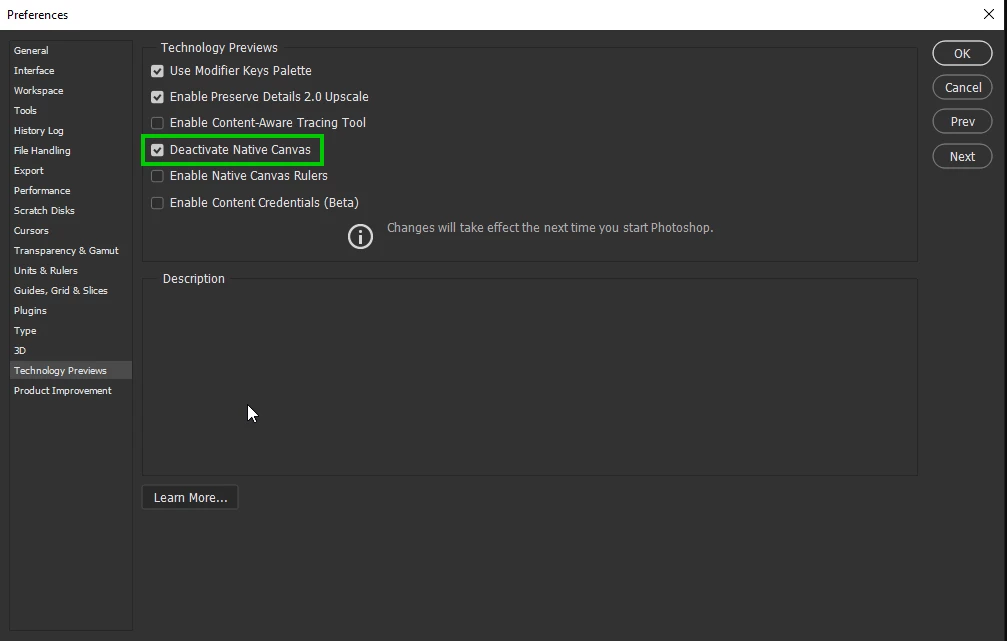
Try enabling this option in preferences and restarting Photoshop to see if it helps

35 replies

Tarun Saini
Community Manager
Community Manager
November 8, 2021

Hi there,

We're sorry for the trouble with Photoshop while using the Type tool.


Could you please share some information based on the questions below in order to narrow down the issue?

  • Are you seeing a similar issue while working on other applications?
  • Since when are you experiencing the problem? Did it start happening after the latest Photoshop update?
  • Is it happening with all the files or some specific files?


Could you please try resetting the preferences of Photoshop and let us know how it goes? https://helpx.adobe.com/photoshop/using/preferences.html


Please backup your settings prior to resetting the preferences: https://helpx.adobe.com/photoshop/using/preferences.html#BackupPhotoshoppreferences


You may check this similar conversation: https://community.adobe.com/t5/photoshop-ecosystem-discussions/text-not-displaying-in-photoshop-cc-2018/td-p/10059046


Regards,

Tarun


RemoNonazAuthor
Inspiring
November 8, 2021

To answer your questions:


I do not have this problem with any other application.


This is new with V23.0. Prior to now, when you typed text it was visible. Now it is only visible once you hit enter. The layer is correctly named the new text. 


I first saw this issue with a new document in V23.0. I pulled up an old document with text layers and it now behaves the same way. I did not have this issue when I created the documents. 


I have reset my preferences and it made no effect on the problem.


RemoNonazAuthor
Inspiring
November 8, 2021

I have also doen the suggested settings changes in https://community.adobe.com/t5/photoshop-ecosystem-discussions/text-not-displaying-in-photoshop-cc-2018/td-p/10059046, but to no avail. I can still only see the text I have typed after hitting the enter key. This is for new text and for editing existing text. 

Amelia Wysocki
Inspiring
November 5, 2021

When I do something in Photoshop, such as manually resizing text or an image, I can't see it being done until after I deselect the layer and click somewhere within the window. This is a serious issue.

"Amelia the Neek" Wysocki
nikunj.m
Community Manager
Community Manager
November 5, 2021

Hi,


We're sorry about the trouble with Photoshop. Would you mind sharing the exact version of Photoshop you're using? You can try updating Photoshop to the latest version to the latest version (23.0) to check if it helps.


You can try disabling the option to Use Graphics Processor from Photoshop by going to Preferences, then Performance to check if that helps.


If the issue persists, you can try to reset the preferences of Photoshop using the steps mentioned here: https://helpx.adobe.com/photoshop/using/preferences.html#reset_preferences

Please backup your settings prior to resetting the preferences. You can check: https://helpx.adobe.com/photoshop/using/preferences.html#BackupPhotoshoppreferences


Let us know how it goes!

Regards,

Nikunj

Participant
November 5, 2021

Text tool not working properly

Error/bug:
When you select the text tool and start to type "Lorem Ipsum" stays there without updating and no text shows up despite the cursor moving to the right

Fixes tried so far:
Removing and reinstalling graphics card drivers
Resetting Text Tool
Resetting preferences on exit
Clearing Photoshop on startup using (Ctrl-Alt-Shift)

System:
CPU: AMD Ryzen 3900X
Motherboard: MSI MPG X570 GAMING PLUS
RAM: 64GB
SSD: WD 1TB NVME drive
HDD: WD Black 10TB
GPU: Visiontek 2GB Radeon HD 5450


Ged_Traynor
Community Expert
Community Expert
November 5, 2021

Hi

It's working fine for me with Photoshop version 23.0 running Windows 10 with or without the placeholder text, try disabling the placeholder text from the preferences to see if you still have the issue

Participant
November 4, 2021

Hi I am trying to make a name badge using Photoshop, it will be 9cmx6cm but when I try to use the type tool it doesn't work, can anyone advice me as to what I am doing wrong please. Thank you

Regards

Sheila

PECourtejoie
Community Expert
Community Expert
November 4, 2021

Hello, "does't work" tells us almost nothing.

Do you see the text cursor? what is the resolution of the document, and the type tool setting? maybe the type is too big to fit, and you do not see it.

Are you using Ps 2022? 

Maybe post a screenshot with the entire interface to illustrate the issue.

gregmaxx
Participating Frequently
November 4, 2021

When typing with text tool in Photoshop, my text does not appear until I leave the text tool by clicking another tool and coming back to my text tool or when I click on another layer and come back to the original text layer.

I uninstalled and installed the latest version of Photoshop.

I also followed tool reset proceedures and reset workspace essencials and that did not worked.

I do not have the same problem typing in Illustrator.

I have been running Photoshop on my computer for quite a while with no problems.

This problem appeared reciently.

My computer is Windows 10 pro. 

Any ideas about what could make this happen.

PECourtejoie
Community Expert
Community Expert
November 4, 2021

Hi, did you try to check "Deactivate Native Canvas" in the menu Edit/Preferences/Technology preview (Pc) or Photoshop/Preferences/Technology preview (Mac), then restart Photoshop.
This is not a fix, but rather a way to check if the issue appears only with the new technology, and should be reported to the Ps team.

G.E. Flynn
Participating Frequently
November 5, 2021

Doesn't the update maintain a user's previous settings?

If so, shouldn't the type tool function as it did in previous versions?

I'm having the same problem. I am also not seeing any image names in my Open Recent Files list.