Known Participant
June 16, 2015
Answered

Photoshop cc 2015 crashes on startup

  • June 16, 2015
  • 35 replies
  • 78997 views

I updated my Photoshop and LR this morning, LR is fine but PS is crashing on startup, saying 'The last time you opened Photoshop CC, it unexpectedly quit while reopening windows. Do you want to try to reopen its windows again?' I have already trawled the forums, and tried a few suggestions (deleting the temp file in the autorecover file, Signing out of creative Cloud) but now at a total loss. Running a 2013 Retina MacBook.

Any thoughts would be much appreciated.
This topic has been closed for replies.
Correct answer vdrielc

I've done a little investigating myself, since Adobe isn't really coming to the party on fixing this.

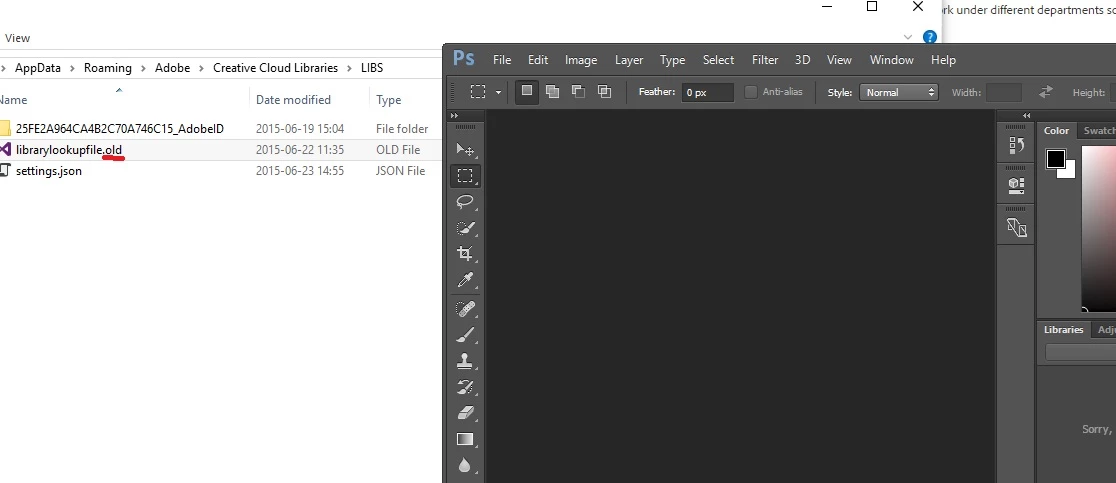
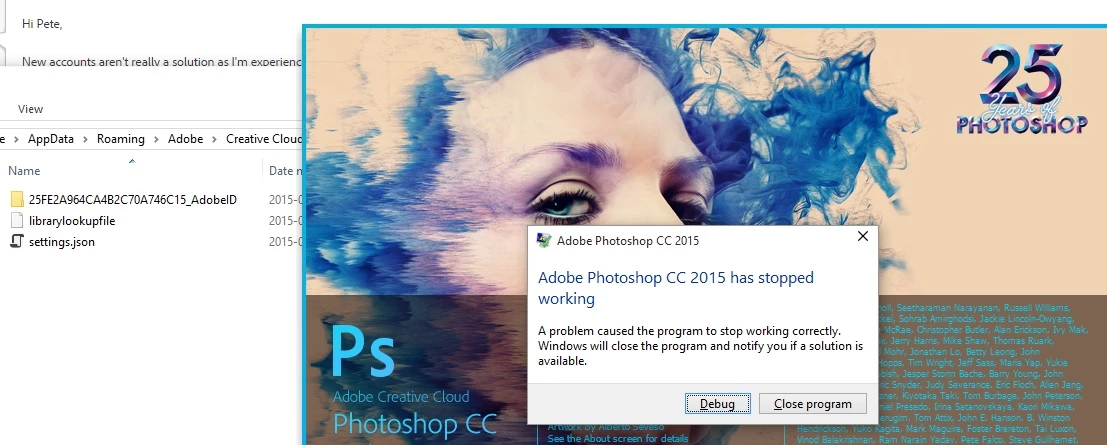
So, in C:\Users\%USERNAME%\AppData\Roaming\Adobe\Creative Cloud Libraries\LIBS is a file called librarylookupfile

This is the file that appears to be responsible for my crash at least (and looking at the dump data, everyone is having the same issue). Renaming this file (or just deleting it) resolves the issue for me.

I'm not sure what the significance of this file is, it just appears to contain a reference to Fonts that I have used. I'm also not sure if it is truly corrupt or if there is an issue with the latest version of Photoshop when loading a valid version of this file.

Either way, try renaming that and see if it works for you.

Thanks.

35 replies

Participant
July 2, 2015

I also would like an answer. I can edit the raw image in lightroom cc and then proceed to edit in Photoshop cc 2015 only to crash between different layer builds! I am running a MacBook Pro retina. I also cannot get the previous version to install as it is not even shown on the cloud program under previous versions. Would really like an answer Adobe.

Participant
July 2, 2015

This did not fix it for me

Participant
July 2, 2015

I had this problem fixed it then Photoshop wouldn't save my preferences.....final solution for me was to totally uninstall all Adobe apps (including the full Premiere Pro suite, Illustrator and Acrobat), use the Creative cleaner to clean for all apps, delete anything adobe in registry and all Adobe folders on the C drive, then I re installed everything, only took a fewhours and no problems since.

Participant
July 1, 2015
Problem Event Name:APPCRASH
  Application Name:Photoshop.exe
  Application Version:16.0.0.88
  Application Timestamp:55681d39
  Fault Module Name:MSVCR120.dll
  Fault Module Version:12.0.21005.1
  Fault Module Timestamp:524f83ff
  Exception Code:c000001d
  Exception Offset:0000000000096cd5
  OS Version:6.1.7600.2.0.0.256.1
  Locale ID:1033
  Additional Information 1:096a
  Additional Information 2:096a2e6fc4d77a7a966ff48506139a6c
  Additional Information 3:016d
  Additional Information 4:016dfb7218e8ce18ad1c15d79aa0a2ae

Read our privacy statement online:

  http://go.microsoft.com/fwlink/?linkid=104288&clcid=0x0409

If the online privacy statement is not available, please read our privacy statement offline:

  C:\Windows\system32\en-US\erofflps.txt

I got this issue how to solve it.

Participating Frequently
June 27, 2015

vdrielc

Thanks a million, it is working now.

Lee

MarciA
Participant
June 25, 2015

This is what I get when trying to 'open as' right from an image. If I open from the Photoshop icon no problem. Not sure why this happens, never had an issue with just CC. Takes about 20 clicks (assuming there are just that any error messages behind one another) for it to go away.

Chris Cox
Legend
June 26, 2015

That is not related to this topic.

And it just means that your onOne plugins need to be reinstalled to get all their support files in place.

MarciA
Participant
June 26, 2015

Thanks, I did not realize it was not related or that it was onOne plugins! I thought it was telling me to reinstall Photoshop - thank you

Participating Frequently
June 23, 2015

‌My pleasure guys! Glad to help.

Participating Frequently
June 23, 2015
Pete.Green
Community Manager
Community Manager
June 23, 2015

Awesome -- Great job Sleuthing that one out vdrielc!

Looking forward to others seeing resolution with this solution.

Thanks for putting it up on your blog. Much appreciated!

Hope PS runs smoothly for you all here on out, apologies for the crashes!

Regards

Pete

vdrielcCorrect answer
Participating Frequently
June 23, 2015

I've done a little investigating myself, since Adobe isn't really coming to the party on fixing this.

So, in C:\Users\%USERNAME%\AppData\Roaming\Adobe\Creative Cloud Libraries\LIBS is a file called librarylookupfile

This is the file that appears to be responsible for my crash at least (and looking at the dump data, everyone is having the same issue). Renaming this file (or just deleting it) resolves the issue for me.

I'm not sure what the significance of this file is, it just appears to contain a reference to Fonts that I have used. I'm also not sure if it is truly corrupt or if there is an issue with the latest version of Photoshop when loading a valid version of this file.

Either way, try renaming that and see if it works for you.

Thanks.

User9500
Participating Frequently
June 23, 2015

That worked for me, vdrielc! Crazy how one little file could crash the whole program. When launching Photoshop 2015, it creates a new librarylookupfile, so I compared the two in notepad++.  The old one just has a bunch of "NUL NUL NUL NUL" (not sure what they're supposed to be), but the new one has a line of actual readable information. The old one must have been corrupted or something. Nice detective skills!

Participating Frequently
June 23, 2015

Glad I could help. It does recreate the file, and yes, the original is most definitely corrupted.

You didn't by any chance use Adobe Shape on an iPad before the issue started? (Or add any other content to the CC Library for that matter?)

http://www.vandrielmedia.com/articles/photoshop-cc-2015-crash-on-startup-fixed

Thanks

Participating Frequently
June 22, 2015

Experiencing the same issue. Started this morning.

Version=1

EventType=APPCRASH

EventTime=130794528685709011

ReportType=2

Consent=1

UploadTime=130794528687389011

ReportIdentifier=8a821bf5-18e1-11e5-8070-50e5493c09e6

IntegratorReportIdentifier=b921fbb6-bf71-4c6d-b04d-2b50525e88f5

NsAppName=Photoshop.exe

Response.BucketId=8b7d6c1b6ca23d615ac09ec254fe22dd

Response.BucketTable=4

Response.LegacyBucketId=120264955728

Response.type=4

Sig[0].Name=Application Name

Sig[0].Value=Photoshop.exe

Sig[1].Name=Application Version

Sig[1].Value=16.0.0.88

Sig[2].Name=Application Timestamp

Sig[2].Value=55681d39

Sig[3].Name=Fault Module Name

Sig[3].Value=Photoshop.exe

Sig[4].Name=Fault Module Version

Sig[4].Value=16.0.0.88

Sig[5].Name=Fault Module Timestamp

Sig[5].Value=55681d39

Sig[6].Name=Exception Code

Sig[6].Value=c0000005

Sig[7].Name=Exception Offset

Sig[7].Value=000000000385514d

DynamicSig[1].Name=OS Version

DynamicSig[1].Value=10.0.10130.2.0.0.256.48

DynamicSig[2].Name=Locale ID

DynamicSig[2].Value=1033

DynamicSig[22].Name=Additional Information 1

DynamicSig[22].Value=d9f7

DynamicSig[23].Name=Additional Information 2

DynamicSig[23].Value=d9f7c4b749bdbc5daa0802daf8800d0f

DynamicSig[24].Name=Additional Information 3

DynamicSig[24].Value=e811

DynamicSig[25].Name=Additional Information 4

DynamicSig[25].Value=e811ad99a804f999e013148ad95a439a

UI[2]=C:\Program Files\Adobe\Adobe Photoshop CC 2015\Photoshop.exe

UI[3]=Adobe Photoshop CC 2015 has stopped working

UI[4]=Windows can check online for a solution to the problem.

UI[5]=Check online for a solution and close the program

UI[6]=Check online for a solution later and close the program

UI[7]=Close the program

LoadedModule[0]=C:\Program Files\Adobe\Adobe Photoshop CC 2015\Photoshop.exe

LoadedModule[1]=C:\WINDOWS\SYSTEM32\ntdll.dll

LoadedModule[2]=C:\WINDOWS\system32\KERNEL32.DLL

LoadedModule[3]=C:\WINDOWS\system32\KERNELBASE.dll

LoadedModule[4]=C:\WINDOWS\system32\WS2_32.dll

LoadedModule[5]=C:\WINDOWS\system32\sechost.dll

LoadedModule[6]=C:\WINDOWS\system32\RPCRT4.dll

LoadedModule[7]=C:\WINDOWS\WinSxS\amd64_microsoft.windows.gdiplus_6595b64144ccf1df_1.1.10130.0_none_043d3dc070626c47\gdiplus.dll

LoadedModule[8]=C:\WINDOWS\system32\msvcrt.dll

LoadedModule[9]=C:\WINDOWS\system32\combase.dll

LoadedModule[10]=C:\WINDOWS\SYSTEM32\GLU32.dll

LoadedModule[11]=C:\WINDOWS\system32\NSI.dll

LoadedModule[12]=C:\WINDOWS\SYSTEM32\mscms.dll

LoadedModule[13]=C:\WINDOWS\system32\USER32.dll

LoadedModule[14]=C:\WINDOWS\SYSTEM32\OPENGL32.dll

LoadedModule[15]=C:\WINDOWS\system32\GDI32.dll

LoadedModule[16]=C:\WINDOWS\system32\ADVAPI32.dll

LoadedModule[17]=C:\WINDOWS\SYSTEM32\WINHTTP.dll

LoadedModule[18]=C:\Program Files\Adobe\Adobe Photoshop CC 2015\AdbePM.dll

LoadedModule[19]=C:\WINDOWS\SYSTEM32\WINSPOOL.DRV

LoadedModule[20]=C:\Program Files\Adobe\Adobe Photoshop CC 2015\icucnv40.dll

LoadedModule[21]=C:\Program Files\Adobe\Adobe Photoshop CC 2015\adobe_caps.dll

LoadedModule[22]=C:\Program Files\Adobe\Adobe Photoshop CC 2015\VulcanControl.dll

LoadedModule[23]=C:\WINDOWS\system32\SHELL32.dll

LoadedModule[24]=C:\Program Files\Adobe\Adobe Photoshop CC 2015\VulcanMessage5.dll

LoadedModule[25]=C:\WINDOWS\system32\ole32.dll

LoadedModule[26]=C:\Program Files\Adobe\Adobe Photoshop CC 2015\cg.dll

LoadedModule[27]=C:\WINDOWS\system32\windows.storage.dll

LoadedModule[28]=C:\WINDOWS\system32\OLEAUT32.dll

LoadedModule[29]=C:\WINDOWS\system32\shlwapi.dll

LoadedModule[30]=C:\Program Files\Adobe\Adobe Photoshop CC 2015\cgGL.dll

LoadedModule[31]=C:\WINDOWS\system32\kernel.appcore.dll

LoadedModule[32]=C:\Program Files\Adobe\Adobe Photoshop CC 2015\ahclient.dll

LoadedModule[33]=C:\WINDOWS\system32\shcore.dll

LoadedModule[34]=C:\Program Files\Adobe\Adobe Photoshop CC 2015\amtlib.dll

LoadedModule[35]=C:\WINDOWS\system32\powrprof.dll

LoadedModule[36]=C:\Program Files\Adobe\Adobe Photoshop CC 2015\AXEDOMCore.dll

LoadedModule[37]=C:\WINDOWS\system32\profapi.dll

LoadedModule[38]=C:\Program Files\Adobe\Adobe Photoshop CC 2015\MPS.dll

LoadedModule[39]=C:\Program Files\Adobe\Adobe Photoshop CC 2015\PlugPlugOwl.dll

LoadedModule[40]=C:\Program Files\Adobe\Adobe Photoshop CC 2015\tbb.dll

LoadedModule[41]=C:\WINDOWS\system32\SETUPAPI.dll

LoadedModule[42]=C:\WINDOWS\system32\CFGMGR32.dll

LoadedModule[43]=C:\Program Files\Adobe\Adobe Photoshop CC 2015\ExtendScript.dll

LoadedModule[44]=C:\Program Files\Adobe\Adobe Photoshop CC 2015\ScCore.dll

LoadedModule[45]=C:\Program Files\Adobe\Adobe Photoshop CC 2015\AdobeOwl.dll

LoadedModule[46]=C:\WINDOWS\system32\CRYPT32.dll

LoadedModule[47]=C:\WINDOWS\system32\MSASN1.dll

LoadedModule[48]=C:\WINDOWS\SYSTEM32\USERENV.dll

LoadedModule[49]=C:\Program Files\Adobe\Adobe Photoshop CC 2015\dnssd.dll

LoadedModule[50]=C:\Program Files\Adobe\Adobe Photoshop CC 2015\AdobeLinguistic.dll

LoadedModule[51]=C:\WINDOWS\SYSTEM32\MSVCP120.dll

LoadedModule[52]=C:\WINDOWS\SYSTEM32\MSVCR120.dll

LoadedModule[53]=C:\WINDOWS\SYSTEM32\DDRAW.dll

LoadedModule[54]=C:\WINDOWS\SYSTEM32\bcrypt.dll

LoadedModule[55]=C:\Program Files\Adobe\Adobe Photoshop CC 2015\icudt40.dll

LoadedModule[56]=C:\Program Files\Adobe\Adobe Photoshop CC 2015\libmmd.dll

LoadedModule[57]=C:\WINDOWS\SYSTEM32\msi.dll

LoadedModule[58]=C:\WINDOWS\SYSTEM32\WININET.dll

LoadedModule[59]=C:\WINDOWS\SYSTEM32\IPHLPAPI.DLL

LoadedModule[60]=C:\WINDOWS\SYSTEM32\MSVCP110.dll

LoadedModule[61]=C:\WINDOWS\SYSTEM32\MSVCR110.dll

LoadedModule[62]=C:\Program Files\Adobe\Adobe Photoshop CC 2015\AIDE.dll

LoadedModule[63]=C:\WINDOWS\SYSTEM32\DCIMAN32.dll

LoadedModule[64]=C:\WINDOWS\SYSTEM32\WINNSI.DLL

LoadedModule[65]=C:\WINDOWS\system32\IMM32.DLL

LoadedModule[66]=C:\WINDOWS\system32\MSCTF.dll

LoadedModule[67]=C:\Program Files\Adobe\Adobe Photoshop CC 2015\tbbmalloc.dll

LoadedModule[68]=C:\WINDOWS\SYSTEM32\bcryptPrimitives.dll

LoadedModule[69]=C:\WINDOWS\system32\uxtheme.dll

LoadedModule[70]=C:\Program Files\Common Files\microsoft shared\ink\tiptsf.dll

LoadedModule[71]=C:\WINDOWS\SYSTEM32\VERSION.dll

LoadedModule[72]=C:\WINDOWS\SYSTEM32\PROPSYS.dll

LoadedModule[73]=C:\WINDOWS\WinSxS\amd64_microsoft.windows.common-controls_6595b64144ccf1df_6.0.10130.5_none_8475d8205cca41e2\Comctl32.dll

LoadedModule[74]=C:\WINDOWS\SYSTEM32\STI.DLL

LoadedModule[75]=C:\WINDOWS\system32\clbcatq.dll

LoadedModule[76]=C:\WINDOWS\SYSTEM32\cryptsp.dll

LoadedModule[77]=C:\WINDOWS\system32\rsaenh.dll

LoadedModule[78]=C:\WINDOWS\SYSTEM32\CRYPTBASE.dll

LoadedModule[79]=C:\WINDOWS\SYSTEM32\wiatrace.dll

LoadedModule[80]=C:\Program Files\Adobe\Adobe Photoshop CC 2015\Photoshop.dll

LoadedModule[81]=C:\Program Files\Adobe\Adobe Photoshop CC 2015\PSViews.dll

LoadedModule[82]=C:\Program Files\Adobe\Adobe Photoshop CC 2015\PSArt.dll

LoadedModule[83]=C:\WINDOWS\system32\dwmapi.dll

LoadedModule[84]=C:\WINDOWS\system32\dataexchange.dll

LoadedModule[85]=C:\WINDOWS\system32\d2d1.dll

LoadedModule[86]=C:\WINDOWS\system32\dcomp.dll

LoadedModule[87]=C:\WINDOWS\system32\d3d11.dll

LoadedModule[88]=C:\WINDOWS\system32\dxgi.dll

LoadedModule[89]=C:\WINDOWS\system32\twinapi.appcore.dll

LoadedModule[90]=C:\WINDOWS\SYSTEM32\DWrite.dll

LoadedModule[91]=C:\WINDOWS\system32\c_g18030.dll

LoadedModule[92]=C:\WINDOWS\SYSTEM32\ntmarta.dll

LoadedModule[93]=C:\WINDOWS\SYSTEM32\MSIMG32.dll

LoadedModule[94]=C:\WINDOWS\SYSTEM32\icm32.dll

LoadedModule[95]=C:\WINDOWS\SYSTEM32\apphelp.dll

LoadedModule[96]=C:\Windows\System32\dlnashext.dll

LoadedModule[97]=C:\Windows\System32\PlayToDevice.dll

LoadedModule[98]=C:\Windows\System32\DevDispItemProvider.dll

LoadedModule[99]=C:\WINDOWS\System32\MMDevApi.dll

LoadedModule[100]=C:\WINDOWS\System32\DEVOBJ.dll

LoadedModule[101]=C:\WINDOWS\system32\wpdshext.dll

LoadedModule[102]=C:\Program Files\Adobe\Adobe Photoshop CC 2015\Required\Plug-Ins\Extensions\FastCore.8bx

LoadedModule[103]=C:\Program Files\Adobe\Adobe Photoshop CC 2015\Required\Plug-Ins\Extensions\MMXCore.8bx

LoadedModule[104]=C:\Program Files\Adobe\Adobe Photoshop CC 2015\svml_dispmd.dll

LoadedModule[105]=C:\Program Files\Adobe\Adobe Photoshop CC 2015\Required\Plug-Ins\Extensions\MultiProcessor Support.8bx

LoadedModule[106]=C:\Program Files\Adobe\Adobe Photoshop CC 2015\PLUGIN.dll

LoadedModule[107]=C:\WINDOWS\system32\wbem\wbemprox.dll

LoadedModule[108]=C:\WINDOWS\SYSTEM32\wbemcomn.dll

LoadedModule[109]=C:\WINDOWS\system32\wbem\wbemsvc.dll

LoadedModule[110]=C:\WINDOWS\system32\wbem\fastprox.dll

LoadedModule[111]=C:\Program Files\Adobe\Adobe Photoshop CC 2015\updaternotifications.dll

LoadedModule[112]=C:\WINDOWS\SYSTEM32\NETAPI32.dll

LoadedModule[113]=C:\WINDOWS\SYSTEM32\wkscli.dll

LoadedModule[114]=C:\WINDOWS\SYSTEM32\netutils.dll

LoadedModule[115]=C:\WINDOWS\SYSTEM32\srvcli.dll

LoadedModule[116]=C:\Program Files\Adobe\Adobe Photoshop CC 2015\AdobeXMP.dll

LoadedModule[117]=C:\Program Files\Adobe\Adobe Photoshop CC 2015\Required\Plug-Ins\File Formats\Dicom.8bi

LoadedModule[118]=C:\WINDOWS\SYSTEM32\WSOCK32.dll

LoadedModule[119]=C:\Windows\System32\taskschd.dll

LoadedModule[120]=C:\Program Files\Adobe\Adobe Photoshop CC 2015\Required\Plug-Ins\File Formats\PSDX.8bi

LoadedModule[121]=C:\Windows\System32\SspiCli.dll

LoadedModule[122]=C:\Program Files\Common Files\Adobe\Plug-Ins\CC\File Formats\Camera Raw.8bi

LoadedModule[123]=C:\Windows\System32\XmlLite.dll

LoadedModule[124]=C:\Program Files\Adobe\Adobe Photoshop CC 2015\BIB.dll

LoadedModule[125]=C:\Program Files\Adobe\Adobe Photoshop CC 2015\BIBUtils.dll

LoadedModule[126]=C:\Program Files\Adobe\Adobe Photoshop CC 2015\ACE.dll

LoadedModule[127]=C:\Program Files\Adobe\Adobe Photoshop CC 2015\AGM.dll

LoadedModule[128]=C:\Program Files\Adobe\Adobe Photoshop CC 2015\CoolType.dll

LoadedModule[129]=C:\Program Files\Adobe\Adobe Photoshop CC 2015\AXE8SharedExpat.dll

State[0].Key=Transport.DoneStage1

State[0].Value=1

FriendlyEventName=Stopped working

ConsentKey=APPCRASH

AppName=Adobe Photoshop CC 2015

AppPath=C:\Program Files\Adobe\Adobe Photoshop CC 2015\Photoshop.exe

NsPartner=windows

NsGroup=windows8

ApplicationIdentity=19EF12A939B92EEE625074C2BEABFB48

User9500
Participating Frequently
June 21, 2015

An interesting thing I've noticed is that if i launch Photoshop immediately after booting and while my desktop stuff is still loading, it gets further into launching before it crashes. Usually it gets to "initializing panels" then crashes, but once it even got as far as bringing up the main program interface then immediately stopped working. After a few seconds, it again stops at "Reading Color Settings". I wonder if something that launches at startup is interfering. I tried unplugging everything except the mouse, keyboard, and main monitor, but still the same behavior.

Participating Frequently
June 21, 2015

I had a simmilar feeling. When starting after a "Safe Start" it blocked when trying to access th CC Libraries ... whatever ths really is