Known Participant
June 16, 2015
Answered

Photoshop cc 2015 crashes on startup

  • June 16, 2015
  • 35 replies
  • 78997 views

I updated my Photoshop and LR this morning, LR is fine but PS is crashing on startup, saying 'The last time you opened Photoshop CC, it unexpectedly quit while reopening windows. Do you want to try to reopen its windows again?' I have already trawled the forums, and tried a few suggestions (deleting the temp file in the autorecover file, Signing out of creative Cloud) but now at a total loss. Running a 2013 Retina MacBook.

Any thoughts would be much appreciated.
This topic has been closed for replies.
Correct answer vdrielc

I've done a little investigating myself, since Adobe isn't really coming to the party on fixing this.

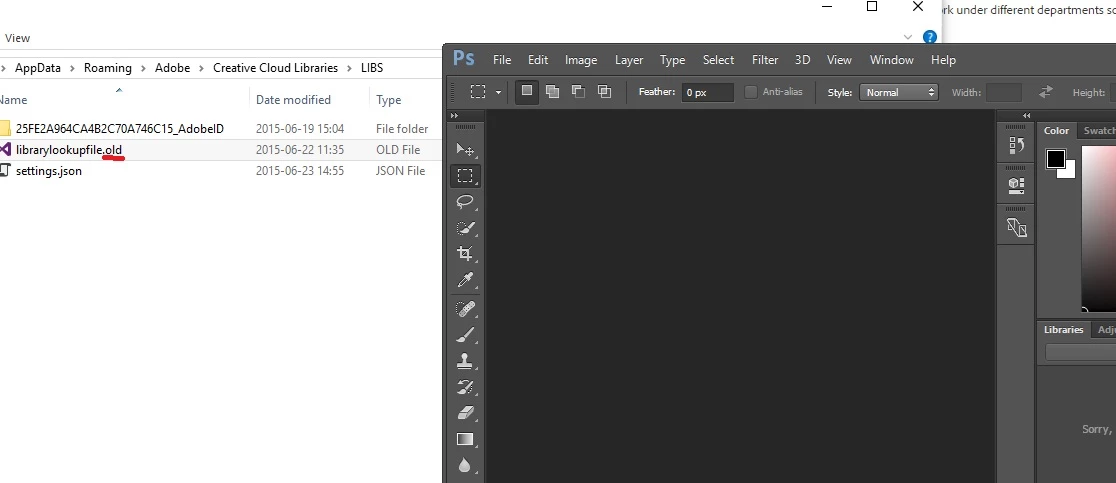
So, in C:\Users\%USERNAME%\AppData\Roaming\Adobe\Creative Cloud Libraries\LIBS is a file called librarylookupfile

This is the file that appears to be responsible for my crash at least (and looking at the dump data, everyone is having the same issue). Renaming this file (or just deleting it) resolves the issue for me.

I'm not sure what the significance of this file is, it just appears to contain a reference to Fonts that I have used. I'm also not sure if it is truly corrupt or if there is an issue with the latest version of Photoshop when loading a valid version of this file.

Either way, try renaming that and see if it works for you.

Thanks.

35 replies

Participant
June 21, 2015

I'm having the same problem, Photoshop CC 2015 was working fine until I came home last night and it crashed when I went to edit a file from Lightroom. The only thing that worked was to create a new user name in windows as described above. I uninstalled Photoshop and used the clean tool, then did the same with CC cloud desktop to no avail. I also can't find 2014 Photoshop CC on the cloud, it's not listed anywhere. I have wedding pictures to finish and don't want to create new settings and a new lightroom catalog on my SSD drive. If someone can help me get 2014 back I would really appreciate it! FYI, Photoshop CC 2015 is still working fine on my Laptop.... go figure??

Participating Frequently
June 21, 2015

I can only tell you what worked for me and because your laptop works I feel you have the same problem.

The crashing is due to PS add-ins that are not compatible with 2015CC. A simple diagnostic can help identify if this is the problem (as outlined in a previous post).

1. Move all add-ins from the PS 2015 program folder to a separate clean folder on your desktop. Do this with PS closed.

2. Restart PS 2015. If it starts without failing then you know that one of the add-ins is to blame. For me there were two add-ins that caused starting problems for PS 2015.

3. If PS 2015 fails to start with ALL add-ins moved from the add-ins folder then you have another problem, so good luck.

4. If PS 2015 starts properly with ALL add-ins moved from the add-ins folder you have found the problem and the next step is necessary.

5. Move add-ins back to the PS 2015 add-ins folder ONE at a time and restart PS 2015 after each move. Do this until you find the one(s) that cause PS 2015 to fail to start.

6. Contact the source of the problem add-in to see if they now have an update for their add-in for PS 2015.

Participant
June 21, 2015

Thanks for the reply! The only add in I'm using is the NIK collection, which I removed reinstalled Photoshop 2015 and still no success! I did find my installer for the 2014 build and it's working perfect, I think I'm going to stick with 2014 for a bit until I see a solution come in from Adobe or at least get the wedding shots done. FYI the NIK collection is working fine in Photoshop CC 2015 on my Laptop, crazy isn't it. Thanks again!

caleuanhopkins
Participant
June 17, 2015

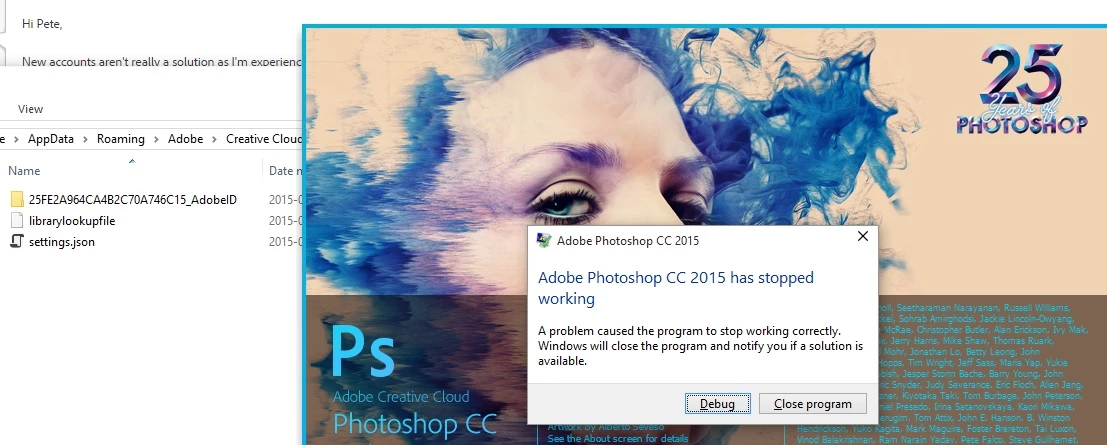
Got the same issue on a Windows 7 machine. starts up and crashes, does the same for InDesign 2015 too. Have cleared preferences and settings for PS CC 2015 but no help either. Have seen similar errors codes for issues with graphic cards but Windows event debugger says it's Photoshop.exe that's causing the fault, not a .dll file.

Pete.Green
Community Manager
Community Manager
June 17, 2015

Hey folks,

Sorry about the PS crashes!

For the windows crashers -- Can you head to the Windows Event viewer and paste the crash details here?

Regards,

Pete

LongTimeMemories
Participant
June 17, 2015

Faulting application name: Photoshop.exe, version: 16.0.0.88, time stamp: 0x55681d39

Faulting module name: Photoshop.exe, version: 16.0.0.88, time stamp: 0x55681d39

Exception code: 0xc0000005

Fault offset: 0x000000000385514d

Faulting process id: 0x4270

Faulting application start time: 0x01d0a93d88fdcdef

Faulting application path: F:\adobe\Adobe Photoshop CC 2015\Photoshop.exe

Faulting module path: F:\adobe\Adobe Photoshop CC 2015\Photoshop.exe

Report Id: c725b4c6-1530-11e5-8f4f-d050995ccf12

Participating Frequently
June 17, 2015

I have exactly the same issue. The LR launch and works as it should. The CC2015 crashes at startup (Windows 7 SP1, 64-bits)

I will later on try the solution proposed by Pete Green if not bye bye 2015 and welcome again 2014

Pete.Green
Community Manager
Community Manager
June 16, 2015

Hi TaberPhotography,

Does it help if you clear the Photoshop CC 2015 preferences? blogs.adobe.com/crawlspace/2012/07/photoshop-basic-troubleshooting-steps-to-fix-most-issues.html#Preferences

Regards

Pete

Amr Essam
Participant
June 17, 2015

Thanks Peter but it didn't work.

Known Participant
June 16, 2015

Update... I have reinstalled CC 2014 from the 'earlier versions' section and 2014 is running perfectly, obviously a glitch with the 2015 software, install.

Participant
June 25, 2015

I have Windows 7 24mB ram, and want to go back to cc 2014 also. However, it is not listed under the apps in the Creative Cloud desktop panel. Can anyone direct me to an alternate download.

With cc 2015 I am having issues with jerky zooming and the selections disappear with close zoom. I have toggled off the ruler and upgraded my video card to GeForce 750 ti.