

Participant
April 30, 2018
Answered

Photoshop CC 2018 crop tool

  • April 30, 2018
  • 3 replies
  • 5463 views

Old Photoshop had a crop tool to cut photo to equal 3rds. Is it not available on the new Photoshop CC 2018 ?

    This topic has been closed for replies.
    Correct answer JJMack

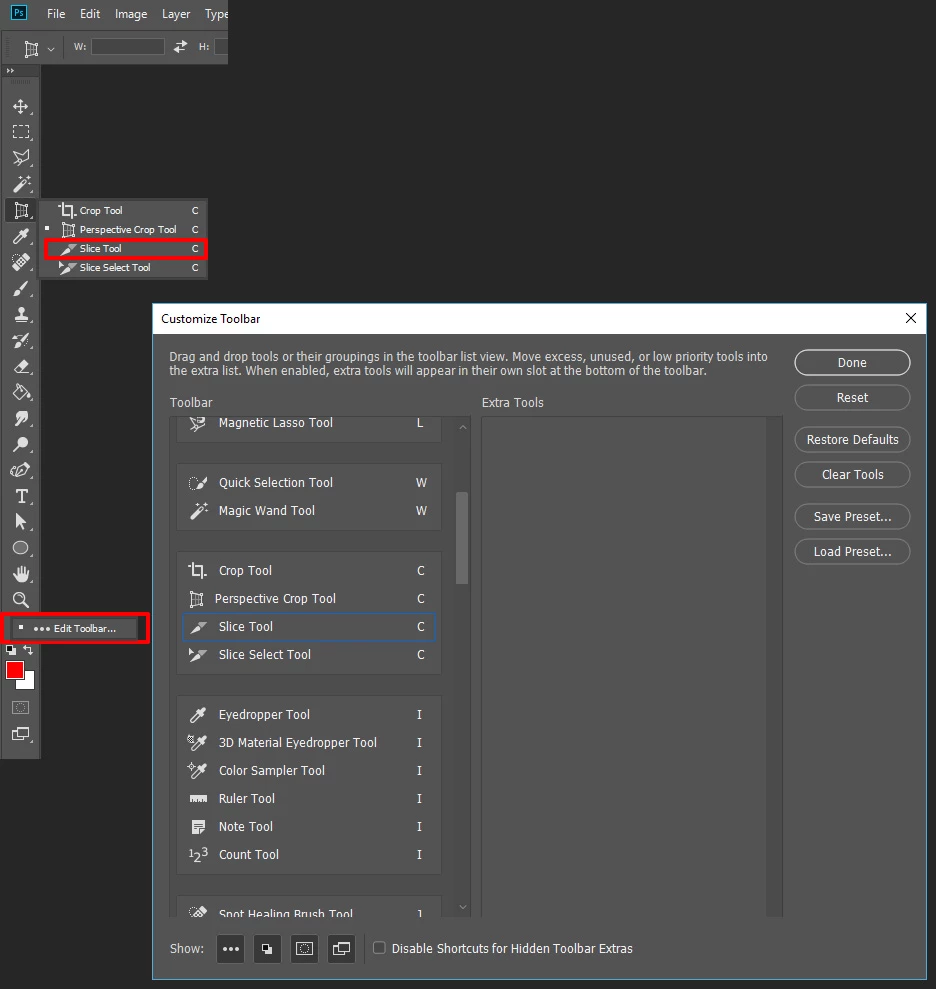
    The old Photoshop had the "Slice Selection Tool", it was easier. What ever happened to it ? Why was it not included withe the new Photoshop CC 2018 ?


    Did you customize your Toolbar and remove the tool? If you did restore Defaults.
    3 replies

    magical_Skyline0D4A
    Inspiring
    April 30, 2018

    You can use guide, choose View > New Guide Layout ... And enter the 3 columns

    Participant
    April 30, 2018

                          I meant cropping it into 3 equal sections from 1 panoramic photo and saving it. In the older version of Photoshop it has this crop tool.

    JJMack
    Community Expert
    Community Expert
    April 30, 2018

    To do that you would need to create three new document each beeing 1/3 the image,  Could easly be done by setting a fixed size selection.  100% height 33.3% wide.  Copy and past the three 1/3  selections of the background layer.  Delete the background and save layers as files.

    JJMack
    Participant
    May 12, 2018

    The old Photoshop had the "Slice Selection Tool", it was easier. What ever happened to it ? Why was it not included withe the new Photoshop CC 2018 ?

    JJMack
    Community Expert
    Community Expert
    April 30, 2018

    Actually is has several rules. But you need to click on a corner to have the guide be displayed. Always Show Overlay alone does not do it....

    JJMack
    peterf91279813
    Participant
    April 30, 2018

    pretty much solves my problem!