Participating Frequently
March 13, 2019
Answered

Photoshop CC: how to always open images from the clipboard with a certain resolution?

  • March 13, 2019
  • 1 reply
  • 3501 views

Photoshop CS6 opened new images from the clipboard with the resolution of the previously opened image. Can I do that with CC? It's a pain to prepare images for Retina by copying files from InDesign and then having to resize them in CC, when CS6 does that easily.

    This topic has been closed for replies.
    Correct answer D.A.R

    If I use InDesign CC. Select an image, right click and select copy, then switch to PS CS6, create a new document, the resolution is 72ppi. - regardless of the resolution of the placed image

    If I instead take a screenshot of the image and create a new document in PS CS6 the resolution will be 144ppi.

    This is the same behavior in PS CC 2019. 20.0.1

    However, if I emulate what I believe you are doing (regardless of the reason why) and set a specific resolution for one document, the next document will be the same resolution in CS6 but you are correct, the result is not the same in CC and there is no way to maintain the resolution from the previous image.

    Now the good news.

    If you know the resolution you want AND it is always the same then you can create an action that will run prior to pasting your copied file.

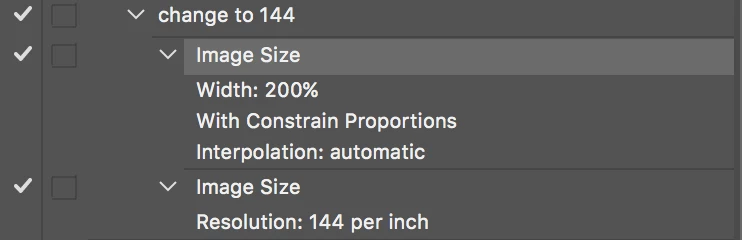
    In my example I created and action that would

    a. double the pixel dimension via percentage (200%)

    b. change the resolution to a specified amount (144ppi)

    This would give you the same result as what you have been getting in CS6. So your workflow that you have become used to doesn't change.

    To make the action run upon creating a new document use File > Scripts > Script events manager...
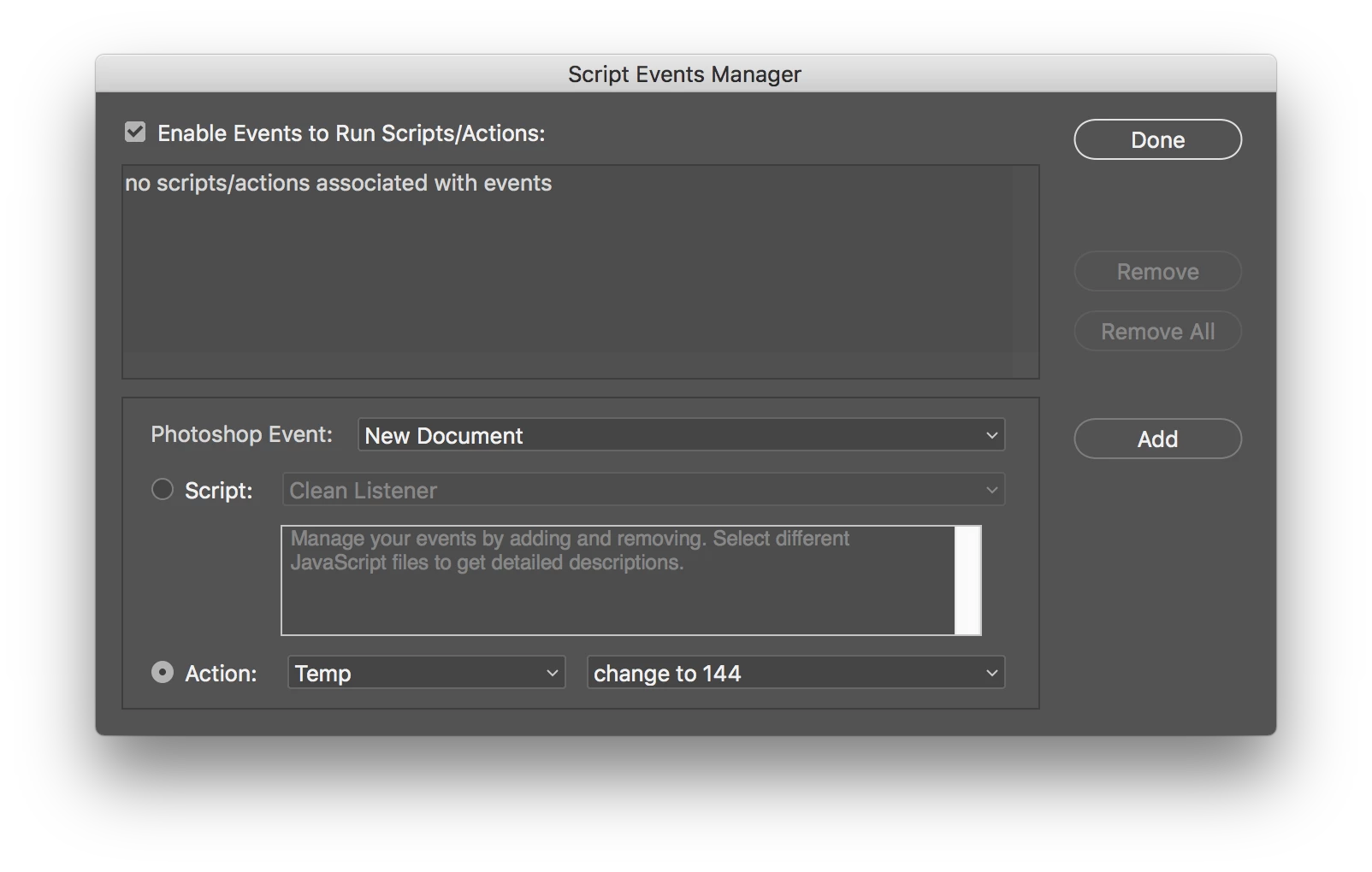
    The action
    Note that this will double the size and change the resolution for any new document unless you uncheck the "Enable Events to Run Scripts/Action" button


    1 reply

    c.pfaffenbichler
    Community Expert
    Community Expert
    March 14, 2019
    It's a pain to prepare images for Retina by copying files from InDesign

    What are you copying exactly from Indesign?

    What are the ultimately needed file formats?

    Participating Frequently
    March 14, 2019

    It’s part of our email marketing process: designers deliver the InDesign files that have to be reproduced in code. If I copy images from InDesign and create a new document in Photoshop CS6 from what’s in the clipboard, whatever resolution I choose is kept in the subsequent new Document creations. Apparently that was removed from or hidden in CC. Bringing back the “legacy” menu doesn’t do it, it still doesn’t retain the resolution.

    c.pfaffenbichler
    Community Expert
    Community Expert
    March 15, 2019
    If I copy images from InDesign and create a new document in Photoshop CS6

    You are copying images from Indesign instead of opening the linked files?

    That would seem needlessly deteriorative.
