
Question
Photoshop Color Picker functionality in UI
Hi,
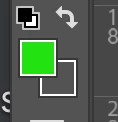
I'm working on UI, where I want a Photoshop color picker like functionality (see a snapshot from the Photoshop Toolbar). The default color-picker functionality of Photoshop updates the color palette in real time as the user hovers the eye-dropper tool on an image.
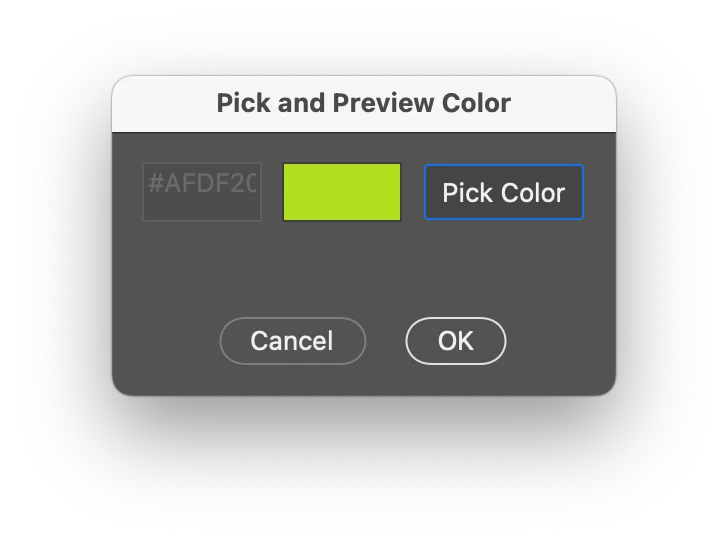
The below code rightly opens the color picker and updates the Hex value, but it is not reflecting the selected color in the preview box. I think the problem is that the color-picker or the color palette is not updating parallelly with the eye-dropper. Neither the palette is taking any color values once the eye-dropper is released.
Can anyone please look into this and fix the behaviour of the 'Pick Color' button and the 'Color Preview' box.
// Simplified color picker and preview update script

function showDialog() {
  var dialog = new Window("dialog", "Pick and Preview Color");

  // Function to update the preview panel color
  function updatePreviewColor(previewPanel, color) {
    previewPanel.graphics.backgroundColor = previewPanel.graphics.newBrush(
      previewPanel.graphics.BrushType.SOLID_COLOR,
      [color.red / 255, color.green / 255, color.blue / 255, 1]
    );
    previewPanel.graphics.foregroundColor = previewPanel.graphics.newBrush(
      previewPanel.graphics.BrushType.SOLID_COLOR,
      [color.red / 255, color.green / 255, color.blue / 255, 1]
    );
    previewPanel.notify("onDraw"); // Force the panel to redraw
  }

  // Function to convert RGB values to hex color
  function rgbToHex(r, g, b) {
    return (
      "#" +
      ((1 << 24) + (r << 16) + (g <<  + b).toString(16).slice(1).toUpperCase()
    );
  }

  // Group and elements for color picking
  var colorGroup = dialog.add("group");
  colorGroup.orientation = "row";

  var colorInput = colorGroup.add("edittext", undefined, "#000000");
  colorInput.size = [60, 30];
  colorInput.enabled = false; // Disable until checkbox is selected

  var colorPreview = colorGroup.add("panel", undefined, "");
  colorPreview.size = [60, 30];
  colorPreview.enabled = true; // Enable the panel

  var colorButton = colorGroup.add("button", undefined, "Pick Color");
  colorButton.size = [, 30];

  // Add color picker functionality
  colorButton.onClick = function() {
    var initialColor = app.foregroundColor.rgb; // Store the initial foreground color
    var pickedColor = app.showColorPicker();

    if (pickedColor !== -1) {
      // Wait until the color picker is closed and then get the foreground color
      $.sleep(100); // Add a short delay to ensure the color picker updates
      var color = app.foregroundColor.rgb;
      var hexColor = rgbToHex(color.red, color.green, color.blue);
      colorInput.text = hexColor;
      updatePreviewColor(colorPreview, color);
    } else {
      // Revert to the initial color if the picker is canceled
      app.foregroundColor.rgb = initialColor;
    }
  };

  // Add buttons
  dialog.add("statictext", undefined, " "); // Adding a line gap before buttons

  var buttons = dialog.add("group");
  buttons.alignment = "center"; // Center align the buttons
  buttons.add("button", undefined, "Cancel", { name: "cancel" });
  buttons.add("button", undefined, "OK", { name: "ok" });

  dialog.show();
}

showDialog();


 AdChoices