
Participant
October 9, 2012
Answered

Photoshop displaying everything in gray

  • October 9, 2012
  • 12 replies
  • 232466 views

I've checked Mode and grayscale isn't checked. I'm still in RGB. I'm on a mac using Photoshop CS5 and, if it helps, I was trying to do a screen shot using cmd+shift+4 and must have hit the wrong key somewhere...
Correct answer Howard Pinsky

Hi, Mandi_Miles.

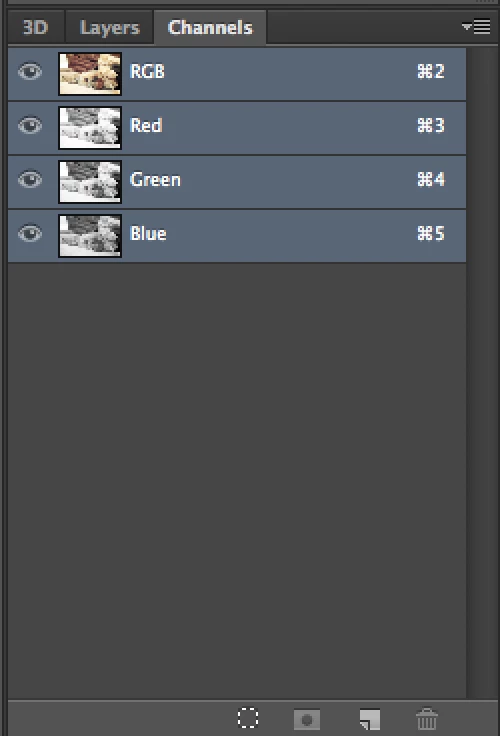
You may have switched Channels, with the Command + 3, 4 or 5 shortcut. Command + 2 should switch back to RGB, or you can check in your Channels panel. Make sure RGB is selected.

I hope that helps!

12 replies

Participant
February 26, 2022

THANKS TO MANDY MILES FOR ASKING THIS! HAHA AND THANKS TO HOWARD PINKSY!!

ITS BEEN 10 YEARS BUT STILL USEFUL


Jack Strangeways
Participant
August 17, 2021

Thank you very much. I made a shortcut mistake and Command 3 got me out of Photoshop Hell : )

nicholas weigel
Participant
July 17, 2021

Thank You! 😉

Paul Carlin
Participating Frequently
October 11, 2019

Somewhat related... I hit Shift-5 instead of Shift-F5 (on a Mac) and ended up with 50% translucent checkerboxes over my image.  Apparently Shift-1 to Shift-0 are varying degrees of checkerboxes... with Shift-0 being the solution to getting out of this.

lauren2319
Participant
January 23, 2019

THANK YOU!!!!    

Participant
December 7, 2018

life saver! thank you

Abambo
Community Expert
Community Expert
March 3, 2018

Double life saver and that 5 years after...

ABAMBO | Hard- and Software Engineer | Photographer
Participant
March 3, 2018

OMG, Howard Pinsky, I thought I wanted to kill myself until I quickly found your answer, it was accurate! You saved my life! LOL!!!! Thank you sooo much!

Participant
February 2, 2018

You just saved my life :-)

Participant
November 29, 2017

Thanks!!!!