
Participant
October 9, 2012
Answered

Photoshop displaying everything in gray

  • October 9, 2012
  • 12 replies
  • 232466 views

I've checked Mode and grayscale isn't checked. I'm still in RGB. I'm on a mac using Photoshop CS5 and, if it helps, I was trying to do a screen shot using cmd+shift+4 and must have hit the wrong key somewhere...
Correct answer Howard Pinsky

Hi, Mandi_Miles.

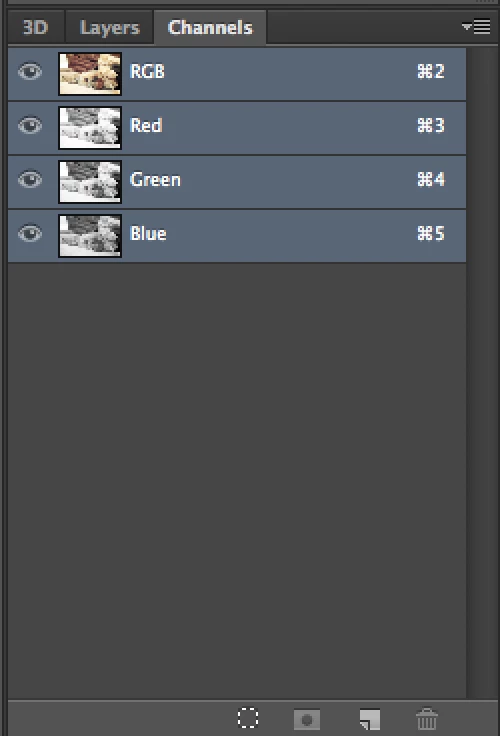
You may have switched Channels, with the Command + 3, 4 or 5 shortcut. Command + 2 should switch back to RGB, or you can check in your Channels panel. Make sure RGB is selected.

I hope that helps!

12 replies

Participant
October 16, 2017

how it turn back the background into default ? it turns white and i dont know why please help me

Participant
December 26, 2017

Go to Preferences -> Interface -> Appearance -> Color Theme

Participant
June 29, 2018

Thank you!!!!

Howard Pinsky
Adobe Employee
Howard PinskyCorrect answer
Adobe Employee
October 9, 2012

Hi, Mandi_Miles.

You may have switched Channels, with the Command + 3, 4 or 5 shortcut. Command + 2 should switch back to RGB, or you can check in your Channels panel. Make sure RGB is selected.

I hope that helps!

Participant
October 9, 2012

That was it. Thank you so much!