


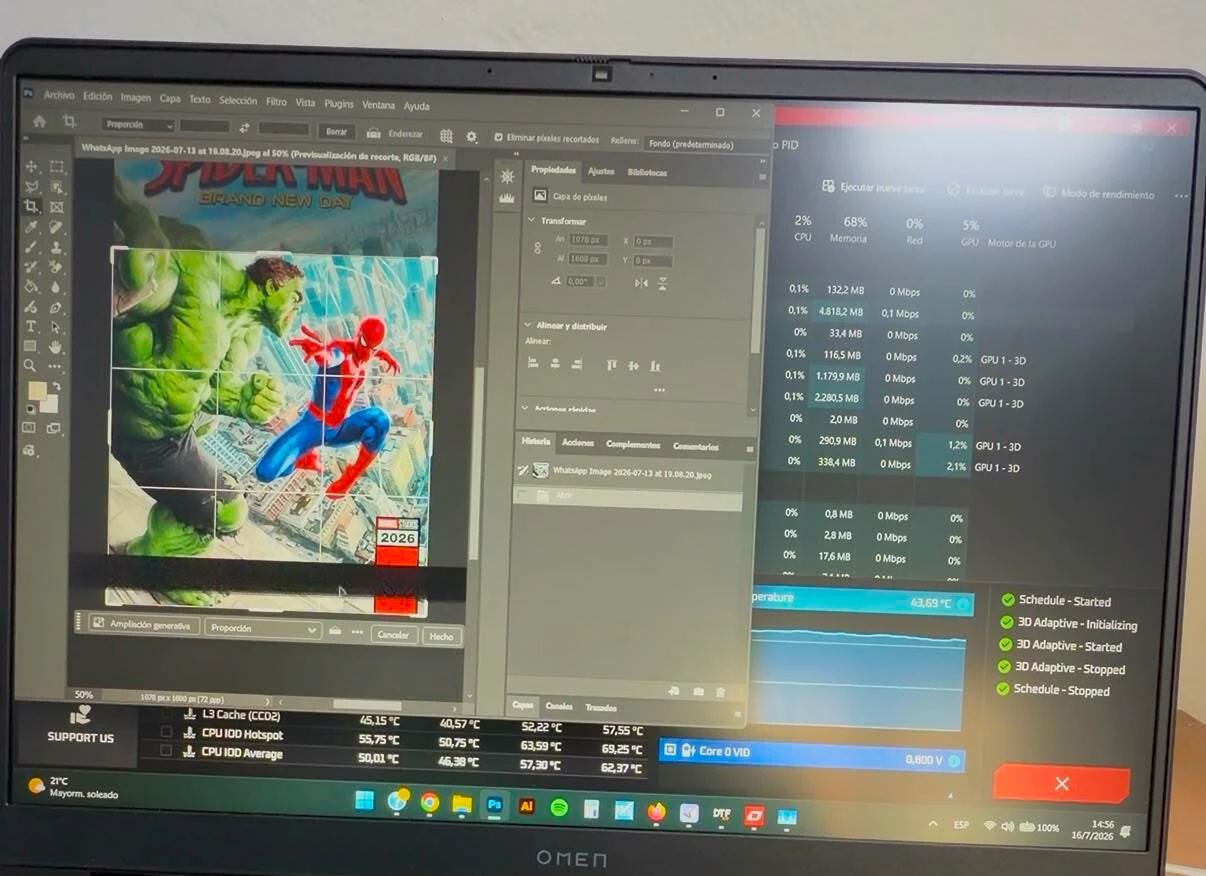
Photoshop displays random black horizontal lines on the canvas when "Use Graphics Processor" is enabled.
I'm reporting what appears to be a GPU rendering bug in Photoshop.
I recently purchased a new HP Omen laptop specifically for Photoshop work, but I'm experiencing a persistent graphics issue that only occurs in Photoshop.
System
- HP Omen Laptop
- Windows 11
- AMD Ryzen 9 8940HX
- NVIDIA GeForce RTX 5060 Laptop GPU
- AMD Radeon 610M (integrated GPU)
- Photoshop 27.8 (also tested with 26.11.6)
Issue
Random black horizontal lines appear only inside the Photoshop canvas.
The artifacts usually appear while:
- Moving the mouse
- Panning the document
- Zooming
- Moving or transforming layers
The important detail is that the artifacts are limited to the image canvas only.
The Photoshop interface (menus, panels, toolbar, etc.) remains completely normal, and the artifacts never appear elsewhere in Windows.
I've attached a screenshot where the black line is visible only inside the canvas.
Sometimes the issue becomes worse:
- Photoshop freezes.
- The screen briefly goes black.
- The laptop suddenly restarts.
- There is no BSOD.
Important observation
If I disable:
Edit → Preferences → Performance → Use Graphics Processor
the problem disappears completely.
With GPU acceleration disabled:
- No black lines
- No visual artifacts
- Photoshop behaves normally
This strongly suggests the issue is related to Photoshop's GPU rendering.
Troubleshooting already performed
I have already tried:
- HP OEM NVIDIA driver
- Latest NVIDIA Studio Driver
- Latest NVIDIA Game Ready Driver
- Clean driver installations
- Multiple Photoshop GPU settings
- Photoshop 27.8
- Photoshop 26.11.6
I also stress-tested the GPU using OCCT for approximately 38 minutes at 99% GPU usage.
The GPU completed the test successfully:
- No artifacts
- No crashes
- Normal temperatures
This makes me believe the hardware itself is functioning correctly, since the issue appears only inside Photoshop.
Additional information
The reason I'm trying to solve this instead of simply disabling GPU acceleration is that I specifically purchased this laptop because of its RTX 5060 GPU for Photoshop and other creative work.
Disabling "Use Graphics Processor" is only a temporary workaround and defeats the purpose of having dedicated GPU acceleration.
Has anyone experienced a similar issue, especially on RTX 50-series laptops or systems using hybrid graphics (AMD + NVIDIA)?
I'd be happy to provide Photoshop System Info, crash logs, or perform additional tests if needed.
Thank you.
 AdChoices