umaynome
Inspiring
February 6, 2025
Question

Photoshop Distribution by custom width parameters

  • February 6, 2025
  • 4 replies
  • 1330 views

Hello Group,


I am pretty solid in PS and familiar with the distribution tool and it works nicely for setting layers at the same height or even the same width (evenly) across all layers in a row.


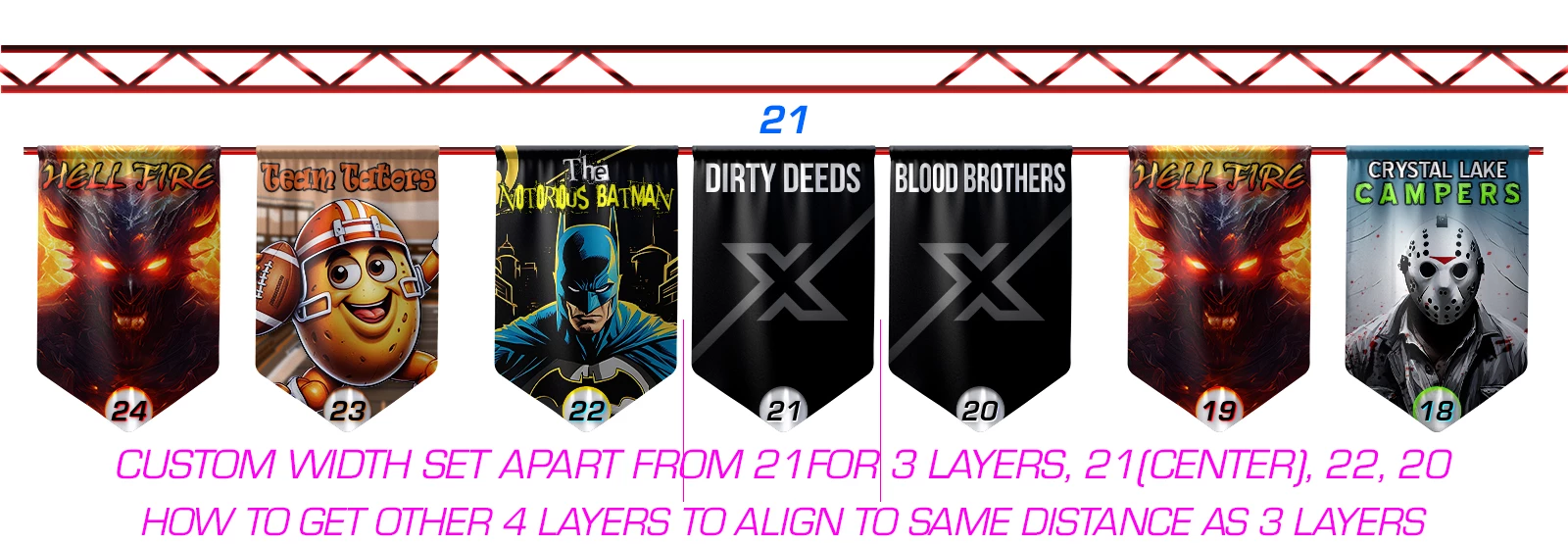
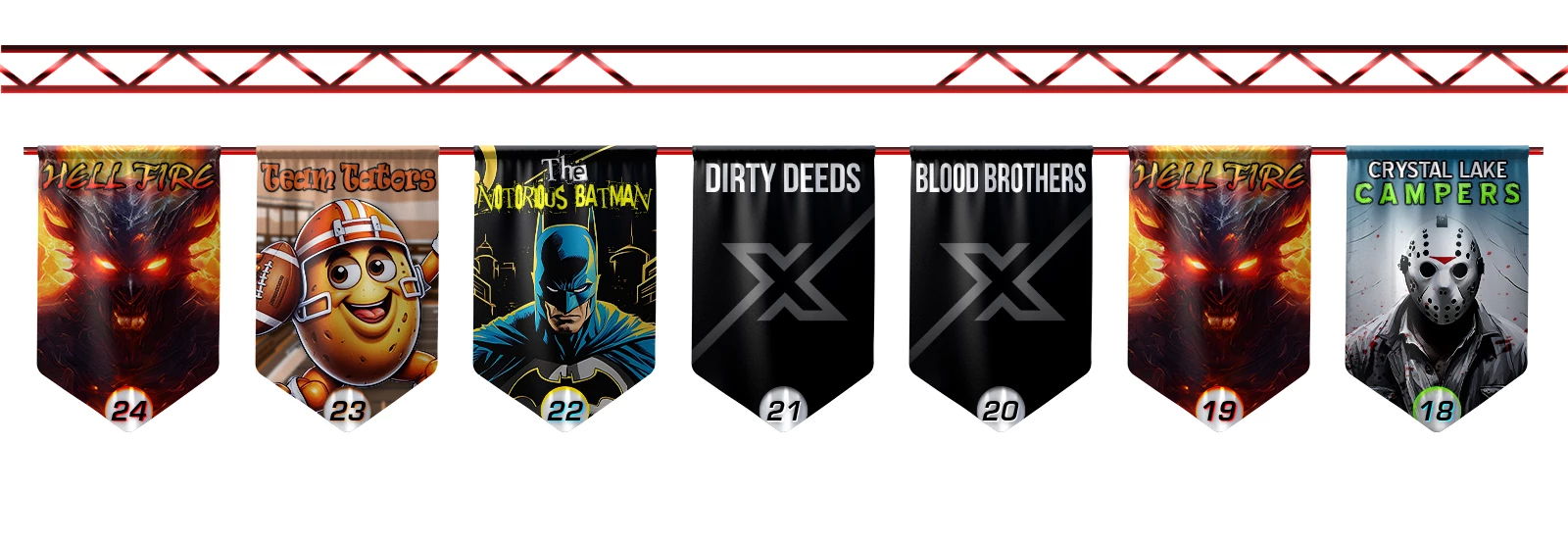
What i would like to know is there a way to set for example 1 layer center of the canvas and then subsequent layers to align from that center image a custom width value from it. (see examples).


I have been using guides to help me do this over the years and would like a better systematic way to do this approach if available.


Thank you

U
4 replies

Chuck Uebele
Community Expert
February 9, 2025

Ha! I found the script and found another script that does what you want, except that it doesn't center the middle layer. It just spaces all the layers on a custom value in pixels. Here it is. For it to work, you have to select the layers that you want distributed.


#target photoshop
app.displayDialogs = DialogModes.NO; 

if (app.documents.length>0){
      var dlg = new Window('dialog','Space Objects');
      var docRef = activeDocument
      var shapeSizeTotal = 0
      var selLay = getSelectedLayersIdx()
      var docLayers = new Array()
      var isHor = true;
      var amt;

      if (selLay.length>2){runProg()}
      else{alert('There needs to be 3 or more layers selected')}
}
else{alert('There are no open Documents')};

function runProg(){
      var run = true;
      dlg.hor = dlg.add('radiobutton',undefined,'Space Horizontal');
            dlg.hor.value = true;
      dlg.vert = dlg.add('radiobutton',undefined,'Space Vertical');
      
      dlg.infoGp = dlg.add('group');
      dlg.sTxt = dlg.infoGp.add('statictext',undefined,'Enter the distance between the objects (' + app.preferences.rulerUnits.toString().replace(/Units\./, '') + '):');
      dlg.eTxt = dlg.infoGp.add('editnumber',undefined, '');
      dlg.eTxt.size = [100,20]      
      
      dlg.buttonGp = dlg.add('group');
            dlg.buttonGp.okay = dlg.buttonGp.add('button',undefined,'Okay');
                  dlg.buttonGp.okay.onClick = function(){
                         dlg.close();
                         if(dlg.hor.value){isHor = true}
                         else {isHor = false};    
                         amt = dlg.eTxt.value
                        }
            
            dlg.buttonGp.cancel = dlg.buttonGp.add('button',undefined,'cancel');
                  dlg.buttonGp.cancel.onClick = function(){
                        dlg.close();
                        run = false;
                        }
                    
      dlg.eTxt.active = true;
      dlg.show()

      if(run){
            makeActiveByIndex(selLay, true)
            docLayers.sort(compare)

            for (var i=0;i<docLayers.length-1;i++){
                  if(isHor){
                         var deltaM = amt-(docLayers[i+1][1].bounds[0].value-docLayers[i][1].bounds[2].value)               
                         docLayers[i+1][1].translate (deltaM, 0) 
                         $.writeln(deltaM)
                        }
                  else{
                         var deltaM = amt-(docLayers[i+1][1].bounds[1].value-docLayers[i][1].bounds[3].value)               
                         docLayers[i+1][1].translate (0, deltaM) 
                        }
                  };


            makeSingleActiveByIndex(selLay[0], true);//select only one layer to make the translations
            //docRef.activeLayer = docRef.layers[docRef.layers.length-1]

            makeActiveByIndex(selLay, true);//reset selection to all layers
      }//end if to run
};//end function runProg

function compare(a,b){return a-b}

function getSelectedLayersIdx() {
    var selectedLayers = new Array;
    var ref = new ActionReference();
    ref.putEnumerated(charIDToTypeID("Dcmn"), charIDToTypeID("Ordn"), charIDToTypeID("Trgt"));
    var desc = executeActionGet(ref);
    if (desc.hasKey(stringIDToTypeID("targetLayers"))) {
        desc = desc.getList(stringIDToTypeID("targetLayers"));
        var c = desc.count
        var selectedLayers = new Array();
        for (var i = 0; i < c; i++) {
            try {
                docRef.backgroundLayer;
                selectedLayers.push(desc.getReference(i).getIndex());
            } catch (e) {
                selectedLayers.push(desc.getReference(i).getIndex() + 1);
            }
        }
    } else {
        var ref = new ActionReference();
        ref.putProperty(charIDToTypeID("Prpr"), charIDToTypeID("ItmI"));
        ref.putEnumerated(charIDToTypeID("Lyr "), charIDToTypeID("Ordn"), charIDToTypeID("Trgt"));
        try {
            docRef.backgroundLayer;
            selectedLayers.push(executeActionGet(ref).getInteger(charIDToTypeID("ItmI")) - 1);
        } catch (e) {
            selectedLayers.push(executeActionGet(ref).getInteger(charIDToTypeID("ItmI")));
        }
    }
    return selectedLayers;
}

function makeActiveByIndex(idx, visible) {    

      for (var i = 0; i < idx.length; i++) {
            var desc = new ActionDescriptor();
            var ref = new ActionReference();
            ref.putIndex(charIDToTypeID("Lyr "), idx[i])
            desc.putReference(charIDToTypeID("null"), ref);
            if (i > 0) {
                  var idselectionModifier = stringIDToTypeID("selectionModifier");
                  var idselectionModifierType = stringIDToTypeID("selectionModifierType");
                  var idaddToSelection = stringIDToTypeID("addToSelection");
                  desc.putEnumerated(idselectionModifier, idselectionModifierType, idaddToSelection);
            }
            desc.putBoolean(charIDToTypeID("MkVs"), visible);
            executeAction(charIDToTypeID("slct"), desc, DialogModes.NO);
            
            if(checkLayerKind(docRef.activeLayer)){  
                  if(isHor){var layerLeft = new Array(docRef.activeLayer.bounds[0],docRef.activeLayer)}
                  else{var layerLeft = new Array(docRef.activeLayer.bounds[1],docRef.activeLayer)}
                  docLayers.push(layerLeft)
                  }
      }

};// end makeActiveByIndex

function makeSingleActiveByIndex(idx, visible) {
      
            var desc = new ActionDescriptor();
            var ref = new ActionReference();
            ref.putIndex(charIDToTypeID("Lyr "), idx)
            desc.putReference(charIDToTypeID("null"), ref);
            /*if (i > 0) {
                  var idselectionModifier = stringIDToTypeID("selectionModifier");
                  var idselectionModifierType = stringIDToTypeID("selectionModifierType");
                  var idaddToSelection = stringIDToTypeID("addToSelection");
                  desc.putEnumerated(idselectionModifier, idselectionModifierType, idaddToSelection);
            }*/
            desc.putBoolean(charIDToTypeID("MkVs"), visible);
            executeAction(charIDToTypeID("slct"), desc, DialogModes.NO);

      
};//end makeSingleActiveByIndex

function checkLayerKind(lay){
      if(lay.kind == LayerKind.NORMAL || lay.kind == LayerKind.TEXT || lay.kind == LayerKind.SOLIDFILL){return true}
      else{return false}
      
      };//end checkLayerKind


umaynome
umaynomeAuthor
Inspiring
February 9, 2025

Nice, thank you again! I will try it out tomorrow and see how it works. The center default layer I automatically center it on the canvas myself so that isn't a issue.


Chuck Uebele
Community Expert
February 9, 2025

Well, after using the script, it will move the centered layer, so you would need to to select all the layers and snaps the group to the center. Not a big deal.

Chuck Uebele
Community Expert
February 9, 2025

I would say you need a script for that. I wrote one back before Adobe released the distribute with even spaces, but it would just be a matter of using input for the spacing rather than dividing the space between the objects.

umaynome
umaynomeAuthor
Inspiring
February 9, 2025

Can your current script be reworked to add input value between each object by pixels set by user input? Maybe AI can even edit it, I was using ChatGPT and copilot and I had to many failures so the ASK needs to be simplified for AI to build it I feel.

Chuck Uebele
Community Expert
February 9, 2025

I'll see if I still have the script and if it can be reworked.

c.pfaffenbichler
Community Expert
February 7, 2025

Could you please post screenshots with the pertinent Panels (Toolbar, Layers, Options Bar, …) visible? 


I suspect this would need a Script, but that might need additional checks/rules in case the left and the right distance between the three layers are actually not exactly identical. 

umaynome
umaynomeAuthor
Inspiring
February 7, 2025

C.Pfaffenbichler.... Thank you for the reply and i have posted the art. I can use guides to make this work as i have been but if PS allowed custom widths to be entered that would be ideal of course.

umaynome
umaynomeAuthor
Inspiring
February 8, 2025

I tried to get AI to make a script for this but to no avail as PS UI locks up when the script is running so you cant pick the next layer and next layer to sort out. I will try to rethink it with AI scripting but its not that big of a deal to manually do this with guides really.

creative explorer
Community Expert
February 7, 2025

I think so... @umaynome  Not sure if you have text with the banners or not... so, I quickly added some movie posters with their movie titles, and group them accordingly. In my quick video. I selected the the groups. As you will see, I purposedly moved Ballerina and Freddy's over alot.... Once I select the groups in my case because I have text and a poster, I want the images and text to be positioned even through the page. I set my far poster over to the left and then the poster to the right. And then use 'Distribute Horizontally' which is also found under 'Distribute Spacing' too... not sure if this is what you mean?

If you wanted to evenly disribute it, you could select the 4th banner-5th-6th-and 7th banner and align Distribute Horizontally where you want it. And then flip over and do the sane for 1st-2nd-3rd and make it Distribute Horizontally to the 4th banner?

m
umaynome
umaynomeAuthor
Inspiring
February 7, 2025

CE thank you for the reply and video, appreciated. However, I am aware of the distribute evenly in PS per my posting above, and if someone needed them evenly spaced that works wonders. However, i posted 5 compressed layers (no text), and what i am looking for is a way to custom set my width apart from layer 21, on layers 20 and 22, and then subesquently get the following layers 18-24 to fall in line at that custom width i set, rather then the evenly distribute width.

Hope that helps.